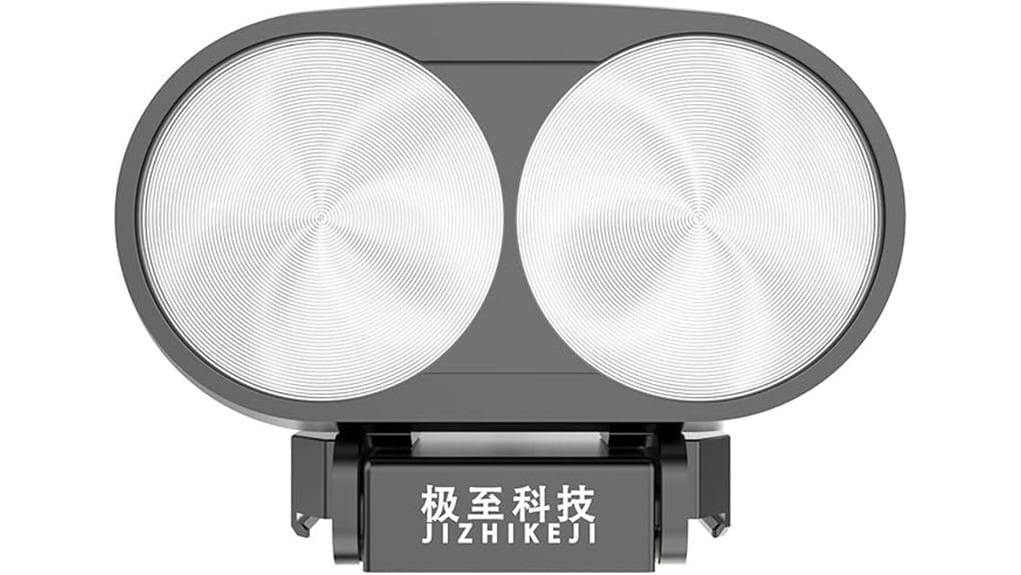
You’ll get a powerful 60W matrix spotlight that mounts directly to a Matrice 30 via a quick‑release bracket and offers precise 0–85° gimbal aiming. It throws usable light to about 150 m, covers roughly 1,400 m² with even illumination, and noticeably improves nighttime imagery and shutter speeds. It’s plug‑and‑play with DJI SDK control and predictable power draw, though IP4X limits wet‑weather use. Keep going and you’ll find fuller specs, integration tips, and trade‑offs.
Some Key Takeaways
- 60W matrix array delivers balanced hotspot and spill, improving nighttime contrast and reducing sensor noise up to ~150 m.
- Usable throw distance about 150 m (492 ft) with coverage near 1,400 m² for corridors, sectors, and perimeter sweeps.
- 0–85° gimbal tilt offers precise aiming without drone repositioning, controllable via DJI SDK.
- Mounts to Matrice 30 quick‑release bracket, plug‑and‑play with onboard power reporting for accurate flight budgeting.
- Rugged construction resists knocks (IP4X) but is not fully weatherproof, so avoid heavy rain or use additional waterproofing.
Quick Verdict and Who Should Consider the JZ T60
If you need a powerful, drone-mounted spotlight that’s built for practical fieldwork, the JZ T60 delivers: it’s a 60W matrix lamp that reaches up to 150 m and lights as much as 1,400 m², mounts directly to the Matrice 30 via a quick-release bracket, and gives you precise 0–85° gimbal control for targeted illumination. You’ll find it reliable for inspection, search, and perimeter tasks. Expect solid runtime management—battery life depends on flight profile but integrates cleanly with Matrice 30 systems. Pay attention to weight distribution during mounting; balance affects handling and endurance. Overall, a pragmatic choice. Consider pairing it with a dedicated drone landing pad to ensure safe, visible landings and stable setups when operating in varied field conditions.
Key Specs at a Glance : 60W Output, Range, Coverage, and Gimbal Angles
While compact, the JZ T60 packs a 60W matrix array that gives you practical reach and coverage for night operations: it throws usable light up to 150 m (492 ft) and can illuminate roughly 1,400 m², making it effective for inspection corridors, search sectors, and perimeter sweeps. You get a controllable 0–85° gimbal so you can precisely aim illumination without repositioning the drone. The matrix design delivers a configurable beam pattern that balances hotspot intensity and spill. Power draw stays predictable at rated 60W, so you can plan flight time and payload power budgets accurately and consistently. This makes it a good match for FPV drone photographers who need reliable lighting for aerial imaging and inspections with drone-mounted cameras.
Real-World Lighting Performance and Imagery Improvements
When you mount the JZ T60 on a Matrice 30, its 60W matrix array noticeably sharpens nighttime imagery by boosting scene contrast and reducing noise in camera sensors; you’ll see clearer detail at distances up to about 150 m (492 ft) and across roughly 1,400 m². You’ll notice improved contrast ratios that separate subjects from backgrounds, making targets and textures easier to identify. The matrix design provides even illumination, cutting hot spots and shadowing that can hide detail. Motion blur from slow shutter speeds is reduced because you can use faster exposures with the added light, improving usable frame rates. This makes the unit a great choice for photographers seeking better handheld and on-camera lighting with on-camera LED lights.
Installation, Matrice 30 Integration, and DJI SDK Support
Because the T60 uses the Matrice 30’s standard quick‑release bracket and communicates via DJI’s SDK, you’ll mount and integrate it without custom hardware or complex wiring. You’ll appreciate the plug‑and‑play feel: secure the bracket, connect via the drone’s interface, and validate through the controller. Check firmware compatibility before flight to avoid mismatched commands. The SDK lets you control brightness, gimbal angle, and automated routines, while onboard power management hands off load data to the Matrice 30 so you can monitor consumption in real time. Installation is straightforward, predictable, and well documented for operational deployment. This makes the T60 an excellent choice for aerial photography enthusiasts who use high-resolution drones.
Durability, Protection (IP4X), Trade-Offs, and Final Buying Recommendation
Although it’s not fully weatherproof, the T60’s IP4X rating gives you reliable protection against solid debris and rugged handling, making it suitable for most field deployments where dust and impact are concerns. You’ll appreciate the robust build and secure quick-release bracket that resist knocks during transport. Ingress protection is adequate for dry, dusty environments but not for heavy rain or submersion. Longevity testing isn’t extensive publicly, so factor potential wear under wet conditions into your decision. Trade-offs: excellent illumination and integration vs limited water resistance. Recommendation: buy if you need powerful, durable lighting for primarily dry operations. For those using camera gear outdoors, consider pairing the T60 with waterproof housings designed for photography to guard other equipment when conditions worsen.
Some Questions Answered
What Is the Lamp’s Weight and Effect on Drone Flight Time?
The lamp weighs about 0.9–1.2 kg, and you’ll see modest battery drain that shortens flight time. You’ll notice altered flight dynamics: slightly reduced hover endurance and quicker battery depletion during aggressive maneuvers. In practice, expect 10–25% less flight time depending on payload and settings. You should plan missions conservatively, monitor battery closely, and adjust payload or flight profiles to mitigate battery drain and preserve stable flight dynamics.
Is Color Temperature or CRI Specified for the LED Output?
No, the manufacturer doesn’t specify color accuracy, CRI, or a kelvin range for the LED output. You’ll have to infer performance from brightness and beam control; the lamp’s 60W matrix and adjustable gimbal give strong illumination, but without CRI or kelvin data you can’t evaluate true color rendering. If color-critical work matters, you should request spectral specs or third-party measurements to confirm how accurately the light reproduces colors in the field.
Does It Support Dimming or Programmable Light Patterns?
Yes — you can dim and run patterns. You’ll use wireless control through the DJI SDK to adjust intensity and trigger programmable sequences, and scene syncing lets multiple units match brightness and effects in real time. You’ll get precise, responsive dimming and pattern timing for search, signaling, or inspection. Integration is seamless with the Matrice 30’s quick release bracket, giving reliable, synchronized lighting across operations.
Are Spare Parts or Replacement LEDS Available?
Yes — spare availability is generally offered by the manufacturer and authorized dealers, and you can source replacement LEDs through official channels. You should contact the vendor or DJI-compatible accessory suppliers for replacement sourcing, confirming part numbers and warranty. Inspect serials, request compatibility confirmation, and ask about lead times. If official parts aren’t available, authorized service centers may repair or replace modules using OEM components.
What Is the Warranty Period and Customer Support Process?
You get a standard one-year warranty duration covering manufacturing defects; extended plans may be available through the vendor. For support channels, contact the manufacturer via email, phone, or authorized reseller portals; DJI SDK integration issues can be routed through DJI developer support. You should register the product immediately, keep purchase records, and follow return authorization steps. Response times vary, but escalation paths and replacement procedures are defined in support documentation.


