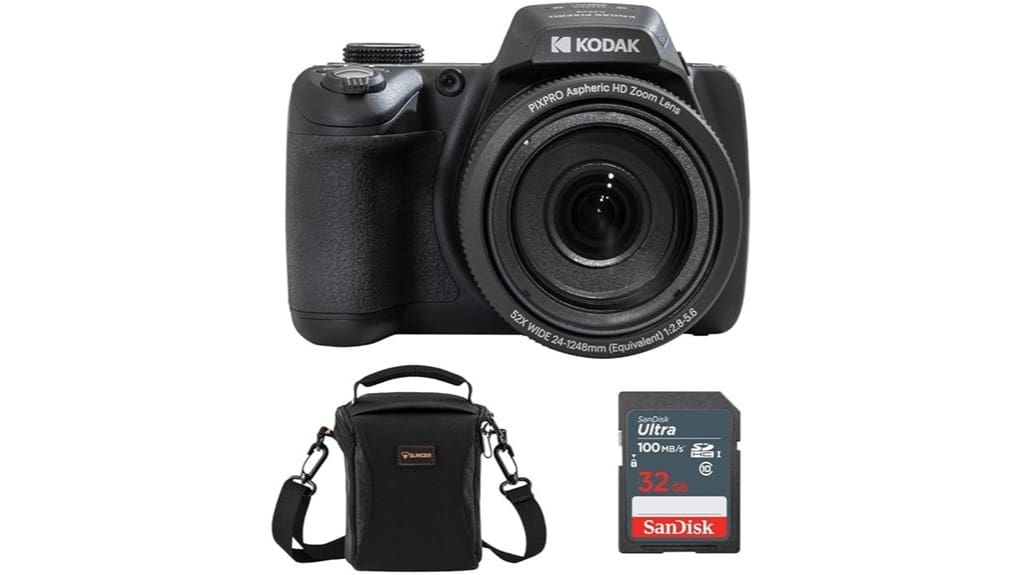
You’ll get a compact, budget-friendly superzoom that starts at a 24mm wide angle and reaches 52x optical zoom, offering strong daytime sharpness through mid-telephoto and usable full‑HD video. Autofocus and low‑light performance are modest — noise rises past ISO 800 and fast action can induce hunting — but controls are straightforward and Wi‑Fi/USB work reliably. Battery life and storage are modest, so bring spares; continue for detailed tests and alternative options.
Some Key Takeaways
- 52x optical zoom starting at 24mm makes the AZ528 excellent for distant subjects and travel-wide framing.
- 16‑MP CMOS sensor and 3.0″ LCD deliver good daytime sharpness through mid-telephoto, softening past ~30x.
- 1080p Full HD video is stable, with modest rolling shutter and basic vlogging capability.
- Low-light performance is limited: noise rises after ISO 800 and dynamic range compresses.
- Simple controls, Wi‑Fi, and bundled essentials (32GB card, AC adapter, strap) suit budget buyers prioritizing zoom.
Quick Verdict: Is the Kodak PIXPRO AZ528 Worth Buying?
Wondering if the Kodak PIXPRO AZ528 is worth it? You’ll find a clear value proposition: long-range optics, basic vlogging capability, and bundled essentials deliver competent performance for hobbyists at a modest price. You should weigh image quality limits against zoom versatility and accessory inclusion. Consider purchase timing—buy during promotions or when you need extended zoom over cutting-edge sensors—to maximize cost effectiveness. You’ll accept compromises in low-light and advanced controls, but you’ll get reliable connectivity, extras, and straightforward operation. If those trade-offs match your priorities, the AZ528 represents a pragmatic, budget-oriented choice rather than a flagship alternative. Perfect Tripods offers complementary tripod options that pair well with superzoom cameras for improved stability and framing, especially when using the AZ528’s long zoom range and tripod compatibility.
What the AZ528 Offers: Key Specs and Included Accessories
While the AZ528 targets hobbyists, it packs a 52x optical zoom with a 24mm wide‑angle equivalent, a 16‑MP CMOS sensor, and a 3.0″ LCD that together prioritize reach and straightforward framing over advanced low‑light performance. You get 6 fps burst shooting, 1080p video, Wi‑Fi control, and USB connectivity for quick transfers. Power is via a rechargeable Li‑Ion battery; battery compatibility with standard AZ series cells simplifies spares. Included are a SanDisk 32GB SDHC card, AC adapter, neck strap, lens cap with cord, quick start guide, Slinger bag, and a 1‑year warranty. This kit is aimed at DSLR enthusiasts and photographers who want versatile reach without the complexity of interchangeable lenses, making it a useful bridge for those exploring essential gear.
Real-World Performance: Image Quality, Zoom, and Video Tests
Having outlined the AZ528’s specs and kit, let’s look at how that hardware performs in practice. You’ll get sharp daytime results at 24mm to mid-telephoto; detail holds well until about 30x where diffraction and compression soften edges. The 52x optical range is usable for distant subjects but requires steady support to avoid blur. In low light noise rises noticeably past ISO 800; fine detail is lost and dynamic range compresses. Video records stable 1080p with modest rolling shutter. Autofocus speed is adequate for static and slow-moving subjects but lags tracking fast action, causing occasional hunting. For travel photographers who want portability, pairing the camera with a lightweight tripod can greatly improve sharpness at long zooms.
Day-to-Day Usability: Controls, Battery Life, Connectivity, and Storage
Jump into the AZ528’s day-to-day use and you’ll find a straightforward control layout with clearly labeled buttons and a responsive mode dial that keeps common functions within easy reach. You’ll access manual controls via dedicated dials and menus; tactile feedback is predictable, so adjustments are quick. Wi‑Fi pairing and USB tethering are stable for remote shooting and file transfer. The included Li‑Ion battery delivers modest runtimes; expect realistic performance over many charge cycles but plan for spares on long outings. Storage uses SD/SDHC cards up to 32GB. Standby drain is low but remember to power down between sessions. For extended shoots many photographers recommend carrying spare camera batteries.
Who Should Buy the AZ528 and Alternative Options to Consider
If you want an affordable, travel-friendly bridge camera that prioritizes extreme zoom and simple vlogging features, the AZ528 fits that niche: it gives you a 52x optical reach, 24mm wide-angle start, and Full HD video in a compact, easy-to-operate package. You should buy it if you’re entry level vloggers, travel photographers, budget beginners, or wildlife enthusiasts who need long reach without mirrorless complexity. It’s suited to observational shooting, casual video, and travel carry. Alternatives: consider a basic mirrorless with interchangeable lenses for image quality, or a compact superzoom from Canon/Nikon for improved autofocus and low-light performance. Consider pairing it with a gimbal stabilizer to master smooth shots and reduce handshake during long-zoom or video capture.
Some Questions Answered
Does the AZ528 Have Built‑In Image Stabilization?
No, it doesn’t include sensor shift stabilization; the AZ528 relies on optical stabilization. You’ll get lens-based optical stabilization to counter camera shake, which helps at long focal lengths and during handheld shooting. It won’t offer in-body sensor shift stabilization, so low-light handheld performance depends on the optical system, steady handling, or higher ISO. Use a tripod for best results at extreme zoom or slow shutter speeds.
Can the Camera Shoot RAW Files?
No — the camera doesn’t offer RAW support. You’ll capture only JPEGs from its 16 MP CMOS sensor, so you can’t access native bit depth beyond the processed 8‑bit JPEG output. That limits post‑processing latitude and effective dynamic range compared with RAW workflows. If you need full bit depth and maximum dynamic range control, you’ll want a different model that records RAW files from a comparable sensor size.
Is There a Hot Shoe for External Flash or Mic?
No, it doesn’t have a hot shoe; accessory compatibility is limited. You won’t mount an external flash or microphone directly. You can use the built‑in pop‑up flash and rely on Wi‑Fi control or the USB/adapter for power and data. For external audio or advanced lighting you’ll need off‑camera solutions (separate mounts or adapters) that clip or bracket to the camera body, since no dedicated hot shoe or sync terminal exists.
What File Formats Does the Video Record In?
The camera records video in MP4 files using the H.264 recording codec, so you’ll get standard MP4 video formats for Full HD 1080p capture. You’ll also see .MOV listed in some menus for compatibility, but primary output is MP4/H.264. Bitrate and frame rates are fixed by the camera’s firmware; you’ll control resolution and frame rate via settings, but you can’t change to different professional codecs onboard.
Is the LCD Screen Articulating or Touch‑Enabled?
No — the LCD screen isn’t articulating and it lacks touch responsiveness. You get a fixed 3.0″ LCD without an articulating mechanism, so you won’t tilt or swivel the display for high- or low-angle shooting. The panel also doesn’t support touch controls, so you’ll rely on physical buttons and dials for menu navigation, focus and playback. This keeps operation straightforward but limits flexibility for vlogging or creative framing.


