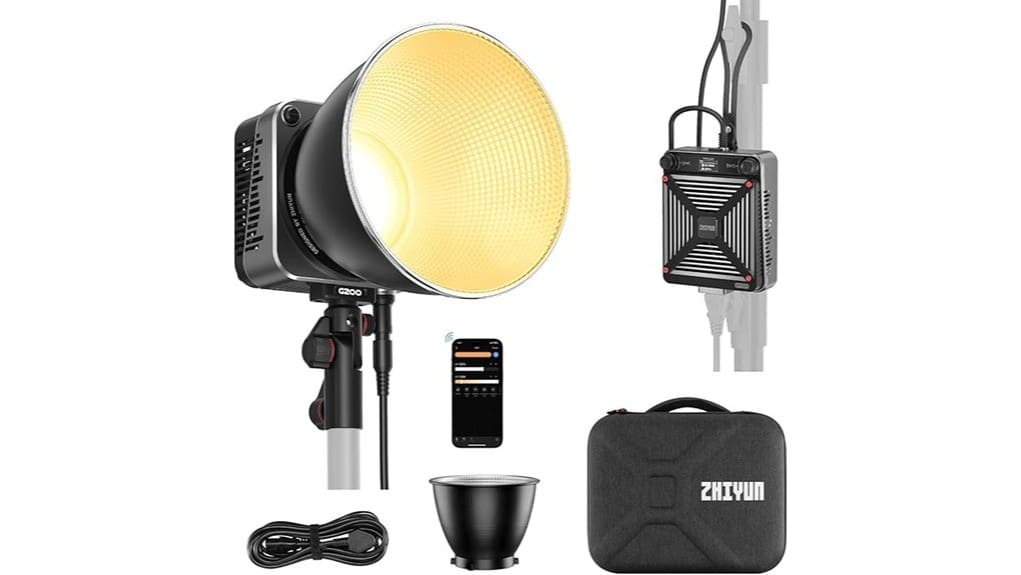
You’ll get a compact, high-output bi‑color COB that punches like a studio lamp while staying portable and easy to control. It delivers up to 200W normally with a one-press MAX boost to ~300W, smooth dimming, precise DMI tuning, and five color‑accurate presets. Bowens mount and umbrella slot make modifiers simple, while Bluetooth Mesh and an intuitive controller handle groups and presets. Cooling and build are solid, though battery life and weatherproofing aren’t stellar—keep going to see full performance details.
Some Key Takeaways
- High-output 200W COB with one-press MAX boost (~300W) delivers strong key/fill lighting for location and small studio shoots.
- Bi-color 2700K–6500K with DMI adjustment and five color-accurate presets enables precise, repeatable color control.
- Bowens mount and umbrella slot provide broad modifier compatibility for versatile light shaping.
- Separate controller, ZY Vega app, and Bluetooth Mesh allow responsive remote control, grouping, and preset switching.
- Solid thermal design and build handle normal use, but battery runtime drops at high output and unit lacks weatherproofing.
How Bright Is the G200 in Real Use? Output, Modes, and Measured Performance
When you need a serious, portable punch of light, the ZHIYUN MOLUS G200 delivers — its COB emitter puts out up to 200W in normal use and a one-press MAX Extreme boost to about 300W, which translates to bright, usable output for portraits, interviews, and small studio setups. You’ll see high measured lux at typical working distances, with usable headroom for key or fill roles. Modes are straightforward: steady bi-color and MAX boost. Controls let you dial output precisely, so you can balance exposure without guesswork. Note battery runtime varies with output; higher power cuts endurance sharply. The site also focuses on helping photographers choose the best video panels and related products with practical buying advice and comparisons, including panel recommendations for different shooting needs and budgets, which can help you pick the right light for your workflow and setup—see their guides on video light panels.
How Flexible Is the Light? Color Temperature, Dimming, Presets, and Mounting Options
Having established that the G200 can deliver serious output, let’s look at how you shape that light for different scenes. You get a 2700K–6500K range with seamless CCT and DMI adjustment, so dialing warm to cool is precise. Dimming is smooth across output; MAX mode exists for bursts. Five built-in color accurate presets let you recall common temperatures and brightness instantly. Mounting is practical: Bowens mount compatibility, integrated support with a 180° adjustable arm, and a universal umbrella slot give you versatile mounting options for studio or location rigs. Overall, flexibility is professional-grade and predictable. For photographers who value consistent results, choosing continuous LED lighting can markedly improve session workflow and exposure reliability.
How Easy Is It to Control and Cool? Controller, App/Bluetooth Features, and Thermal Performance
How straightforward is the G200 to operate and keep cool? You get a separate controller with two interactive buttons, a clear display, and simple rope mounting—intuitive physical controls complemented by responsive touch controls in the ZY Vega app. Bluetooth Mesh enables remote monitoring, group dimming, and preset switching, so you can adjust multiple units without fuss. Thermal design combines a dedicated heat sink, FOC fan and DynaVort system; in normal use it stays stable, and MAX mode pushes temps but the fan ramps predictably. Overall, control and cooling are well-integrated, dependable for studio and on-location workflows. For photographers who maintain gear, having a robust screwdriver set on hand makes adjustments and minor repairs easier.
Who Should Buy the G200? Use-Case Scenarios, Portability, and Accessory Compatibility
Good control and cooling make it easier to judge whether the G200 fits your workflow, but who actually benefits most from it depends on output needs, mobility, and accessory plans. You’ll want this if you shoot on location portraits and need high, consistent COB output with handheld portability and quick app presets. Studio pros doing product photography setups will value the Bowens mount and accessory ecosystem for modifiers and umbrellas. Indie filmmakers and interviewers gain reliable thermal management and remote dimming. Skip it if you need weatherproofing or integrated battery longevity beyond occasional handheld use and short shoots. Perfect Light Stand Picks for passionate photographers helps match accessories and stands to the G200’s strengths.
Final Verdict: Strengths, Weaknesses, and Whether It’s Worth Buying (Price-to-Performance)
While the G200 doesn’t reinvent COB lighting, it delivers a compelling mix of high output, responsive cooling, and practical controls that make it a strong value for many creators. You’ll appreciate peak brightness, DynaVort cooling that keeps output stable, and solid build quality that survives regular rigging. Weaknesses: battery life depends on accessories (no built-in cell), water resistance is absent, and the basic user manual could be clearer. Pricing strategy positions the G200 competitively against rivals, offering Bowens compatibility and app features that justify the cost if you need high-output, portable bi-color performance. Many photographers who use video lights also benefit from learning about bi-color lighting to get the most out of portable fixtures.
Some Questions Answered
Does the G200 Work With Third-Party Bowens Softboxes and Modifiers?
Yes — you can use third-party Bowens compatibility modifiers with the G200. Its Bowens mount and universal modifier mounting accept most softboxes, grids, and reflectors, so you’re not locked into ZHIYUN accessories. You’ll get secure Modifier mounting and full adjustability, though fit and light spill can vary by brand. Test seals and alignment; heavier modifiers may need additional support to avoid strain on the adjustable arm.
Can the Light Run on Batteries or Only AC Power?
No — it needs AC power; battery operation isn’t built in. You’ll rely on the included power adapter for standard use, though you can set up third-party V-mount or Gold mount battery solutions with appropriate high-power DC adapters or cables for field use. Evaluate draw and runtime carefully: the G200’s 200W normal (300W MAX) demands substantial battery capacity, so plan for high-capacity packs and proper voltage regulators to avoid instability.
Is There a Warranty Extension or Paid Support Available?
Yes — you can often get extended warranty options and paid support beyond the standard one-year warranty, but availability depends on the seller or region. You should contact ZHIYUN or your retailer to confirm warranty options, pricing, and coverage limits. If you want faster service or on-demand help, paid support plans can add phone or priority repair benefits. Keep receipts and ASIN B0C8T6MPLN handy when enquiring.
How Loud Is the Fan at Close Distances During Operation?
You’ll hear a noticeable but not overpowering fan at close distances; the near field noise is audible during high output or MAX mode. The acoustic profile shows a steady, low-frequency hum with occasional higher tones when the FOC fan ramps. For interviews or quiet sets you’ll likely need distance, a mic with good rejection, or noise reduction in post. Overall it’s manageable but not silent.
Are There Color-Rendering (Cri/Tlci) Specs for the COB Output?
Yes — you’ll find color fidelity specs reported by reviewers, though ZHIYUN’s official sheet doesn’t prominently list CRI/TLCI numbers. Independent tests often show high CRI and TLCI values suitable for professional work. Check spectral charts from tests to confirm full-spectrum performance and any spikes. You’ll want to review those spectral charts and measured CRI/TLCI numbers before critical color work to guarantee accurate skin tones and color rendering.


