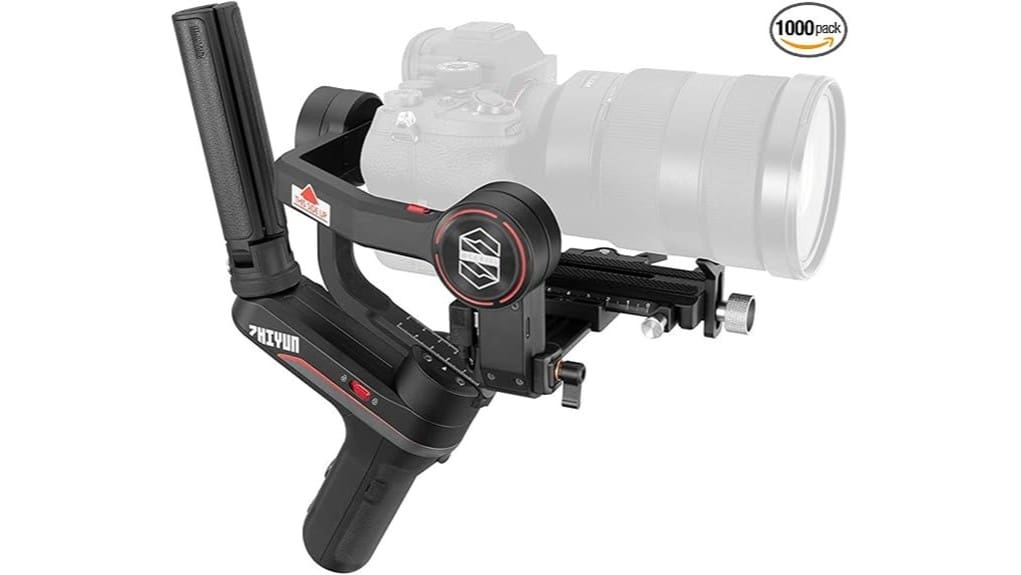
You’ll find the Zhiyun Weebill S gives you pro‑level 3‑axis stabilization with an 8th‑gen Instune algorithm, roughly 14 hours of battery life, and broad mount compatibility from Sony a6000/a7/a9 to Canon R, Nikon Z, Fujifilm X and Micro Four Thirds — plus some cinema bodies if you mind weight and lens length. It’s compact, offers reliable motor tuning, dual focus options and an optional TransMount 1080p transmitter, and it’s ideal for solo pros who want details on setup and tradeoffs.
Some Key Takeaways
- Compact 3‑axis gimbal delivering strong 8th‑gen Instune stabilization for walking, running, and quick pans.
- Supports a wide range of mirrorless and DSLR bodies, plus select cinema cameras with weight/port checks.
- Long battery life — about 14 hours — ideal for extended solo shoots and event coverage.
- Intuitive controls, OLED readout, dual focus options, and Sling mode for underslung moves and creative shots.
- Optional TransMount module offers 1080p/30fps wireless transmission to up to three receivers.
What Camera and Lenses the Weebill S Actually Supports
Although the Weebill S handles most mirrorless and DSLR combos, you should confirm your exact camera-plus-lens balance before mounting to guarantee peak performance. You’ll find broad compatibility: Sony bodies from a6000 series to full-frame a7/a9 variants, Canon R and EOS models, Nikon Z and select DSLRs, Fujifilm X series, Micro Four Thirds bodies including Olympus OM D, plus cinema options like Blackmagic Pocket and Z CAM. Check combined weight and lens length against published limits; heavy cinema lenses or long telephotos may need counterweights or alternate support. Verify port clearance and accessory fit to avoid interference with gimbal motors. For longer shoots consider the Weebill S’s battery life and power management to ensure uninterrupted recording.
Hands-On Setup: Balancing, Quick Release and Sling Mode Tips
Start by laying out your camera, lens, and any accessories on a flat surface and attach the quick-release plate to the camera body—tighten it securely and confirm the plate’s alignment with the gimbal’s slot before mounting. Mount the camera, then follow a strict balance checklist: adjust pan, tilt, and roll until the camera holds level without motors. Use strap adjustments on any neck or wrist straps to prevent pull during tests. Engage motors briefly, fine-tune via micro-adjust knobs, and verify axis centering. For Sling mode, lower the handle, recheck roll balance, and test smooth shifts before shooting. Also consider practicing common moves and modes with the gimbal to build skill and confidence while using Sling mode.
Real-World Stabilization: 8th‑Gen Instune, 3‑Axis Performance and Battery Life
When you put the Weebill S through real-world movement—walking, running, and quick pans—you’ll notice the 8th‑generation Instune algorithm keeps footage steady with minimal jitter, translating rapid inputs into smooth motor corrections across all three axes. You get consistent stabilization on handheld, underslung Sling mode, and brief sprinting; the gimbal compensates without overshoot. Movement latency stays low, so framing feels immediate and predictable. Battery longevity is strong—rated for about 14 hours under normal use—so you can shoot long runs without swapping cells. Overall, balance and tuning remain critical for peak 3‑axis performance in demanding scenarios. For photographers and videographers looking to monitor results on the fly, pairing the gimbal with an external camera monitor like those sold on our site improves focus and composition external camera monitors during shoots.
Controls, Dual Focus System and TransMount Video Transmission in Use
Because the Weebill S combines tactile buttons, dual focus options, and an optional TransMount transmission module, you’ll get a workflow that feels both immediate and tightly integrated. You’ll use clearly labeled buttons, a responsive joystick and OLED readout to set modes and tweak motor strength without fumbling. The dual controls let you switch between wheel and external focus motor smoothly; setup is straightforward and repeatable. TransMount delivers 1080p/30fps feeds to up to three receivers with reliable range, though you should monitor wireless latency for critical sync work. Overall, controls and transmission prioritize speed, predictability, and professional-repeatable results. Field monitor accessories like sunshades and mounting arms help optimize on-set visibility and ergonomics for efficient shooting with gimbals and monitors, enhancing field monitor workflows.
Who Should Buy the Weebill S (Use Cases, Comparable Alternatives and Value)
If you need a compact, professional gimbal that balances long battery life, responsive stabilization, and versatile focus control, the Weebill S is a strong choice. You’ll appreciate its 14-hour runtime, 8th‑gen Instune responsiveness, and dual focus system for run and gun shooting, event coverage, and wedding videography. It supports most mirrorless and DSLR combos and slips into Sling mode for underslung moves. Alternatives include DJI RS 2 for heavier cinema kits or smaller motorized stabilizers for ultralight travel; add Zhiyun’s TransMount module if you need multi-monitor transmission. It’s high value for solo pros and hybrid shooters. The site also offers accessories and guides for mastering handheld gimbal techniques, including tips on achieving smooth motion with handheld gimbals.
Some Questions Answered
Does the Weebill S Come With a Carrying Case?
No, it doesn’t include a dedicated hard case. You’ll get the gimbal and basic accessories in the retail box, so you’ll need to seek separate carrying options and storage solutions. Many users buy a padded soft case, hardshell case, or modular camera bag sized for mirrorless rigs to protect the Weebill S, batteries, and optional TransMount modules. Choose one with internal dividers and shock protection for secure transport.
Can Firmware Be Updated via USB-C?
Yes — you can update the firmware via USB-C. You’ll perform USB C flashing by connecting the gimbal to your computer, running Zhiyun’s updater, and following on-screen prompts for firmware updateability. The process’s safeguards verify compatibility and prevent interruptions; still, you should use a stable cable, avoid power loss, and back up settings. Updates enable improved responsiveness, bug fixes, and new features, so keep firmware current for peak performance.
Is It Weather-Sealed or Water-Resistant?
No, it isn’t fully weather-sealed or rated as water-resistant. You should treat the unit as splash- and dust-tolerant only; Zhiyun designed robust sealing materials around key joints and electronics but didn’t provide an IP rating. You’ll want to avoid heavy rain, immersion, or dusty storms. For reliable outdoor work, you should use protective covers, silica packs in your case, and keep contacts and motors dry to maintain long-term performance.
Does It Support Vertical (Portrait) Shooting Modes?
Yes — you can shoot in portrait mode: the Weebill S supports quick switch between landscape and vertical orientations. You’ll use its ergonomic sling/form factor and the quick release system to re-mount the camera rapidly, and the gimbal’s motor tuning plus the dual focus control keep stabilization consistent in portrait. You’ll appreciate the responsive 8th-generation Instune algorithm and OLED feedback while composing upright shots for smooth, reliable vertical footage.
Can Accessories Draw Power From the Gimbal Battery?
Yes — you can power some accessories via the gimbal’s battery passthrough, improving accessory compatibility. You’ll draw regulated power through the USB-C/output port for devices like wireless transmitters or small monitors, but check each accessory’s voltage and current needs. The gimbal supplies stable power suitable for many lightweight peripherals, yet high-draw items may still require independent power to avoid overtaxing the gimbal battery and guarantee reliable operation.


