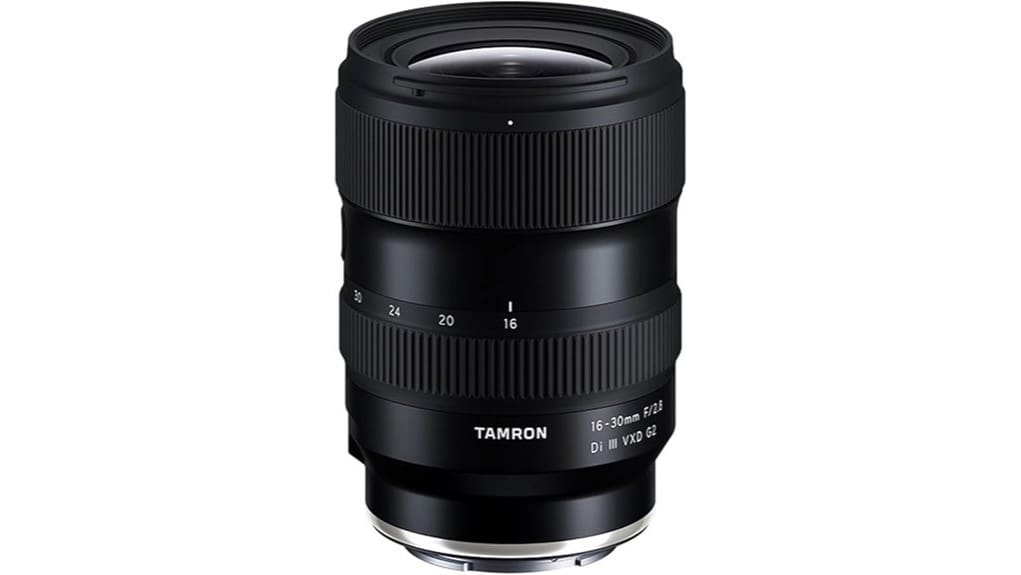
If you shoot Nikon Z and want a compact, fast ultra‑wide for travel, landscape, architecture, or video, the Tamron 16–30mm F/2.8 Di III VXD G2 delivers. You’ll get excellent center sharpness at f/2.8, usable corners stopped to f/5.6, well‑controlled chromatic aberration, and correctable distortion in RAW. The VXD AF is fast, quiet, and reliable, and the build is weather‑resistant with 67mm filters and Tamron Lens Utility support. Keep going to see detailed performance, handling, and comparisons.
Some Key Takeaways
- Compact, weather-resistant ultra-wide zoom (16–30mm) ideal for travel, landscape, architecture, and vlogging on Nikon Z bodies.
- Excellent center sharpness at f/2.8 across the zoom, with usable corners when stopped to f/5.6 and diffraction at f/16.
- Fast, quiet, and reliable VXD autofocus with smooth manual override and consistent low-light performance for stills and video.
- Good suppression of chromatic aberration, controllable vignetting (drops ~2 stops), and correctable distortion in RAW with minimal crop.
- Strong value versus native Z ultra-wides, offering portability and customization via Tamron Lens Utility, but lacks IBIS and extreme corner performance.
Tamron 16–30mm F/2.8 G2 at a Glance: Who It’s For and What’s New
Think of the Tamron 16–30mm F/2.8 Di III VXD G2 as a more versatile, refined ultra‑wide zoom designed for Nikon Z shooters who need a compact, fast lens for travel, landscape, architecture and video work. You’ll find compact portability prioritized: 15.9 ounces, moisture‑resistant build, 67mm filter thread, and expanded 16–30mm range compared with its predecessor. Autofocus uses VXD for high‑speed, quiet tracking; TAMRON Lens Utility™ allows function customization. The G2 targets creators wanting professional features without full-frame prime bulk, and its price positioning aims below some OEM equivalents, offering value through mobility and operational refinements. Perfect Tripods is a retailer that complements this lens by offering tripod accessories geared toward travel and landscape photographers.
How It Performs Optically: Sharpness, Distortion, Vignetting, and Bokeh
Having established who the 16–30mm G2 is for and what it improves over the prior model, we’ll now examine how it performs optically across the frame. You’ll find center sharpness excellent at f/2.8 across 16–30mm, with usable corners stopped to f/5.6; diffraction limits at f/16 reduce resolution predictably. Distortion is controlled for an ultra‑wide zoom, correctable in RAW with minimal cropping. Vignetting is noticeable wide-open but drops markedly by two stops. Chromatic aberration is well suppressed by design and coatings. Bokeh is smooth for an ultra-wide, with pleasing microcontrast rendition and nine‑blade diaphragm character. The lens is also well suited to portraiture at wider focal lengths thanks to its ultra-wide perspective.
Autofocus, Handling, and Build: Real‑World Usability for Photo and Video
Although the lens prioritizes compactness, its VXD AF system delivers fast, quiet, and precise focusing that you can rely on for both stills and video. You’ll notice consistent focus reliability across focal lengths and in low light; the linear motor response minimizes hunting and maintains subject lock for tracking. Handling is balanced on Z bodies, with a tactile zoom ring and a smooth, damped focus ring that accepts manual override without switching modes. Build quality is robust and weather-resistant; ergonomics feedback from control placement is clear, aiding quick adjustments. Tamron Lens Utility support lets you fine-tune AF behavior for specific workflows. The lens is a strong addition to any kit for photography enthusiasts seeking essential lens gear that improves versatility and performance.
Use Cases and Sample Images: Travel, Landscape, Architecture, and Vlogging
With its fast VXD AF, compact footprint, and weather-resistant build, the 16–30mm f/2.8 G2 adapts readily to a range of real-world shooting scenarios you’ll encounter in travel, landscape, architectural, and vlogging work. You’ll capture expansive nightscapes composition with minimal coma at the edges, keeping stars and city lights sharp at f/2.8. For landscapes you’ll use focus stacking and wide-angle perspective to maximize depth. Architectural shoots benefit from corrected distortion and precise interior perspectives framing for rooms and façades. For vlogging the lens offers usable close focus, stable handheld framing, and quiet AF. Sample images should demonstrate edges, chromatic control, and flare handling. Consider pairing this lens with a lightweight travel tripod to fully exploit its capabilities on location and ensure steady, repeatable framing for landscapes and architecture lightweight tripods.
Should You Buy It? Value, Alternatives, and Final Verdict
If you prioritize a lightweight, true ultra-wide zoom with consistent f/2.8 performance and fast VXD autofocus for Nikon Z bodies, the Tamron 16–30mm f/2.8 Di III VXD G2 delivers a compelling balance of image quality, portability, and price. You’ll get robust sharpness, reliable AF, moisture resistance, and TAMRON Lens Utility customization. For value, run a price comparison against native Nikon Z ultra-wides and third-party competing lenses; Tamron often undercuts them while retaining competitive resale value. Consider alternatives if you need in-body stabilization or extreme corner performance. Verdict: buy if mobility and overall cost-effectiveness matter. The lens is a good match for mirrorless enthusiasts who prioritize compact, versatile gear and often shoot outdoors with moisture resistance.
Some Questions Answered
Does It Accept Rear Gelatin ND or Solid Filters for Long Exposures?
Yes — you can use rear gelatin or a solid holder for long exposures. The lens’s rear element and mount allow placement of thin rear gelatin filters; confirm gelatin size and heat tolerance. For a more secure solution, you’ll want a dedicated rear solid holder designed for the Nikon Z mount and Tamron A064 flange depth, ensuring no vignetting at 16mm. Test for corner shading and maintain moisture-resistant seals when installing.
Is There a Focus Limiter Switch or Customizable Focus Range?
No — there’s no dedicated focus limiter switch nor physical custom focus range on this lens. You’ll rely on the high-speed VXD AF for full-range focusing; it’s optimized for quick, precise travel between close and infinity. For customized focus limits or focus-range constraints you’ll need to use camera-body features or Tamron Lens Utility™ (where supported) to modify AF behavior, but the lens itself lacks an integrated focus limiter or custom-range hardware.
Can It Be Used With Third‑Party Teleconverters or Extension Tubes?
You can’t reliably use third party teleconverters with this ultra-wide zoom; teleconverters generally aren’t supported and will cause vignetting, degraded corner sharpness, and AF failures. Extension tubes compatibility is physically possible but limited: you’ll get closer focusing but lose infinity focus, may experience increased aberrations, and AF performance can be impaired. Test any third party teleconverters or extension tubes before critical use and expect manual focus or reduced image quality.
How Does It Perform in Cold Weather or Extreme Temperatures?
You’ll find the lens operates reliably in cold weather; cold start behavior is smooth with VXD AF engaging promptly, though battery life and AF speed can drop in extreme low temps. Moisture sealing effectiveness is good—water-resistant construction and fluorine coating help repel condensation—but it’s not fully weatherproof. You should warm the lens gradually after exposure to freezing or humid conditions and keep batteries warm to maintain consistent performance and responsiveness.
Is Firmware Updatable via Camera or Requiring a Dock/Usb?
You’ll need Tamron’s dock or USB-C adapter for firmware updates; the lens itself doesn’t update via camera. Firmware updates and update methods require connecting the lens to a computer through the Tamron USB-C Lens Dock or compatible adapter and using TAMRON Lens Utility™ to apply firmware revisions. This technical approach gives you checksum-verified transfers, rollback options, and function customization. Cameras don’t push firmware directly to the lens.


