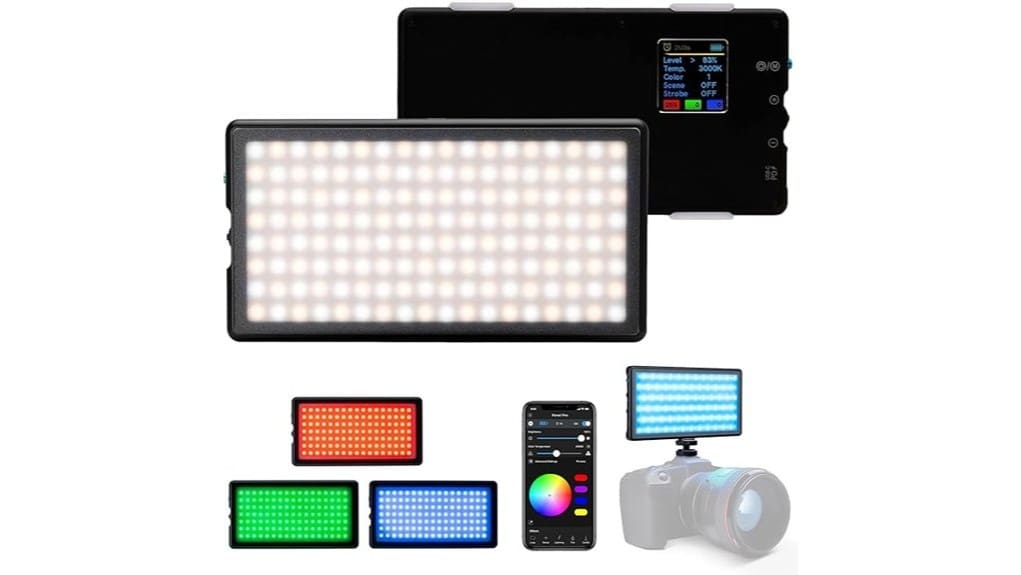
You’ll find the Lume Cube Panel Pro 2.0 RGB a compact, on-camera workhorse that’s ideal for vloggers, interview shooters, and run-and-gun creators. It gives unlimited RGB hues, precise 2700K–7500K tuning, and 1–100% dimming in a tiny package with a snap-on diffuser and ~4+ hour mid-power battery. Mounting and app control make multi-light setups easier, though extreme saturated hues can show bleeding and it’s not the highest-output option — keep going to see specifics and workflow tips.
Some Key Takeaways
- Compact on-camera RGB panel ideal for vlogs, interviews, and run-and-gun shooting with versatile mounting options.
- Wide 2700K–7500K color-temp range plus unlimited RGB hues for creative and accurate color control.
- Stable color rendering across intensities; use a gray card for critical white balance and skin-tone tweaks.
- Snap-on diffuser softens light and reduces hotspots, though spill and occasional hue bleeding can occur at extreme saturations.
- Battery lasts ~4+ hours at mid output; good for multiple takes but may degrade with heavy daily use.
Quick Verdict: Who the Panel Pro 2.0 RGB Is Best For
If you need a compact, versatile on-camera light for creative video or photo work, the Lume Cube Panel Pro 2.0 RGB is a smart choice. You’ll appreciate its small footprint and adjustable output when shooting interviews, vlogs, or social posts—content creators get flexible color and practical control without hauling bulky gear. If you’re a run and gun shooter, it mounts easily to DSLRs and rigs, survives quick setups, and delivers reliable, tweakable light on the move. It’s ideal when you need fast, consistent results: portable, app-controlled, and adaptable for mixed scenes where speed and visual polish matter. The Panel Pro 2.0 is especially useful for photographers and videographers who prioritize on-camera LED lights to brighten their work without adding heavy equipment.
What’s in the Box and Key Specs (Color, Temperature, Brightness, Battery)
Grab the box and you’ll find a compact kit built for on-camera convenience: the Panel Pro 2.0 RGB, a snap-on diffuser with frosted lens, a cold shoe mount plus a 3/4-20 adapter, and charging cable. You get packaging details that clearly list specs and a straightforward quick-start; warranty info appears in the paper insert. The panel offers unlimited RGB hues, 2700K–7500K temperature range, and 1%–100% brightness control. Battery supports 4+ hours continuous at 50% output. Compact mounts suit DSLRs and rigs. For creators prioritizing flexible color and predictable run time, the box covers essentials without extras. This kit is ideal for photographers seeking perfect LED lighting solutions for continuous lighting setups.
Real-World Performance: Color Accuracy, Diffusion, and Battery Life
When you use the Panel Pro 2.0 RGB on a shoot, its color options feel genuinely useful rather than gimmicky: hues are richly saturated and the 2700K–7500K range covers warm-to-cool practical needs, though you’ll want to double-check critical white balance with a gray card for exacting work. In practice, colors stay stable across intensities, and skin tones render naturally if you tweak temperature and tint. The snap-on diffuser softens shadows effectively and reduces harsh hotspots, though you’ll still manage light spill on tight sets. Battery life is reliable — expect multiple takes at mid-power before swapping or charging. For photographers serious about accurate color, consider investing in color calibration tools to ensure consistent results across shoots.
Mounting, Controls, and App: How It Integrates With Cameras and Workflows
Because the Panel Pro 2.0 is built for on-camera and run-and-gun use, its mounting options and controls feel purposefully practical: the included cold shoe and 3/4-20 threads let you attach it to DSLRs, cages, and articulating arms without jury-rigging, and the physical buttons give quick access to power and brightness while the app handles finer adjustments. You’ll appreciate tactile controls during fast shoots; the app integration then lets you dial color, temperature, and presets remotely. Wireless sync across multiple panels is reliable for multi-light setups. Workflow tips: pre-program scenes, group lights in the app, and keep basic controls on the unit. Lume Cube’s focus on video light kits makes the Panel Pro 2.0 a practical choice for photographers who also create video content.
Pros, Cons, and Buying Recommendation (Alternatives and When to Choose)
Although it’s slim and travel-ready, the Panel Pro 2.0 punches above its weight for run-and-gun shooters and content creators who need flexible, on-camera color and temperature control. You’ll get precise 2700K–7500K tuning, unlimited RGB hues, and app-driven tweaks—great for interviews, vlogs, and product shots. Pros: compact, versatile mounts, decent 4+ hour runtime at mid output, and handy diffuser. Cons: watch for battery degradation over heavy daily use and occasional color bleeding at extreme hues or high saturation. Buy it if you value portability and control; consider larger soft panels if you need higher output or flawless color fidelity. Explore more ideas for using RGB lights in photography with vibrant lighting tips.
Some Questions Answered
Does It Support Firmware Updates via USB or Bluetooth?
Yes — you’ll get firmware updates via Bluetooth through the app, not USB. You’ll use wireless pairing with the Lume Cube App to check and install firmware updates, manage color, temperature, and brightness, and tweak settings remotely. That wireless workflow keeps you mobile on shoots and avoids tethering, but it means you’ll need a compatible phone and reliable Bluetooth connection to maintain stable wireless pairing during updates.
Can Multiple Units Be Grouped and Synchronized Wirelessly?
Yes — you can wirelessly group multiple units for synchronized control. You’ll use the app to set up Wireless grouping so units act as one, letting you change color, temperature, and brightness across all panels. For most shoots you won’t notice sync latency, though rapid flashing or dynamic effects may reveal tiny timing differences. This setup’s ideal for multi-panel interviews, product shots, or consistent scene washes.
Is There an IP Rating for Dust or Water Resistance?
No, there’s no official IP rating; the panel doesn’t list an IP rating, so you shouldn’t assume water resistance. For outdoor shoots or in damp environments, you’ll want protective housing or a rain cover to keep moisture and dust away. You can use it in light drizzle only with caution and extra protection. If you need true water resistance for rugged use, choose a light specified with an IP rating for confidence.
Are There Dedicated Presets for Skin Tones or Cinematic Looks?
Yes — you’ll get dedicated skin tone presets and cinematic LUTs via the app. You can quickly select tailored skin tone presets to keep subject tones natural, then switch to cinematic LUTs for stylized looks. This workflow’s great for run-and-gun portraits and short films: you’ll preserve accurate color while applying mood, fine-tune temperature/brightness, and save setups for repeatable results across shoots and cameras.
What Accessories Are Available Separately (Cases, Mounts, Diffusers)?
You can buy a carrying case, snap-on diffuser, and magnetic mounts separately to expand portability and mounting flexibility. You’ll also find cold-shoe adapters, 3/4-20 screws, and extra diffusers for softer light. A padded carrying case protects the panel and accessories for travel; magnetic mounts let you attach the light to metal surfaces quickly. These accessories suit run-and-gun shooters, tabletop creators, and on-location videographers who need fast setup.


