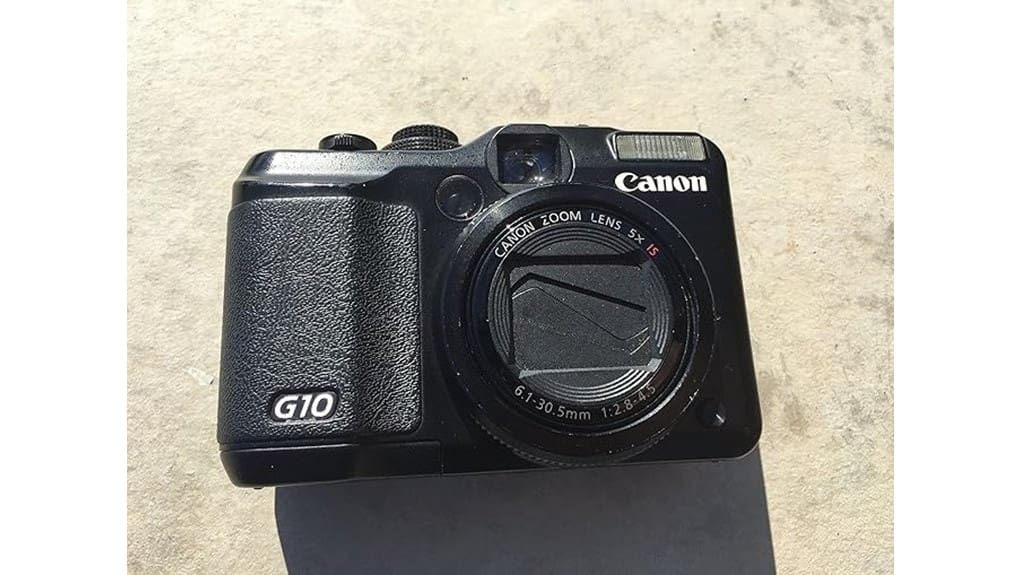

You’ll get a pocketable, tactile Canon PowerShot G10 renewed for less, with 14.7MP RAW capture, physical dials, and an optical viewfinder that feel great in the hand. Image quality is strong at low ISOs thanks to the CCD sensor, but noise and softness rise past ISO 400 and autofocus is sluggish for action. Battery life is modest and video is limited. If you want manual control and don’t need modern low-light or 4K performance, this is worth a look — keep going to see full pros, cons, and buying tips.
Some Key Takeaways
- Renewed Canon PowerShot G10 offers manual controls, RAW capture, and an optical viewfinder in a pocketable, tactile-bodied compact.
- 1/1.7-inch CCD and DIGIC 4 deliver pleasing color and detail at low ISOs but degrade noticeably past ISO 400.
- Contrast-detection autofocus is accurate in good light but slow for tracking and limited in low-light performance.
- 28–140mm stabilized lens, solid ergonomics, and physical dials suit travel and street shooting; fixed rear screen limits framing.
- Inspect renewed units for power, lens condition, cosmetic wear, included accessories, and confirm the 90-day warranty before buying.
Verdict Up Front: Is the Renewed Canon PowerShot G10 Worth Buying?
While it won’t rival modern mirrorless models, the renewed Canon PowerShot G10 still makes sense if you want a solid, pocketable shooter with manual controls and RAW capture at a low price. You’ll get robust handling, useful focal range, and RAW support for editing, but temper expectations: CCD sensor, limited video, and modest autofocus show their age. Battery life is modest compared with newer compacts, so plan for spares. For budget buyers who value tactile dials and optical viewfinder, it’s a pragmatic buy; collectors should weigh resale value against declining demand for older compacts. Consider pairing the camera with essential accessories like DSLR gear to get the most from your photography.
Image Quality and Autofocus: Real-World Stills, RAW vs JPEG, Low-Light Performance
Because the G10 uses a 1/1.7-inch CCD and Canon’s older DIGIC 4 engine, you’ll get pleasing color and fine detail at low ISOs but notice noise, reduced dynamic range, and softness creeping in past ISO 400. In real-world stills you’ll appreciate color rendering and microcontrast for landscapes and portraits, yet shadow recovery is limited. Shoot RAW vs JPEG when you intend heavy edits—RAW preserves highlight/shadow latitude and lets you manage color more effectively. Autofocus is contrast-detection with many points; it’s accurate in good light but sluggish tracking. High ISO Noise is the limiting factor for low-light handheld shots. For making prints that showcase the G10’s color and detail, consider using high-quality photo paper suited to your display preferences.
Handling, Lens, and Shooting Features: Ergonomics, Zoom, Stabilization, and Manual Controls
Grip the G10 and you’ll notice Canon prioritized control: a substantial handgrip, clearly labeled dials, and a top-deck exposure-compensation dial make one-handed adjustments straightforward and intuitive. You’ll appreciate grip comfort during long shoots, though the fixed rear screen limits framing flexibility. Button placement is logical—accessible playback and AF controls—yet some controls feel cramped for larger fingers. The 28–140mm lens covers useful range; zoom throw is smooth but not snappy, favoring precise framing over speed. Optical image stabilization is effective for handheld tele shots. The focus ring offers manual feel, responsive in single-shot use, but limited by contrast AF in low light. Perfect Tripods recommends pairing the G10 with a compact tripod for steadier low-light shooting and improved composition control, especially when using longer focal lengths and stability accessories.
Renewed Condition Checklist: What to Inspect, Included Accessories, Warranty, and Return Options
Start your inspection by confirming the basics: verify the camera powers on, the battery and charger are included and hold a charge, and the SD card and neck strap match what’s listed. Check battery health by running a full charge and testing shutter count and playback. Inspect lens and viewfinder for scratches, fungus, and haze; operate zoom and focus to spot stiffness. Note cosmetic wear—scuffs, paint loss, or dents—and make certain buttons and dials click reliably. Confirm included tripod fits, ask about the 90‑day limited warranty, and verify Amazon Renewed return/replacement options before purchasing. Consider protecting your renewed camera in a hard shell camera case designed for durability and secure transport.
Who Should Buy the G10 (and What Modern Alternatives to Consider)
Although it’s dated compared with today’s mirrorless flagships, the G10 still suits photographers who want manual control and a solid compact body without paying for modern sensor tech. You should buy it if you value vintage aesthetics, tactile dials, optical viewfinder feedback, and shoot casual travel or budget streetphotography where RAW flexibility and durable build matter more than low-light performance. Avoid it if you need high ISO, fast autofocus, or 4K video—modern compacts and mirrorless models from Canon, Sony, and Fujifilm offer superior sensors and autofocus. Consider used Canon G7X series, Sony RX100 II–V, or Fuji X100F as alternatives. Our store carries essential accessories for mirrorless and compact camera users, including straps, filters, and cases for mirrorless camera enthusiasts.
Some Questions Answered
Does the G10 Support External Microphones for Video Recording?
No — the G10 doesn’t support an external mic input, so you can’t plug a shotgun mic directly into the camera. You’ll need to record sound separately with an external recorder or use audio adapters that sync audio to the camera’s video in post. If you rely on improved capture, you’ll be limited to the built‑in mic quality; consider lightweight recorders and timecode or clap syncing for best results.
Can the Camera Be Charged via USB Without the Charger?
No — you can’t reliably charge the G10 via USB without the charger. The G10 uses a removable battery that’s meant to be charged in its dedicated charger; trying USB charging faces battery charging and USB limitations and may not work or could risk damage. You should use the supplied charger or a compatible external battery charger. For convenience, carry a spare battery and use a proper charger to guarantee safe, full battery charging.
Is the Optical Viewfinder Exposure-Coupled or Purely Framing-Only?
It’s framing-only — the optical viewfinder doesn’t provide exposure indication or metering readouts, so you won’t get exposure feedback in the eyepiece and may experience viewfinder blackout in some low-light scenarios. You’ll need to rely on the rear LCD or camera’s exposure meter and histogram for precise exposure control. That limits critical shooting through the finder; use live view for exposure confirmation or bracket to avoid surprises.
Are Firmware Updates Available for the Powershot G10?
No, Canon hasn’t released major firmware updates for the PowerShot G10 in years. You’ll find a sparse firmware history limited to early bug fixes; no recent enhancements exist. If you still want to check, follow official update instructions: visit Canon’s support site, locate G10 downloads, confirm current firmware version, download the file to an SD card, insert it and run the camera’s firmware-update routine. Back up files and keep battery charged.
Does the G10 Accept Canon EF Lenses With an Adapter?
Yes — you can use Canon EF lenses with lens adapters, but don’t expect full compatibility. You’ll need an adapter for the mount compatibility, yet the G10’s fixed small-sensor compact body and electronic limitations prevent full autofocus or aperture control with many EF lenses. You’ll be doing manual focusing and likely manual exposure. Image quality and handling may be awkward, so weigh the compromises before investing in adapters and heavy glass.


