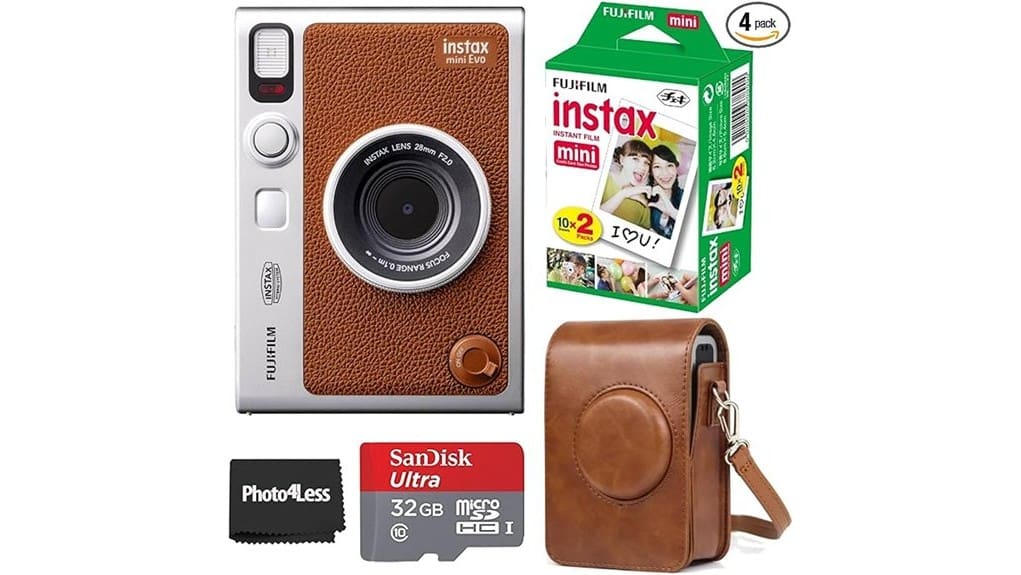
The Fujifilm INSTAX Mini EVO Hybrid in brown is a stylish, pocketable instant camera that’s great if you want tactile prints plus smartphone control. You’ll get vibrant Mini prints, 100 creative filters, macro/manual options, and app previews that save each shot as a digital file. Battery life and print costs limit long trips, and the compact body isn’t for fast-action shooting. It’s a strong gift choice — keep going and you’ll find full specs, pros, cons, and alternatives.
Some Key Takeaways
- Stylish brown INSTAX Mini EVO hybrid delivers vibrant, natural-toned mini prints with strong color and portable charm.
- App-based workflow offers 100 creative filter combinations, preview-before-print, and saves digital copies for easy sharing.
- Compact, tactile body feels solid but sacrifices deep grips and rapid-shoot ergonomics for style and pocketability.
- Battery supports casual sessions (several dozen prints) but requires recharging or spare power for extended use.
- Good gift choice for hobbyists and travelers; consider extra film, protective case, or dye-sublimation alternatives for long-term costs.
Which Buyer Is the INSTAX Mini EVO Hybrid Brown Best For?
While the INSTAX Mini EVO Hybrid in Brown won’t replace a dedicated DSLR, it’s ideal if you want fun, tangible prints plus modern digital control—perfect for casual shooters who value instant physical photos, hobbyists who enjoy experimenting with film and effects, and social users who want to print directly from their phone. You’ll appreciate its hybrid workflow if you’re a young creative wanting hands-on experimentation without complex gear. Casual travelers will like lightweight portability, quick prints, and smartphone connectivity for on-the-go sharing. It suits people prioritizing tactile memories, creative play, and easy social prints over high-end image resolution. It also pairs well with digital frames to display your favorite shots after printing.
Top Real-World Strengths: Image, Prints, and Creative Effects
If you like the hybrid workflow described earlier, you’ll appreciate how the INSTAX Mini EVO pairs playful creativity with reliable print quality. You get vibrant prints straight from INSTAX Mini film—strong color, natural skin tones, and sharpness that suits casual keepsakes. The camera’s 100 creative combinations and app let you layer creative filters, adjust exposure and white balance, then preview before printing, so you waste fewer sheets. Macro and manual controls give useful framing options, while the app saves each print as a digital file for sharing. Overall, it’s a fun, flexible tool for instant-photo enthusiasts who value control and tangible results. For maintaining those vibrant prints and protecting optical elements, consider using lens cleaning solutions designed for photography.
Limitations and Trade-Offs to Consider Before Buying
Because the INSTAX Mini EVO blends digital convenience with instant printing, you’ll trade some traditional camera ergonomics and speed for creative flexibility and novelty. You’ll notice a compact body that favors style over deep grips and fast reflexes, so handheld stability and rapid shooting aren’t its strengths. Battery life limits long outdoor sessions—plan for spares or breaks. Instant film gives tactile rewards, but Print cost adds up quickly compared with purely digital shooting; included twin pack is only a short-term perk. If you value immediate prints and creative filters, these trade-offs may be acceptable. Travelers who prioritize lightweight gear may also appreciate pairing it with travel tripods for better stability and composition.
What You Get in the Box and How It Performs Out of the Case
Tear open the box and you’ll find everything needed to start shooting and printing right away: the brown INSTAX Mini EVO hybrid camera, a 32GB microSD card (with adapter), a brown camera case, and a twin pack of INSTAX Mini film (20 sheets). Out of the case, startup time is brisk — power up and you’re ready in seconds. Build quality feels solid with tactile controls and a reassuring weight, though it’s not waterproof. Battery life is reasonable for casual use; expect to recharge after several dozen prints. Pocketability is limited by size and included case, but it’s still travel-friendly. Perfect Camera Messenger Bags are a great option for carrying this kit on the go, especially for photographers who prefer camera messenger bags that balance protection and style.
Verdict and Buying Recommendations (Who Should Buy, Alternatives, and Where to Save)
You’ve seen how the Mini EVO arrives ready to shoot and prints that pop straight from the camera, so here’s how that performance shapes the buying decision. If you want instant charm, high-quality prints and strong gift appeal, buy this Brown hybrid—its color options are tasteful and the included case and film make gifting easy. Hobbyists who value digital backups and creative filters will enjoy app workflow; pros seeking faster prints should look elsewhere. Consider alternatives like the basic INSTAX Mini or a portable dye-sublimation for longevity. Watch for firmware updates and buy during sales to maximize resale value. For DSLR enthusiasts and photographers, pairing instant gear with essential accessories like protective cases and extra film can enhance the shooting experience and long-term value of the camera, so consider stocking up on essential gear.
Some Questions Answered
Does the Camera Support Rechargeable Batteries or Uses Proprietary Cells?
No, it doesn’t use proprietary cells — it uses a built-in rechargeable battery, so you’ll have rechargeable compatibility. You’ll charge the camera via USB-C rather than swapping proprietary cells or AA/CR123 packs. That means you won’t need special disposables, but you’ll rely on the internal battery’s lifespan and charging habits. Overall, that’s convenient for daily use but limits quick battery swaps during extended shoots without access to power.
Can I Print Directly From an SD Card Without Using the App?
No — you can’t print directly from an SD card without the app. The INSTAX Mini EVO supports SD transfer for saving images to the included microSD, but card printing isn’t available as a standalone feature. You’ll need to use the INSTAX MINI EVO app or the camera’s own interface to apply film effects and send images to print. That setup gives you control over filters, cropping, and saving digital copies before printing.
Is There a Warranty Registration Process With Fujifilm?
Yes — you can register for warranty activation with Fujifilm. You’ll typically register online via Fujifilm’s product support portal or include registration details with your purchase documentation. Doing so activates coverage and makes service easier at authorized service centers if you need repairs. Keep your receipt, serial number, and registration confirmation. If unsure, contact Fujifilm customer support for step‑by‑step help and service center locations near you.
What File Types and Sizes Does the Camera Save Digitally?
The camera saves JPEG files for digital copies and small prints; it doesn’t offer RAW capture. You’ll get standard image sizes suitable for the INSTAX Mini print area and sharing—digital files are optimized for quick printing and app use, not high-resolution editing. Image sizes are tuned to match the 2″ x 3″ print output and 600 DPI effective still resolution, so expect modest file dimensions focused on instant-print quality.
Are Replacement Brown Cases or Straps Sold Separately?
Yes — brown accessories like replacement cases and straps are sold separately. You can buy third‑party and Fujifilm‑branded options for strap availability and matching brown cases through retailers. Evaluate materials and attachment style before buying: look for leather or faux‑leather cases that fit the INSTAX Mini EVO and straps with secure clips or screw mounts. You’ll want a durable strap and a snug case to protect the camera and complement its brown finish.


