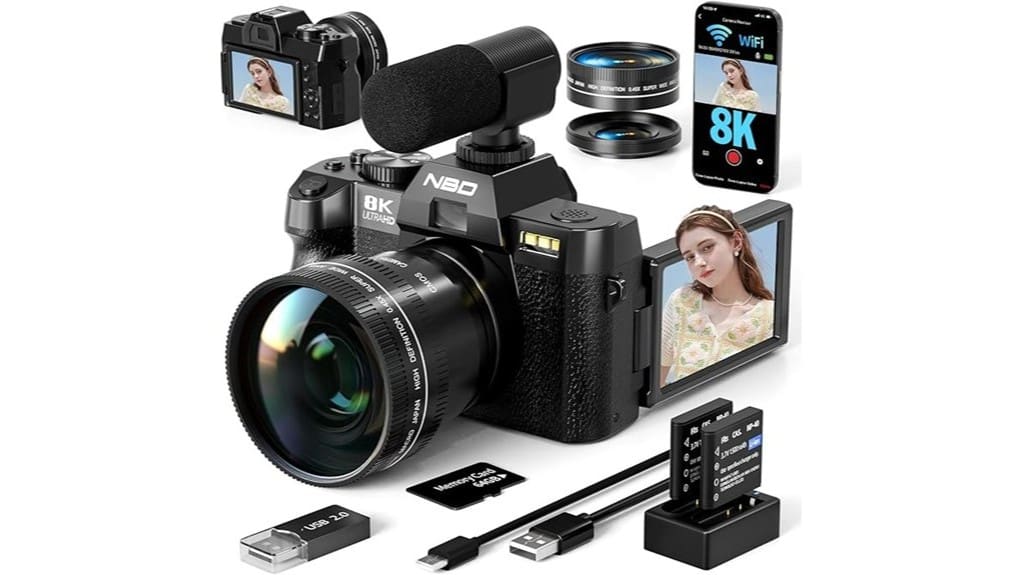
You’ll get courtroom‑level detail from 64MP sensors and future‑proof workflows with 8K video, but expect bigger files and higher battery draw. You’ll be able to crop aggressively and pull cleaner 4K stills, while autofocus, stabilization, and lens quality still dictate usable sharpness more than megapixels. Vloggers gain flip screens and built‑in lights; photographers get fine detail for large prints. Keep an eye on low‑light performance and workflow complexity if you want to learn more.
Some Key Takeaways
- 8K video plus a 64MP sensor gives extreme cropping and high-detail stills, ideal for large prints and tight compositions.
- Downsampling 8K to 4K improves sharpness and noise, but increases file sizes and battery drain.
- Autofocus speed and processor performance matter more for usable sharpness than megapixel count alone.
- Vloggers should prefer models with a 180° flip screen, built-in fill light, and wind-resistant mic for run-and-gun use.
- Low-light, stabilization, and rolling-shutter tests determine practical image quality despite high resolution.
What 8K and 64MP Mean for Real-World Photos and Video
When you compare 8K video and 64MP stills to more common formats, the practical benefits become clear: 8K gives you extreme resolution for cropping, reframing, and future-proofing footage—useful if you plan to extract stills or downsample to 4K with improved sharpness—while 64MP stills deliver fine detail and cropping flexibility for large prints or tight compositions. You’ll leverage dynamic resolution to reframe without softening results and preserve pixel level detail when you shoot with good optics and steady AF. Expect smoother post-production grading, more aggressive stabilization crops, and cleaner downsamples, provided lighting and lens quality aren’t limiting factors. Many mirrorless camera enthusiasts also invest in essential gear to get the most from high-resolution photo and video workflows.
Who Benefits Most: Photographers vs. Vloggers vs. Beginners?
Although the 8K/64MP feature set delivers clear advantages across disciplines, who benefits most depends on your priorities: photographers gain pixel-level detail and cropping freedom for large prints or heavy retouching; vloggers get future-proofed footage, cleaner downsampling to 4K, and the selfie-friendly flip screen plus built-in mic and light for run-and-gun shoots; beginners enjoy the camera’s presets, bundled accessories, and out-of-the-box readiness that lower the learning curve. You’ll find pros and casual travelers value resolution differently: photographers prioritize sensor fidelity, content creators chase flexible video workflows, and beginners profit from simplified controls and included gear that accelerate learning. Consider also how audio capture choices like camera-mounted microphones affect on-camera recording quality with camera microphones.
Key Features to Compare (8K, 64MP, AF, Zoom, Screen, Light)
You’ve seen how different users value resolution and ease-of-use; now let’s compare the specific features that determine real-world performance: 8K video, 64MP stills, autofocus, digital zoom, the flip screen, and built-in light. You’ll want 8K for future-proof video, but note larger files and battery life impact. The 64MP sensor gives cropping flexibility and fine detail for portraits if you combine it with good portrait lighting. AF performance and processor speed dictate usable sharpness more than megapixels. Digital zoom extends reach but degrades detail—prefer framing or crop. The 180° flip screen plus built-in fill light aids vlogging and selfies. For best portrait results, consider pairing high-megapixel cameras with dedicated bi-color video lights to control skin tones and shadows.
Hands-On Performance: Low-Light, Autofocus, and Stabilization Tests
Because low-light performance, autofocus reliability, and stabilization determine whether footage is usable, you should judge the camera by real-world tests rather than specs alone. You’ll test low light using the built-in fill light and high ISO ranges, noting noise, color shift, and dynamic range. Evaluate autofocus tuning across single-point, continuous, and face-detect modes for speed and hunting. Assess stabilization handheld and on gimbal: watch for crop, motion smoothing, and interaction with electronic correction. Record fast pans to expose rolling shutter artifacts. Combine stills and video tests to quantify usable frames per scene and operational limits. Also include tests with dedicated light meters to ensure consistent exposure measurements across lighting setups.
Which 8K/64MP Camera Should You Buy? Recommendations by Use Case
When choosing an 8K/64MP camera, match the model to how you’ll actually shoot—vlogging, travel, studio work, or hybrid content each prioritizes different features like low-light fill light, autofocus consistency, stabilization performance, and battery/runtime. For vloggers pick a model with the flip 3-inch screen, reliable AF, built-in fill light, and wind-resistant mic; for compact travel choose a lightweight body, wide-angle plus macro lenses, and strong stabilization. Studio shooters need consistent 64MP stills, tethering, and controlled lighting. Hybrid creators balance video specs and stills with dual batteries. Consider Budget alternatives that sacrifice extras but retain core imaging. Gear Guide readers often look for digital camera accessories to complete their kits.
Some Questions Answered
Does the Camera Support External Microphones or Audio Interfaces?
Yes — you can use an external mic with this camera, and you’ll likely need audio adapters for some setups. You’ll plug most external microphones into the camera’s mic input or use an adapter if your mic uses a different connector or XLR. You’ll get improved audio for vlogging and interviews. Check compatibility and any phantom power needs; battery-powered or adapter-equipped mics work most reliably with this camera.
Can I Livestream Directly From the Camera Over Wifi?
Yes — you can livestream directly over WiFi. You’ll use the camera’s wireless streaming feature and compatible camera apps to connect to your phone or PC, then push the feed to platforms. It’s designed for straightforward setup: enable WiFi, pair via the app, choose streaming mode and destination. Expect reliable performance for vlogging and casual live sessions, though professional multi-source streams may still need dedicated capture hardware.
What File Formats and Codecs Does the Camera Record In?
It records high-resolution files in common editable formats: MP4 and MOV containers, using h.265 encoding for efficient 8K/4K video and long-record sessions, and offers raw video capture for maximum post-production flexibility. Stills save as 64MP RAW (DNG) and high-quality JPEG. Audio’s embedded in the video files as AAC, and you’ll get compatible bitrate options and bitrate presets to balance quality, storage, and editing workflow.
Is the Included Fill Light Adjustable in Brightness/Color Temperature?
Yes — you can adjust the built‑in fill light’s adjustable brightness, but it doesn’t offer full color temperature control. You’ll be able to dial brightness up or down for better exposure and softer shadows, which is useful for close‑up or selfie work. For precise color balancing you’ll need external lighting or post‑processing, since the internal light provides fixed temperature warmth while giving flexible intensity to suit most beginner and vlogging needs.
Are Firmware Updates and Customer Support Readily Available?
Yes — you’ll get firmware updates and customer support, and they typically include warranty coverage. Check the manufacturer for specific update frequency; updates arrive periodically to fix bugs and improve AF, video modes, and fill light behavior. You can contact support via WiFi-enabled app, email, or hotline; they supply documentation and a charger/parts replacement process under warranty. Keep receipts and register the camera to speed service.


