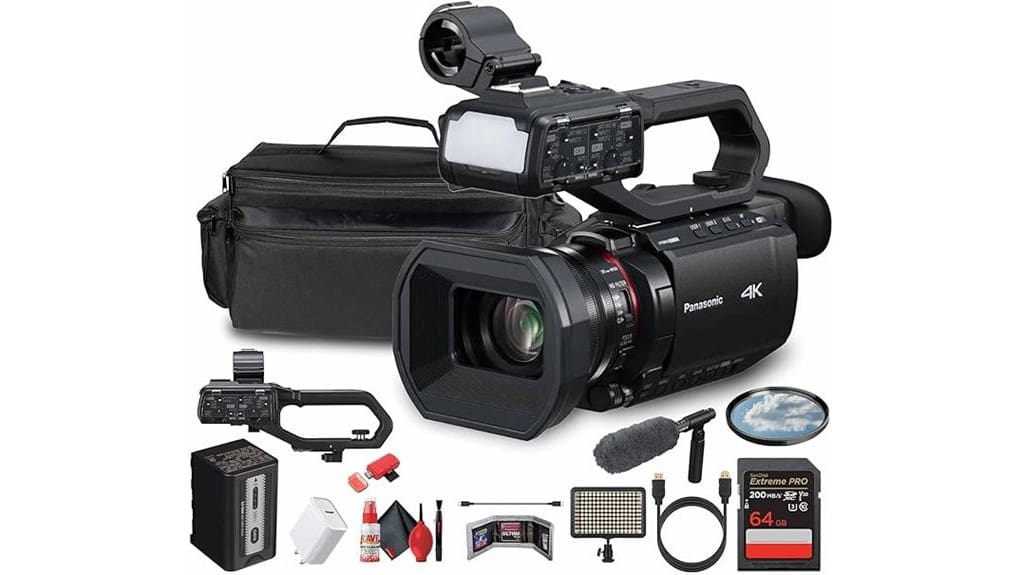
You’ll get a workhorse 4K camcorder that prioritizes workflow reliability over cinematic shallow‑depth looks: dual XLRs with phantom power, genlocked 3G‑SDI, dual SD relay, USB‑C power and ~4.5‑hour runtime. Image is sharp at 4K/60p with limited judder, FHD 120fps usable but softens at high ISO, and rolling‑shutter plus stabilization crop are present. It’s ideal for solo ENG and small crews needing robust feeds and continuous recording—keep going to see detailed performance, streaming, and comparison notes.
Some Key Takeaways
- Professional features: dual SD slots, dual XLRs with phantom power, 3G‑SDI output, and USB‑C power for reliable field workflows.
- Image performance: 4K60p is sharp with limited judder; Full HD up to 120fps allows moderate slow motion but softens at high ISO.
- Stabilization and sensor: hybrid 5‑axis plus Ball OIS reduces micro‑vibration but crops framing and shows rolling‑shutter on fast pans.
- Streaming and connectivity: built‑in RTSP/RTMP(S) over dual‑band Wi‑Fi supports Full HD streaming, requiring bitrate and latency management.
- Ideal users: best for solo shooters and small crews needing long runtime, pro audio, and SDI multicam capability rather than compact mirrorless image quality.
Hands-On Verdict: Is the Panasonic HC-X2100 Worth Buying?
While it won’t be the cheapest option for most creators, the HC-X2100 earns serious consideration if you need a compact, broadcast-ready 4K camcorder that handles demanding workflows, and you’ll immediately notice where Panasonic prioritized professional features over consumer frills. You get dual SD slots, 3G-SDI, XLR audio, robust thermal control, and a deep manual control set that justify a measured price comparison against rivals. If you value reliability, workflow integration, and concrete future proofing features like 4K/60p and 3G‑SDI, you’ll find the HC-X2100 a practical, technically rigorous investment rather than a flashy consumer toy. Field monitors can help ensure accurate framing and exposure on set, especially when using camcorders with broadcast features like the HC-X2100, so consider adding a field monitor to your kit.
Image and Video Performance: 4K/60p, FHD 120fps, and Stabilization Tested
Building on the HC-X2100’s pro-grade feature set, let’s examine how it actually performs when capturing motion: 4K at 60p, Full HD at up to 120 fps, and the on-board stabilization suite. You’ll find 4K/60p delivers sharp temporal resolution with limited judder, but the 1/2.5″ MOS sensor shows rolling-shutter and retained motion blur in fast pans. FHD 120fps is usable for moderate slow‑motion; fine detail softens and noise rises at higher ISOs. Hybrid 5‑axis stabilization plus Ball OIS reduces micro-vibrations effectively, though crop and electronic intervention alter framing and color rendition slightly. For those using external monitors, pairing the camera with a larger display can improve focus accuracy and framing when evaluating stabilization and motion capture in real time, especially for external camera monitors.
Audio, Connectivity, and Live-Streaming: XLR, 3G‑SDI, HDMI and RTMP Workflow Fit
Because Panasonic packed the HC-X2100 with pro audio and multi‑output video, you’ll get a versatile on-set workflow that stands up to professional expectations: dual XLR inputs with phantom power and manual controls on the detachable handle let you capture broadcast‑quality audio without external mixers, while the 3.5mm jack and built‑in stereo mic provide quick backup or ambient ambient capture; on the video side, simultaneous 3G‑SDI and HDMI outputs plus dual SD recording enable direct feed to switchers, recorders, or live‑stream encoders, and built‑in RTSP/RTMP/RTMPS over dual‑band Wi‑Fi (with Full HD streaming) simplifies direct-to-platform streaming—however, you should expect to manage stream bitrate limits, potential Wi‑Fi instability for high‑profile broadcasts, and latency considerations when routing through encoders or SDI infrastructures.
You’ll like the XLR workflow for ENG and documentary shoots; XLR gain knobs and clear meter readouts reduce preamp surprises. SDI routing is solid for multi‑cam rigs, but 3G‑SDI caps your 4K pipeline, so use it for HD feeds or downstream switchers. HDMI pass through is convenient for external monitors and recorders, though you’ll confirm handshake and HDR flags on every device. For RTMP troubleshooting, test device authentication, bitrate ceilings, and Wi‑Fi contention offsite; add a hardware encoder or wired USB‑C power and ethernet adapter for reliability. Our store also offers compatible camera remotes and accessories to streamline your on-set control and monitoring.
Ergonomics, Battery Life, and Included Accessories for Field Use
You’ll notice the HC-X2100’s physical design and accessory kit shape how long you can run useful shoots as much as its I/O did. You’ll grip a robust body with roomy controls; handle ergonomics are thoughtful—XLRs, zoom rocker and record start sit naturally—but weight and bundle mass demand a solid shoulder or rig for long handheld runs. Battery life is commendable: the 5900mAh pack delivers about 4h35m continuous 4K, and USB-C power extends sessions. Included items—case, mic, LED light, cables—show practical accessory durability; metal screws and padded case reduce field failures, though pro rigs may still beef it up. The padded case and rugged accessories make it easy to integrate the camcorder into rolling cases designed for passionate photographers.
Who Should Buy the HC-X2100 and How It Compares to Alternatives
While not aimed at casual vloggers, the HC-X2100 suits solo shooters and small crews who need broadcast-grade connectivity, long continuous runtime, and pro audio without lugging a full ENG rig. You’ll appreciate dual XLRs, 3G‑SDI, USB‑C power, and 4+ hour battery life for events and documentary shoots. Compared with mirrorless hybrids, it trades sensor size for long zoom, steady hybrid stabilization, and multicamera setups via genlocked SDI. It’s overkill for entry level creators on a budget but outperforms camcorders lacking XLRs. Choose the HC‑X2100 when workflow reliability, continuous recording, and integrated audio matter most. For enthusiasts focused on interchangeable-lens systems and compact bodies, our shop offers a wide selection of mirrorless camera gear to complement your setup.
Some Questions Answered
Does the HC-X2100 Support External Timecode Sync or Genlock?
No — the HC-X2100 doesn’t offer dedicated external timecode sync or genlock input/output. You’ll get limited timecode compatibility via recorded file timestamps and dual SD card relay/sync but no professional LTC/TC IN/OUT or house sync. That genlock limitation restricts multi‑camera broadcast rigs and precise frame‑locked workflows. You can work around this with external recorders or software sync, but expect extra setup, potential drift, and added complexity.
Can the Camera Record Proxy Files for Faster Editing Workflows?
Yes — you can record proxy files to speed edit workflows. You’ll get simultaneous proxies alongside full-resolution files, letting you use lower-bitrate proxy recording for offline editing while keeping high-bitrate masters. The camera offers bitrate options so you can balance quality and file size for proxies versus mains. That technical flexibility improves multicam and deadline-driven workflows, though you’ll want to verify your proxy codec/settings match your NLE for smooth relinking.
Is There Weather-Sealing or Dust Resistance on the Body?
No, the body doesn’t offer dedicated weather sealing or rated dust resistance. You’ll find robust build quality and a solid handle-mounted control cluster, but there’s no IP rating or manufacturer claim for moisture or particulate protection. That means you’ll need protective measures—rain covers, silica packs, or clamshell housing—for shooting in wet, dusty, or sandy environments. Relying on accessory protection preserves long-term reliability and serviceability.
Can the Built-In LED Light Run on Lower Power or Adjustable Color Temperature?
Yes — you can adjust the built‑in LED light’s output, but it’s limited. You’ll find adjustable brightness levels for practical fill‑light control, though not continuous dimming with fine granularity. Color temperature isn’t fully variable; you’ll rely on fixed color presets that shift between a few white balance options. Technically, it’s useful for on‑camera tasks and interviews, but it won’t replace a dedicated bi‑color LED panel for precise color control.
Are LUTS or Custom Picture Profiles User-Uploadable In-Camera?
No — you can’t upload Custom LUTs or new Picture Profiles directly into the camera. The HC-X2100 offers a set of built-in picture profiles and adjustable parameters, but it lacks an in-camera LUT import feature. You’ll need to record in a chosen profile (e.g., flat) and apply Custom LUTs in post-production. This limits on-set preview fidelity and forces a workflow dependent on external monitoring or software for final color grading.


