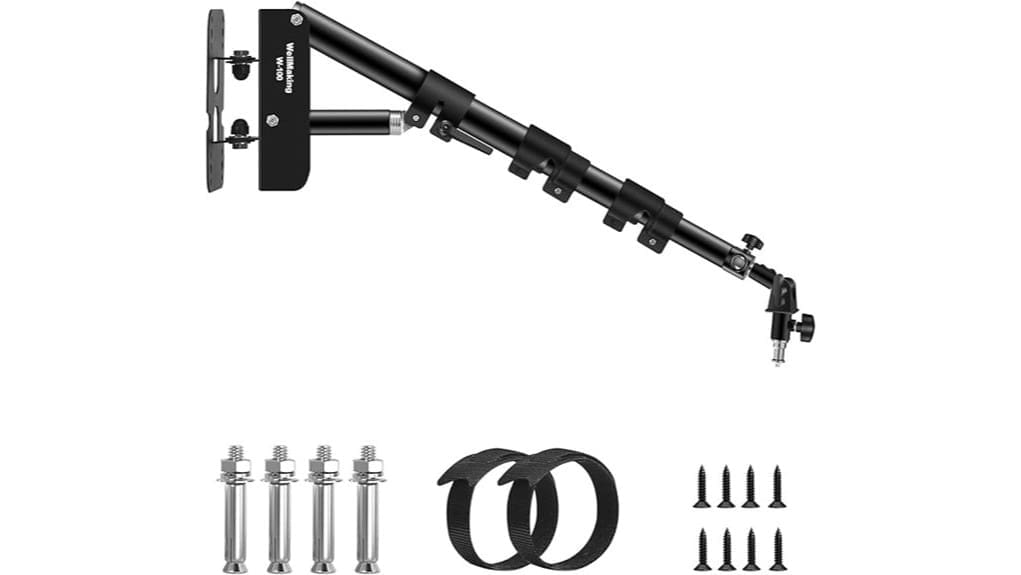
You’ll get a compact, stiff wall-mounted boom that extends to 100 cm with triangle aluminum geometry and dual-swivel action, ideal for LEDs, small strobes, mics and reflectors when properly anchored. It includes M6 expansion and M5 self-tapping screws, a U‑shape tilt adapter with 1/4–3/8 in screw, and two cable ties for neat routing. Expect limited payload and wall-only use, so test incremental loads and torque; continue for installation tips and alternatives.
Some Key Takeaways
- Sturdy triangle aluminum-alloy boom extends to 100 cm, offering increased stiffness and corrosion-resistant powder-coating.
- Dual-swivel design (0°–180°) with fold-flat storage enables flexible positioning and compact stowage.
- Supplied U-shape tilt adapter (1/4–3/8 in screw) and cable ties support broad accessory compatibility and tidy routing.
- Includes M6×50 expansion and M5×30 self-tapping screws; proper masonry bit, anchor cleaning, and torque settings required.
- Best for LEDs, small strobes, microphones, and reflectors; not suitable for heavy monolights or large softboxes.
Detailed Specs and Design: What the Wellmaking WK-100 Offers
Although compact when stowed, the Wellmaking WK-100 extends to 100 cm (39.37 in) and uses a triangle boom-arm design in powder-coated aluminum alloy to deliver rigidity and corrosion resistance. You get dual-swivel rotation (0°–180°), fold-flat storage, and a U-shape tilt adapter with 1/4–3/8 in metal screw for broad compatibility. Dimensions and hardware are specified: stored length 47 cm, included expansion and self-tapping screws. The powder-coated material finish resists corrosion; triangular geometry increases stiffness. Integrated cable management uses two supplied cable ties to route cords along the arm, reducing clutter without tools or added components. This mount is ideal for photographers seeking stable setups with clamp mounts and flexible positioning options.
Real-World Setup and Installation: Mounting, Tools, and Tips for Concrete vs. Drywall
After confirming your WK-100’s geometry and hardware fit your gear, plan the mount location and fastening method based on wall material: for concrete or masonry use the four M6×50 expansion screws supplied and a 6 mm (or slightly larger) masonry bit, drilling to full anchor depth and cleaning the holes before setting anchors; for wood or drywall, use the eight M5×30 self-tapping screws into studs or into appropriately rated anchors—don’t rely on drywall alone. Mark the bolt pattern from the bracket, verify stud location or anchor rating, set installation torque per anchor spec, route cables with the included ties for neat cable management, and test hold before loading. Consider keeping cables and the mount protected in a dedicated tripod bag to preserve gear and simplify transport.
Stability and Performance Test: Load Limits, Swivel Range, and How It Handles Lights & Microphones
When you test the WK-100’s stability and performance, focus on its rated load capacity, swivel range, and real-world behavior under asymmetrical loads; the triangle boom and aluminum-alloy construction provide a rigid platform that resists flex when mounted correctly. You should perform incremental weight testing up to manufacturer recommendations, checking for sag, play, and hardware torque loss. Dual-swivel 0°–180° action offers flexible positioning; verify smooth rotation under load and secure stops. For lights and microphones, assess vibration damping and noise isolation during adjustments and when powered gear operates. Record measurable deflection and repeatability for objective comparison. Also evaluate damping and drag settings against industry fluid head standards to ensure consistent, smooth motion under varied shooting conditions.
Who Should Buy It and Best Use Cases: Studios, Streamers, Salons, and When to Choose Something Sturdier
Having verified the WK-100’s swivel range, load response, and deflection under asymmetric loads, you can now match its capabilities to users and use cases. You should buy it if you need compact, repeatable positioning for LEDs, small strobes, mics, or reflectors in photography studios, streamer desks, or salon suites where studio ergonomics and mounting aesthetics matter. It works well on solid walls to free floor space and simplify cable routing. Don’t choose it if you regularly mount heavy monolights, large softboxes, or boomed cinema rigs—those demands require higher load ratings, reinforced anchors, or professional-grade articulating arms. The WK-100 is especially handy for photographers who prioritize compact light stand solutions that save floor space and maintain tidy cable management.
Final Verdict and Alternatives: Pros, Cons, Price-Value Judgment, and Comparable Mounts to Consider
While the WK-100 won’t replace heavy-duty studio articulations, it gives you a reliable, space-saving mount for LEDs, small strobes, microphones, and reflectors with repeatable positioning and minimal deflection. You get sturdy aluminum triangle bracing, dual-swivel rotation, and compact stored length—good for tight studios and integrated storage solutions. Cons: limited payload, wall-only install, and reliance on proper anchors. Price-value is favorable if you need lightweight, repeatable support; skip it for heavy monolights or cameras. Consider comparable mounts like Neewer wall arms, Elgato Multi Mount, or small articulating studio boom arms when you need higher capacity or refined aesthetic considerations. Perfect Picks caters to photographers seeking suction cup camera mounts and related mounting solutions.
Some Questions Answered
Does It Include a Weight Capacity Chart for Different Arm Extension Lengths?
No — the package doesn’t include a load testing report or an extension chart. You’ll get mounting hardware, a U‑shape tilt adapter and basic specs, but no detailed load testing data or an extension chart showing capacity at various lengths. If you need rated capacities, you should request manufacturer load testing documentation or perform independent testing using safe clamps and graduated weights to verify performance across the arm’s extensions.
Can the Arm Be Lock-Pinned at Specific Swivel Angles?
Yes — you can lock the arm at specific swivel angles using the built-in locking mechanism. It employs dual-swivel joints with defined swivel detents allowing repeatable positions across 0°–180°. You’ll tighten the locking screws to secure the joint; detents provide tactile stops but not indexed pins for every degree. This gives stable, repeatable angles for lightweight studio gear, though exact torque or load-vs-angle specs aren’t provided.
Are Replacement Screws or Adapters Sold Separately by WELLMAKING?
Yes — you can get replacement screws and mounting adapters, but you’ll need to contact WELLMAKING or authorized retailers directly. They’ll confirm stock for replacement screws (M6×50 anchors, M5×30 self-tappers) and U-shape mounting adapters (1/4–3/8). If they don’t have parts, you can source equivalent hardware locally: M6 anchors for concrete, M5 self-tappers for wood/drywall, and standard 1/4-to-3/8 adapters. Warranty may affect availability.
Is the Powder-Coat Finish Resistant to Salt-Air Corrosion?
No — the powder-coat finish isn’t specified as a marine grade coating, so you shouldn’t assume salt-air corrosion resistance. You’ll want to request salt air testing data from the manufacturer or choose a product explicitly rated for marine environments. If you’ll mount near coasts, consider additional corrosion protection (marine-grade paint, stainless fasteners, sealants) or a boom arm with a certified marine-grade coating to guarantee long-term durability.
Does the Warranty Cover Accidental Drops During Installation?
No — the warranty doesn’t cover accidental drops during installation. You’re subject to warranty exclusions for physical damage and misuse, so installation liability stays with you or your installer. The one-year manufacturer warranty addresses defects in materials and workmanship only. To protect yourself, follow mounting instructions, use appropriate anchors for your substrate, document installation, and consider supplemental insurance or a service contract if you want coverage for accidental damage.


