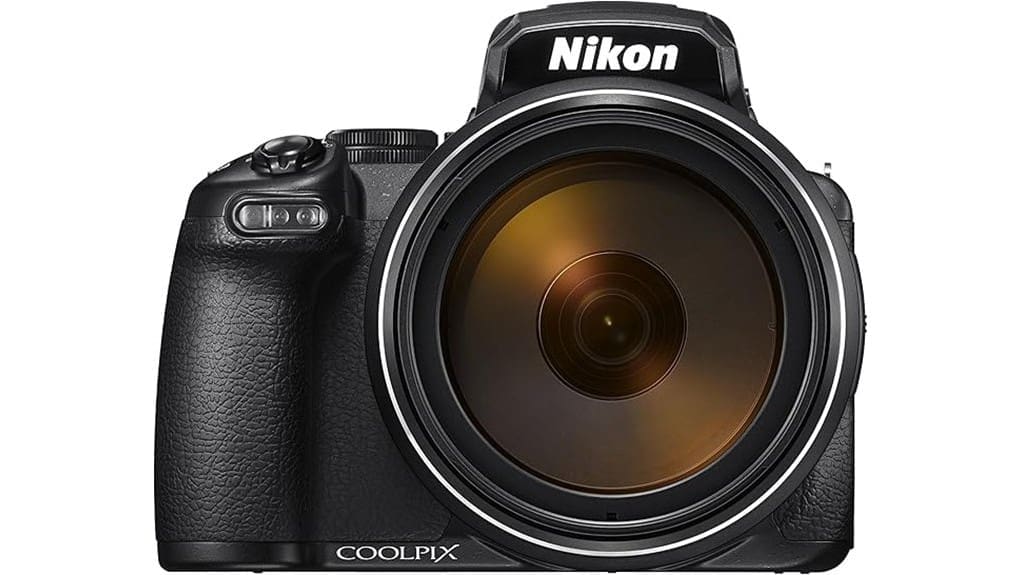
You’ll get unmatched 24–3000mm reach with the renewed Nikon COOLPIX P1000, perfect for extreme framing but with clear trade‑offs: a small 16MP 1/2.3″ sensor limits high‑ISO detail and microcontrast, stabilization helps but can’t restore lost resolving power at full telephoto, and autofocus hunts with focus‑breathing during racks. Ergonomics and battery life are modest, and ports/cards constrain workflows. It’s a niche, creative tool—keep expectations measured, and you can learn more about its real‑world compromises.
Some Key Takeaways
- Offers unmatched 125x zoom (24–3000mm equiv.) for extreme telephoto creativity, but sharpness falls noticeably toward 3000mm.
- 16MP 1/2.3″ sensor limits high‑ISO performance and microcontrast; RAW (NRW) helps recover highlights and tone.
- Dual Detect VR helps reduce shake, yet stabilization can’t recover lost resolving power at extreme focal lengths.
- Ergonomics: logical controls and high‑res OLED EVF, but heavy balance, cramped rear dial, and hinge durability are concerns.
- Renewed value is strong for niche superzoom use, but battery life, limited warranty, and sensor trade‑offs warrant careful buying/testing.
Real-World Telephoto Test: How the 125x Zoom Performs at 24–3000mm
Though the P1000’s headline 125x zoom promises extreme reach, real-world use exposes the trade-offs: at wide-angle (24mm equiv.) the lens is sharp and bright (f/2.8), but as you extend toward 3000mm equivalent resolution, contrast and edge detail fall off noticeably and atmospheric distortion becomes a dominant limiting factor. You’ll appreciate framing options, but atmospheric compression exaggerates distance, flattening scenes and hiding mid-distance detail. Autofocus hunts more at long reach, and focus breathing alters framing during rack focus. Stabilization helps composition but can’t recover lost resolving power; careful technique and good seeing remain essential for usable telephoto images. For wildlife and sports shooters the P1000’s reach is compelling, but mastering telephoto techniques like stabilization and seeing is crucial to getting usable results.
Image Quality and Low-Light Performance: 16MP Sensor, RAW, ISO, and Stabilization
Usually the P1000 delivers usable images in good light thanks to its 16MP 1/2.3-inch BSI CMOS sensor and RAW (NRW) capture, but the small sensor size imposes clear limits as ISO climbs. You’ll appreciate RAW for recovering highlights and adjusting tone, yet 16MP dynamics can’t overcome high‑ISO noise and reduced microcontrast. Native ISO up to 6400 becomes noisy; expanded settings are largely unusable. Dual Detect VR helps freeze telephoto shake, but stabilization limits appear at extreme focal lengths and slower shutter speeds—residual blur and detail loss persist, so you must prioritize fast shutter or tripod support. Proper sensor care and occasional professional cleaning can help maintain image quality over time by preventing dust spots and preserving sensor performance sensor cleaning.
Handling, Ergonomics, and Video: Controls, Viewfinder, Articulating Screen, and 4K Footage
Image stabilization and ISO limits dictate how you’ll shoot, but the P1000’s handling and video features determine how comfortably you can get those shots. You’ll find button placement logical but cramped around the rear dial; repetitive reach slows operation during rapid framing. The OLED viewfinder offers high resolution, yet viewfinder comfort suffers from limited eye relief and weight bias at telephoto. The 3.2″ articulating screen is sharp; articulation durability feels solid but hinges add long-term worry with heavy use. For video, 4K is usable; video ergonomics are hindered by body heft and lack of dedicated movie controls for run-and-gun work. The P1000 is often paired with sturdy tripods to manage its mass and reach, especially when using the superzoom perfect tripods for stability.
Battery Life, Storage, and Ports: EN-EL20a Endurance, SD Card Needs, and Connectivity
Frequently you’ll find the EN-EL20a keeps up with short outings but not marathon shoots; rated capacity is modest for a camera with such a heavy processing and stabilization load, so expect to carry at least one spare for extended photo or 4K video sessions. You’ll manage power by toggling stabilization, limiting continuous 4K recording, and using airplane-mode wireless only when needed; disciplined battery management is essential. Storage-wise, the single UHS-I SD slot accepts SDXC V30/Class 10 cards but forces trade-offs between buffer clearing and long clips. Port limitations—USB 2.0, HDMI, and AV—curb fast tethering and high-speed transfers. For users who shoot frequently, consider keeping a spare camera battery on hand to avoid missed shots.
Should You Buy the Renewed P1000? Value, Warranty, Alternatives, and Buying Tips
If you’re weighing the renewed Nikon COOLPIX P1000, treat it as a niche tool: its unmatched 125x reach and 4K capability deliver unique creative opportunities, but battery life, heavy ergonomics, and a modest 90-day limited warranty constrain its appeal for demanding pros. You should buy it if you need extreme telephoto without interchangeable lenses and accept compromises in sensor size and low-light IQ. Factor warranty considerations into total cost; consider seller reputation and return policy. Check resale potential versus used competitors (Sony RX10 IV, Canon SX70) and negotiate price; test all functions and request recent service records. As a specialty retailer, a camera shop’s product selection and expertise can help you evaluate renewed gear.
Some Questions Answered
Does the Renewed Unit Include Original Accessories and Packaging?
Yes — renewed units typically include essential items, but you shouldn’t assume full accessory authenticity or packaging completeness. Sellers usually provide the camera, battery, basic strap, and charger; original branded boxes and manuals may be missing or replaced. Inspect the listing for explicit notes on included items, serial numbers, and warranty. If authenticity or complete packaging matters, request photos and confirmation before purchase to avoid surprises.
Is There Any History of Previous Repairs or Cosmetic Grading?
You won’t find documented previous repairs unless the seller lists them; check the seller’s previous ownership history notes. Inspect the cosmetic condition grading carefully—renewed units are typically graded A/B/C with photos and notes. You should request service records, repair invoices, and high-res images showing wear points. If grading or history isn’t provided, don’t buy; insist on a return window and warranty confirmation before completing the purchase.
Can I Register a Renewed Nikon for Extended Warranty Coverage?
Yes — you can often register a renewed Nikon for extended coverage, but warranty transferability depends on the seller and Nikon policy. If the renewed unit included a transferable manufacturer warranty or the retailer offers its own extended plan, complete retailer registration promptly and keep proof of purchase. Verify eligibility: some renewed items only get a limited 90-day warranty and aren’t eligible for Nikon’s extended plans, so confirm terms before buying.
Is There a Return or Exchange Policy Specific to the Renewed Model?
Yes — you get a return policy and an exchange window, but specifics depend on the seller. You should confirm timeframe, restocking fees, and condition requirements before buying. Inspect the camera promptly; document cosmetic and functional issues. If defects appear, claim within the exchange window to request replacement or repair. Keep original packaging, receipts, and warranty info. Online marketplace policies may differ from manufacturer or retailer terms.
Are Firmware Updates Applicable to Renewed Units the Same as New Units?
Yes — firmware compatibility for renewed units matches new ones, and you’ll follow the same update procedure. You should verify the camera’s current firmware version, download Nikon’s official firmware file, format an SD card, copy the file to the card, insert it, and run the update via the camera menu. Don’t interrupt power, use a fully charged EN-EL20a battery, and confirm success; otherwise contact Nikon support for troubleshooting.


