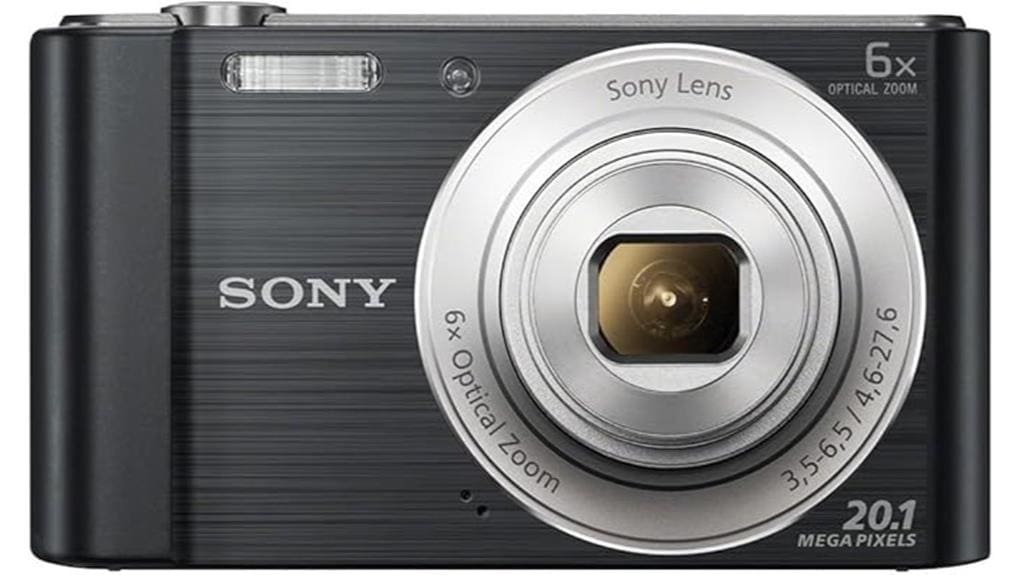
You’ll get a reliable 20MP compact that’s tuned for travel and family snaps: SteadyShot keeps handheld shots sharp, the 6x optical zoom gives useful reach, and panorama mode captures wide scenes easily. Daytime detail and color are strong for prints and social sharing, but low‑light relies on heavy noise reduction and battery life is modest. Videos are simple 720p with one‑touch record. Keep going and you’ll find deeper looks at image quality, handling, and alternatives.
Some Key Takeaways
- 20MP sensor delivers detailed daytime images and usable moderate-size prints with good color accuracy.
- 6x optical zoom offers useful reach and sharp framing without obvious digital artifacts.
- SteadyShot stabilization keeps handheld photos and 720p videos steady, even when zoomed.
- Low-light performance depends on aggressive noise reduction, smoothing fine detail at high ISO.
- Compact, simple controls, fast startup, and panorama mode suit travelers and casual shooters.
Pros and Cons at a Glance: Is the Sony W810 Worth It?
While it won’t match today’s smartphones for sheer convenience, the W810 still gives you solid optics and useful features: 6x optical zoom for detail, SteadyShot to cut camera shake, 360 Sweep Panorama for wide scenes, and 720p movies with a one-touch record button. You’ll appreciate crisp framing and straightforward shooting; menu ergonomics are simple enough for quick adjustments. Downsides: battery life won’t rival modern devices, so carry spares for long outings. Expect modest low-light performance and limited resolution compared with current flagships. Overall, you’ll get a capable compact that favors control and zoom over phone-style immediacy. Consider keeping extra camera batteries on hand to ensure longer shoots and reliable performance.
Real‑World Image Quality: 20MP Stills, Low‑Light and Party Mode
Because the W810 pairs a 20MP sensor with Sony’s processing and SteadyShot, you’ll get detailed daytime shots and usable prints up to moderate sizes, but the results depend on lighting and ISO. You’ll notice fine texture and good color accuracy in bright conditions; sharpening is strong, so crops hold up. In low light the camera leans on aggressive noise reduction, which smooths detail at higher ISOs but keeps images presentable for social or small prints. Party mode boosts exposure and flash balance effectively, reducing motion blur in dim scenes. Overall, expect pleasing everyday results with predictable low‑light tradeoffs. Regular sensor and lens care (use a sensor cleaning kit and gentle lens brush) will help maintain image clarity over time.
Handling and Features: SteadyShot Stabilization, 6x Optical Zoom, and Panorama
Good low-light handling is only part of the picture — how the camera feels and what it lets you do matter just as much. You’ll notice Sony’s SteadyShot image stabilization immediately: handheld shots stay sharp even as you extend the 6x optical zoom, so your subjects don’t blur when you frame tighter. The zoom reach delivers useful close-ups without digital artifacts, and controls feel straightforward for quick adjustments. Panorama mode stitches smooth 360° sweeps automatically, making wide scenes easy to capture. Overall, the handling balances stability, reach, and simplicity, letting you focus on composition rather than technical hassles. This compact setup pairs well with essential mirrorless accessories like mirrorless lenses to expand creative possibilities.
Video Performance and Speed: 720p Movies, Burst Shots, and Responsiveness
Record confidently: the W810 shoots smooth 720p HD video with a dedicated movie button that gets you rolling instantly, and its SteadyShot stabilization keeps handheld footage watchable even when you’re zoomed in. You’ll appreciate reliable start-up speed and low frame latency for most casual clips, so action stays coherent. Burst-shot mode captures quick sequences, though buffer depth is modest — good for short sports or kids’ moments but not extended rapid fire. Audio fidelity is clear for voice and ambient sound, though wind and distant subjects lose detail. Overall responsiveness fits everyday use; pros will want faster, deeper buffers. If you frequently shoot remotely or in group situations, consider pairing the camera with wireless remotes to improve convenience and trigger timing.
Who Should Buy It and the Best Alternatives to Consider
If you want a compact point-and-shoot that handles everyday photos and casual HD video without fuss, the W810 is a solid pick—its quick startup, usable 720p footage and SteadyShot stabilization make it reliable for trips, family events, and social sharing. You should buy it if you’re a budget travelers or need a simple camera that outperforms secondary phones for zoomed shots, panoramas and low-light party scenes. If you want more reach or higher video quality, consider alternatives: a midrange compact with 10x zoom, an entry-level mirrorless for low-light performance, or a smartphone with superior computational imaging. Our site helps photographers rediscover joy in compact point-and-shoot photography.
Some Questions Answered
Does the W810 Support RAW Image Capture?
No — the W810 doesn’t offer raw support? You’ll only get JPEGs from its 20MP sensor, so you can’t rely on raw files for heavy editing. Sensor cleaning? It lacks advanced sensor-cleaning features found on higher-end models, so you’ll need to clean dust manually or with tools. If you want raw capture and built-in cleaning, you’ll need to look at more advanced compact or interchangeable-lens cameras.
Does It Have Built‑In Wi‑Fi or NFC Connectivity?
No — it doesn’t have built-in Wi‑Fi or NFC. You’ll need a cable or card reader to transfer images, so wireless printing isn’t natively supported from the camera. That limits quick sharing and in-field review. You can still update functionality via firmware updates, but those rely on a computer connection. If seamless wireless workflows and direct printing matter to you, consider a newer compact with dedicated Wi‑Fi/NFC features.
What Battery Life Can I Expect per Charge?
You’ll get modest battery endurance — roughly 200–250 shots per charge in typical use, fewer if you record lots of 720p video or use flash/SteadyShot a lot. Expect that number to drop over time as the rechargeable cell ages; useful charge cycles for compact cameras often range into the low hundreds before noticeable capacity loss. Plan to carry a spare battery for extended outings or heavy panorama/video shooting.
Is There a Manual or Aperture Priority Shooting Mode?
No, you won’t get a true manual or aperture priority shooting mode on this camera. You can, however, use creative modes and manual focus-like control in some scene settings to influence framing and focus. That said, the camera’s fixed aperture and limited exposure controls mean you’re best off relying on its presets for easy shooting. If you want full manual or aperture priority, you’ll need a more advanced compact or interchangeable-lens camera.
Does It Accept External Flashes or Accessories?
No, you can’t attach an external hotshoe or mount big flashes; the W810 lacks an external hotshoe and dedicated accessory ports. You’ll be limited to the built-in flash and small sync options like wireless or optical slave triggers if compatible. That means you’ll rely on on-camera flash performance, reflectors, or off-camera flashes triggered remotely. If you need expandability, consider cameras with proper hotshoe and accessory ports for studio or advanced lighting.


