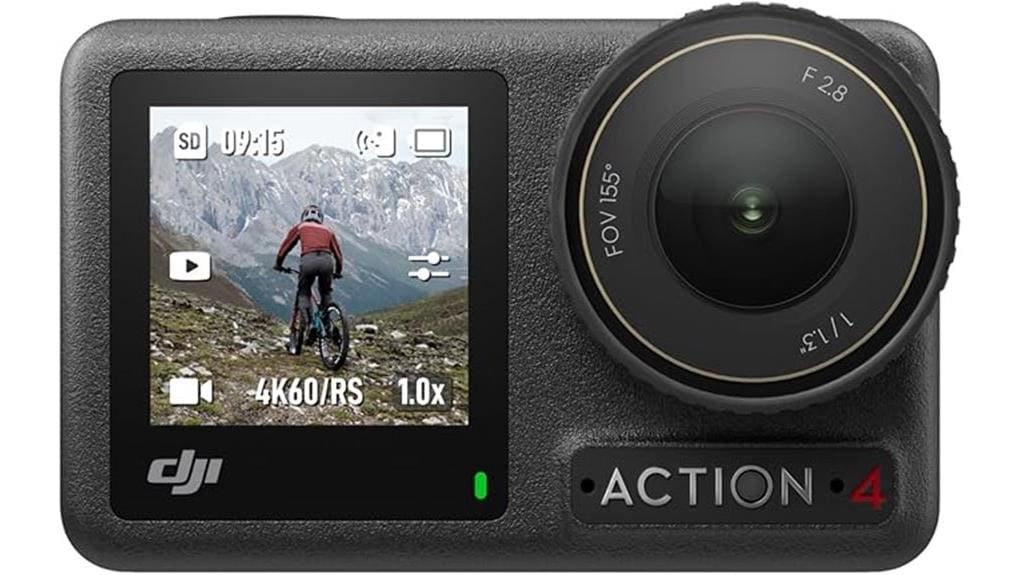

You’ll get a compact, rugged action camera that balances pro-grade 4K/120fps and 10‑bit color with long battery life and reliable stabilization. It’s great for travel, grab‑and‑go rigs, and creators who want sharp footage, usable slow motion, and D‑Log M/RAW for grading. Low‑light isn’t class‑leading and the accessory set is modest, so plan upgrades for diving or extended shoots. Keep going and you’ll find detailed notes on performance, battery, and mounting.
Some Key Takeaways
- Compact, rugged action camera with 1/1.3″ sensor delivering sharp 4K/120fps and 10‑bit color for pro-grade video.
- Reliable stabilization via RockSteady, RockSteady+, and HorizonBalancing keeps footage steady during most action.
- Standard Combo includes camera, one 1770 mAh battery, protective frame, quick‑release mount, adhesive base, lens hood, and USB‑C PD cable.
- Battery life about 150–160 minutes typical; USB‑C PD charging supported, but heat and high output reduce runtime.
- Strong image quality and portability for travel and beginners, but limited low‑light/headroom and modest accessory/audio options.
Quick Verdict : Is the Osmo Action 4 Standard Combo Worth Buying?
While it won’t be the perfect fit for every creator, the Osmo Action 4 Standard Combo is worth buying if you want a compact, rugged action camera that balances advanced imaging (1/1.3″ sensor, 4K/120fps, 10‑bit color) with reliable stabilization and long battery life. You’ll get pro-grade image results, versatile stabilization modes, and endurance for extended shoots. Accessory compatibility is strong for common mounts and DJI add-ons, so you can adapt the rig. Expect ongoing firmware updates that refine performance and fix edge cases. If you need top-tier low-light or interchangeable lenses, consider alternatives. For mounting and rigging options, the kit supports a wide range of action camera accessories commonly used by photography enthusiasts.
What’s in the Standard Combo and Who It’s For
Because you’ll likely use the Osmo Action 4 as a grab-and-go rig, the Standard Combo gives you the essentials: the camera itself, one Extreme 1770 mAh battery, a Horizontal‑Vertical Protective Frame for switching orientations, a Quick‑Release Adapter Mount with locking screw, a Curved Adhesive Base, lens hood, anti‑slip pad, and a USB‑C PD cable. You’ll get straightforward mount compatibility with DJI’s magnetic system and common sport mounts. The kit supports a modest accessory ecosystem without excess extras, suiting a beginner workflow and creators prioritizing travel portability. It’s pragmatic for users who want core functionality without bulky bundles. For added protection in wet environments, consider pairing it with waterproof housings from specialists who focus on camera protection.
Real-World Video Performance: 4K, 120FPS, Color, and Stabilization
Having covered what’s in the Standard Combo and who it suits, let’s look at how the Osmo Action 4 actually performs when you press record. You’ll get sharp 4K footage and usable 120fps slow motion; the 1/1.3″ sensor and 10-bit color yield clean gradients and grading latitude. Stabilization modes (RockSteady, RockSteady+, HorizonBalancing) keep framing steady, though aggressive pans can introduce subtle motion blur. Bitrate control matters: higher bitrates preserve fine detail and reduce compression artifacts during fast action. Overall, you’ll find video reliable for adventure use, provided you match stabilization, FOV, and bitrate to the scene. Consider pairing the camera with on-camera LED lighting to brighten close-up shots and improve low-light color fidelity, especially when shooting indoors with on-camera LED lights.
Photo Quality and Low-Light Shooting With D-Log M and RAW
If you want dependable stills and flexible grading, the Osmo Action 4 delivers—its 1/1.3″ sensor and 40 MP effective resolution produce detailed images, and 10-bit D-Log M plus RAW capture give you headroom for color correction and highlight recovery. You’ll find Low light performance improved over prior models: usable daylight-grade detail down to dusk, though high ISO brings visible grain. Noise Handling is competent; RAW lets you clean luminance without crushing detail. Color Grading in D-Log M is forgiving, preserving midtones for natural shifts. Shadow Retention is strong for this sensor class, aiding highlight-to-shadow balance. For photographers serious about color accuracy, pairing the camera’s output with color calibration tools ensures consistent, true-to-life results across devices.
Battery Life, Charging, and Practical Runtime Expectations
When you push the Osmo Action 4 through a full day of shooting, the Extreme 1770 mAh battery delivers remarkably long runtimes compared with many action cams, with DJI’s lab figures and real‑world tests aligning around 150–160 minutes under typical conditions. You’ll rely on USB‑C PD charging for fast top‑ups; DJI’s 30W charger cuts downtime. Consider battery chemistry and Heat management — high output raises temperature, shortening peak runtime in hot environments. Rapid swapping is practical with the Standard Combo’s single spare or Adventure Combo’s multi‑battery case. Note flight regulations when carrying extra batteries on aircraft. For drone photographers looking to extend outings, choosing batteries with optimized thermal performance and proper storage can significantly improve battery life.
Mounting, Durability, and Underwater Use (IP68 Limits and Tips)
Although compact, the Osmo Action 4’s mounting system and rugged construction are designed for demanding use: its magnetic quick‑release and self‑locking adapter let you swap orientations fast, the Horizontal‑Vertical Protective Frame enables proper vertical mounting, and the camera’s IP68 rating plus optional Waterproof Case provide certified protection down to 18 m when properly sealed. You’ll find broad mounting compatibility with common sport mounts, though check adapter fit for aftermarket rigs. For reliable underwater performance follow waterproof maintenance: make certain clean seals, dry threads, and properly closed ports. Avoid hot springs and corrosive fluids; inspect O‑rings after heavy use. Our store specializes in suction cup mounts and accessories that work well with action cameras like the Osmo Action 4.
Final Pros, Cons, and Whether to Choose the Standard Combo or Upgrade
Since you’ll likely be weighing durability, battery life, and accessory needs most heavily, the Osmo Action 4 stands out for its solid image quality, versatile stabilization, and long battery life, but you should be realistic about accessory choices and underwater use. You’ll get excellent 4K/120fps footage, RockSteady modes, and a rugged IP68 body, but the Standard Combo includes only one Extreme Battery and basic mounts. Choose Standard if you want core performance and good Accessory compatibility for common mounts; upgrade to Adventure for extra batteries, charging case, and extension gear. Note Audio options are limited without external mics. Consider adding a float grip for safer handling during water activities to protect your camera and improve buoyancy float grips.
Some Questions Answered
Can I Use Osmo Action 4 as a Webcam for Livestreams?
Yes — you can use it as a webcam with clean HDMI output or via UVC support where available, but check setup. You’ll need a USB-C or HDMI capture device, enable clean HDMI output in settings, and confirm your computer recognizes the camera as a UVC device or via capture card. Audio may need separate routing. This is practical for livestreams, but test compatibility, resolution, and latency before going live.
Does the Camera Support External USB-C Microphones Besides DJI Mic?
Yes — you can use an external mic via USB-C, but adapter compatibility matters. You’ll connect USB-C mics directly or use a USB-C-to-3.5mm adapter for analog microphones that support digital audio passthrough. Not all adapters or mics will work; power, drivers and the Osmo’s firmware determine compatibility. Test your specific External mic and adapter beforehand, and prefer certified digital USB-C mics or DJI-approved accessories for reliable results.
Are Firmware Updates Automatic via the DJI Mimo App?
Yes — firmware updates can be automatic via the DJI Mimo app, but you’ll need to enable that option and keep the camera connected. You’ll also be able to perform manual checks in the app and on the camera if you prefer control or don’t trust auto installs. That lets you balance convenience of automatic updates with the safety of manual checks, ensuring you decide when to apply firmware changes and avoid unexpected interruptions.
Can I Charge and Record Simultaneously With One Battery?
Yes — you can record while charging via USB-C with charging pass through, but it’s limited. Recording while plugged in keeps the camera powered, yet continuous recording heat and cable movement can affect stability and run times. For long sessions you’ll want a battery swap strategy or external power bank to avoid interruptions. Use recommended PD chargers, monitor temperature, and consider swapping batteries or the Adventure Combo’s multi-battery case for extended shoots.
Is There Cloud Backup or Automatic Media Transfer to Phone?
No — there’s no built‑in cloud sync or automatic auto transfer from the camera itself. You’ll need to connect via Wi‑Fi/Bluetooth to the DJI Mimo app to manually download or trigger transfers to your phone, then use your phone’s cloud service for backup. You can also offload files via microSD or USB‑C to a computer and enable cloud backup there. This makes automated cloud sync dependent on external apps or devices.


