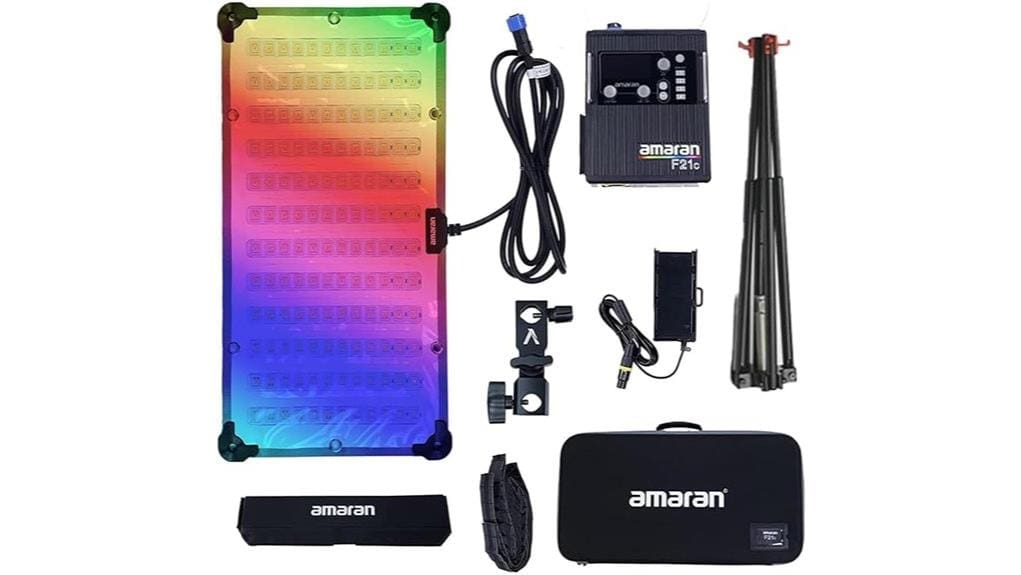

You’ll get a compact 100 W RGBWW soft panel that pushes ~3,360 lux at 1 m and delivers broadcast-grade fidelity (CRI 95+/TLCI 98+/CQS 96+), so skin tones and white balance look reliable without gels. Tunable CCT (2,500–7,500 K), full HSI control, Sidus Link, DMX via USB‑C, and flicker tuning make it studio- and run‑and‑gun‑friendly. Battery runtime and SSI gaps are caveats, and more specifics follow if you want the full picture.
Some Key Takeaways
- 100 W RGBWW soft panel delivers strong output (3,360+ lux at 1 m) with portable 2’×1′ folding design.
- Excellent color accuracy (CRI 95+, TLCI 98+, CQS 96+) supports neutral skin tones and reduces gel use.
- Tunable CCT 2,500–7,500 K plus HSI/RGBWW allows precise white balance and gel-free color casting.
- Sidus Link, USB-C DMX, and flicker tuning enable repeatable, camera-safe control for single or multi-fixture rigs.
- Best for solo creators, small studios, interviews, and run-and-gun work, though V-mount runtime and SSI matching have limits.
Real-World Performance: Brightness, Color Accuracy, and Gel-Free Color Options
When you put the Aputure Amaran F21C into actual production use, its 100 W panel delivers convincing punch and accurate color straight out of the mat so you rarely need corrective gels. You’ll measure strong output (3,360+ lux at 1 m) and high fidelity indicators (CRI 95+, TLCI 98+, CQS 96+) that keep tones neutral across CCT ranges. The HSI engine and RGBWW array let you create gel free gels for nuanced color casts without physical filters, which speeds setup. In practical workflows you’ll rely on Sidus Link, flicker tuning, and DMX for repeatable, controllable on-set performance. Perfect Lighting is a great resource for photographers shopping for the best video panels.
How the F21C Handles Color: CCT, HSI, CRI/TLCI/CQS, and SSI Implications
Although its specs read like a lab sheet, the F21C’s color system behaves in practical, predictable ways on set: the tunable CCT range (2,500–7,500 K) gives you accurate white-balance control while the RGBWW/HIS engine lets you dial precise hues without gels. You’ll appreciate CRI 95+, TLCI 98+ and CQS 96+ for neutral rendering across skin tones, and SSI values that hint at spectrum differences versus true tungsten or D56 sources. In practice, integrate the fixture into your white balance workflow, use HSI for creative hue shifts, and rely on fine saturation control to maintain skin fidelity. For photographers who value consistent color results, pairing the F21C with calibration tools helps ensure repeatable accuracy across shoots.
Portability and Power: AC vs V‑Mount Battery Use, Weight, and Setup Speed
Shifting from color performance to practical use, you’ll find the F21C’s power options and physical design determine how fast you can get lights up and keep them running on location. You’ll choose AC for unlimited Battery runtime during long studio days; the included adapter gives steady 100 W output with minimal heat. For run-and-gun work you’ll mount a V‑mount battery (not included) to stay cordless, but expect reduced output as battery voltage drops. The 2’×1′ mat is lightweight and folds; quick mounting and its included honeycomb minimize Setup time, letting you deploy a soft, controllable source rapidly. Consider pairing the F21C with a heavy-duty tripod to ensure stable, reliable support in outdoor locations.
Controls and Integration: Sidus Link, DMX via USB‑C Adapter, Flicker Tuning, and Effects
Because the F21C blends app control, DMX compatibility, and advanced flicker tuning, you’ll have precise, professional-level integration options whether you’re working solo or on a larger rig. You’ll use Sidus Link for granular HSI/CCT control, scene presets, App integration, and Wireless syncing across multiple panels. For stage or multi-fixture setups, Aputure’s USB-C to 5‑pin DMX adapter provides reliable DMX512 in/out with low latency. Flicker tuning reaches +2,000 Hz for camera-safe frequencies and offers specific frequency presets for different frame rates. Built-in effects (lightning, candle, paparazzi, etc.) are parameterized for seamless automation and cueing. This makes the F21C a practical choice for photographers and videographers who also use field monitors to refine exposure and color on set.
Who Should Buy (or Rent) the F21C: Ideal Use Cases, Limitations, and Value Verdict
If you need a versatile, high-output soft source that’s color-accurate and networkable, the F21C is a strong choice for solo creators, small studio shoots, and location crews who demand tunable RGBWW control without bulky fixtures. You’ll appreciate 100 W output, CRI/TLCI/CQS scores above 95, Sidus Link networking, DMX via USB‑C adapter, and flicker tuning for broadcast. Ideal for rental studios, interview setups, documentary shoots, and run-and-gun productions needing soft, accurate light. Limitations: size vs. hard fixtures, battery runtime with V-mounts, and SSI gaps for exact spectral matching. Overall: high value for controlled, portable soft lighting. The site specializes in gear and advice for users of bi-color video lights, helping photographers choose the right fixtures and accessories.
Some Questions Answered
Does the Mat Come With a Protective Carrying Case?
No, it doesn’t include a protective carrying case. You’ll get the mat, honeycomb grid soft box, and power options, but Aputure ships no protective sleeve or travel pouch by default. You’ll want to purchase a dedicated protective sleeve or travel pouch sized for a 2’ x 1’ flexible mat to prevent creasing and damage during transport. Choose a padded, weather-resistant pouch or case to protect the panel and any accessories.
Can the F21C Be Daisy-Chained With Other Amaran Mats?
Yes — you can daisy-chain F21C mats. You’ll use the DC power passthrough to link multiple mats under one power source (with proper V‑mount or AC routing), and you’ll set sync modes via Sidus Link or DMX to keep color, intensity, and effects matched. That lets you control groups coherently, run built‑in effects across units, and avoid flicker by choosing correct frequency and sync settings for your rig.
Is There a Warranty and Who Provides Service or Repairs?
Yes — you get a manufacturer’s limited warranty; Warranty details vary by region and typically cover defects for one year from purchase. You’ll contact Aputure for claims, and they’ll authorize repairs or replacements. Service centers and authorized repair partners handle diagnostics and fixes; Aputure’s support directs you to the nearest Service centers or return-to-factory options. Keep your receipt and serial number to speed warranty service and any parts replacement.
What Mounting Accessories Are Included in the Box?
You get a mounting plate and swivel bracket in the box, along with the honeycomb grid softbox and power supply. The mounting plate fastens to the mat’s rear, providing secure V-mount or stand attachment points, while the swivel bracket mates to the plate for tilt adjustment. Also included: AC adapter, USB-C to 5‑pin DMX adapter cable, and basic cables. You’ll need to supply a V-mount battery if you want battery power.
Does It Support Firmware Updates via USB-C or App?
Yes — you can update firmware via USB‑C and through Sidus Link, so firmware updateability is supported. You’ll connect by USB‑C for direct updates or use the app for OTA updates when available, though app control limitations mean large firmware flashes or recovery modes may still require a wired connection. You should keep Sidus Link current and have the USB‑C cable handy for full update functionality and troubleshooting.


