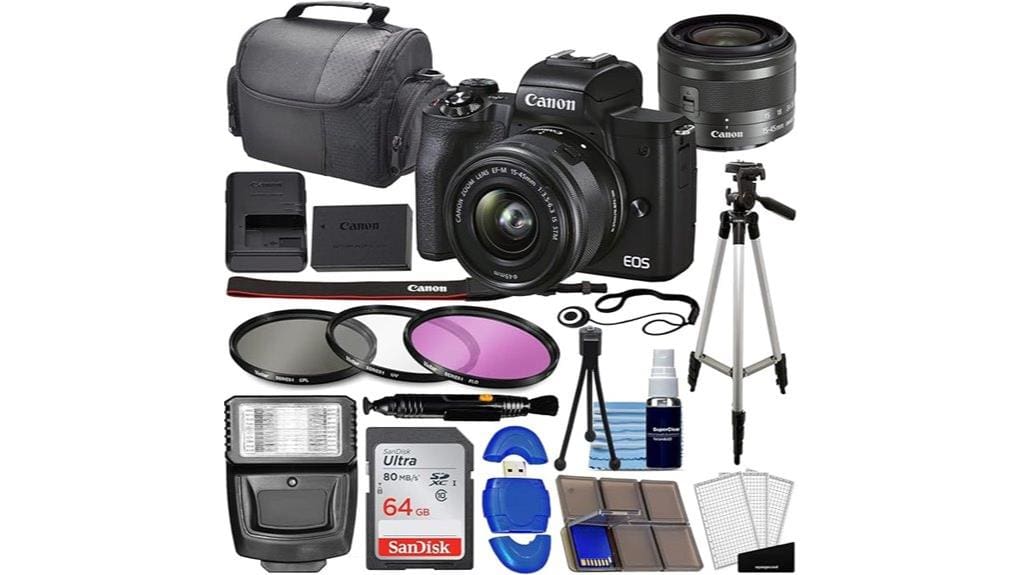
You’ll get a compact, capable hybrid: a 24.1MP sensor with Dual Pixel AF gives punchy color, reliable Eye Detect, and strong 1080p performance for vlogging, though 4K is cropped and AF is reduced there. DIGIC 8 controls noise through mid‑ISO, but RAW burst buffering is limited and high ISO worsens. The retractable 15–45mm kit lens and hefty accessory bundle boost out‑of‑box value, while EF‑M’s future is uncertain—keep going to see detailed tradeoffs and alternatives.
Some Key Takeaways
- 24.1MP APS‑C sensor with Dual Pixel CMOS AF delivers sharp stills and reliable eye-detect autofocus for photos and 1080p video.
- 4K video is available but cropped with reduced autofocus area and weaker tracking compared to 1080p.
- DIGIC 8 controls noise well at low–mid ISOs, but image quality degrades notably above ISO 3200.
- Kit EF‑M 15–45mm lens is compact and stabilized; bundled accessories add immediate value for budget buyers.
- Great for vloggers and beginners needing affordable hybrid performance, though alternatives offer stronger AF or in-body stabilization.
Verdict: Is the Canon EOS M50 Mark II Worth Buying?
Although it isn’t Canon’s flagship, the EOS M50 Mark II delivers a strong balance of imaging performance and features for photographers and vloggers who want a compact, capable kit. You’ll appreciate reliable Dual Pixel AF, a 24.1MP sensor, and useful connectivity that simplify capture and workflows. For budget-conscious buyers the renewed form factor and bundled accessories boost immediate value, and measured ergonomics suit extended handheld use. Consider long term value versus evolving mirrorless mounts; resale potential is moderate given discontinued EF-M support. If you need an affordable, versatile body for hybrid shooting, this camera remains a pragmatic choice. Our store carries essential mirrorless camera accessories to help you get the most from this kit.
Image and Video Performance You Can Expect
Having established its value as a versatile hybrid body, let’s look at what the M50 Mark II actually produces in stills and video. You’ll get clean 24.1MP RAWs with punchy dynamic color and usable shadow recovery up to mid-ISO; DIGIC 8 keeps noise controlled through native range. Video is serviceable: 4K crops and 1080p60 with a silent rolling shutter at lower frame rates, plus 720p120 for slow motion. Exposure and color are predictable; apply cinematic LUTs in post for richer grading. Continuous shooting reaches 10 fps but watch burst buffering limits with RAW sequences—plan accordingly. For consistent studio results consider pairing the camera with video panels designed for photography lighting.
Autofocus, Stabilization, and Low‑Light Behavior
When you push the M50 Mark II into real-world shooting, its Dual Pixel CMOS AF with Eye Detect AF delivers fast, confident subject acquisition for stills and 1080p video, locking onto faces and eyes with minimal hunting even in mixed lighting; performance in 4K is less robust due to a cropped mode and reduced AF area, so expect slower or less consistent tracking there. You’ll appreciate precise eye detection for portraits and run-and-gun video, while motion tracking handles moderate subject speed but struggles with fast erratic movement. Combined stabilization (lens IS plus in-body algorithms) aids handheld low-light shooting, though high ISO noise rises above ISO 3200. For an improved shooting experience and better monitoring of focus and exposure, consider pairing the camera with an external monitor for composition and critical focus external camera monitors.
Kit Lens, Bundled Accessories, and Real‑World Usability
The bundled EF‑M 15–45mm f/3.5–6.3 IS STM kit lens snaps onto the M50 Mark II as a compact, versatile starter optic that covers 24–72mm (35mm equiv.) and delivers useful stabilization and decent edge-to-edge sharpness for casual shooting. You’ll appreciate lightweight handling for long walks and vlogs; the retractable design keeps the kit small when stowed and balanced on the body. Bundled accessories—64GB SanDisk card, battery/charger, filter set, flash, tripods, bag, reader and cleaning kit—make the camera shoot-ready. Rapid lens swapping is smooth on the EF‑M mount, and real-world ergonomics favor quick setup and reliable portability. For photographers looking to simplify workflow, including a dedicated memory card reader in the bundle saves time transferring files during shoots.
Who Should Buy It : Alternatives and Final Buying Tips
Although it’s not the most advanced mirrorless in Canon’s lineup, the EOS M50 Mark II suits you if you need a compact, affordable APS‑C body that excels at vlogging, casual hybrid use, and travel photography while offering easy livestreaming and webcam capability. You’ll want it if you’re into beginners vlogging, want reliable Dual Pixel AF, and need a lightweight kit for travel enthusiasts. Alternatives: consider the Sony A6400 for superior AF and 4K, or Fujifilm X‑S10 for in‑body stabilization and film simulations. Final tip: prioritize lens ecosystem and buy a stabilized prime or lightweight zoom for best results. Consider pairing the camera with a travel-friendly tripod to maximize portability and stability on the road, especially a model designed for lightweight travel.
Some Questions Answered
Does It Support Vertical (Portrait) Video Natively?
Yes — you can shoot vertical video natively. You’ll use portrait mode framing and physically rotate the screen to compose; the camera records vertically when you rotate the camera, and many editing apps preserve orientation. For live streaming, phone mirroring via Canon’s app can display vertical output to a phone for monitoring, but some platforms may require rotation or reorientation. Evaluate workflow: capture vertical, confirm metadata, and test phone mirroring for correct orientation.
Can It Record Clean HDMI Output for External Recorders?
Yes — you can output clean HDMI from the camera for external recorders, but with caveats. It delivers a clean HDMI feed without overlays at 1080p (not full-frame 4K), so you’ll capture high-quality footage. You’ll need to manage external audio separately: the camera supports external audio input via its mic jack but doesn’t pass mixed external audio over HDMI by default, so record audio directly to the recorder or sync in post.
Is a Battery Grip Available/Compatible?
No official battery grip exists for the Canon EOS M50 Mark II, but you can use third party compatibility options. You’ll evaluate third‑party battery grips and vertical grips that fit the M50 series; they typically use an LP‑E12-style battery pack or an external battery pack with a dummy connector. Check build quality, electrical contacts, firmware compatibility, and shutter/camera control integration before buying to avoid power cutouts or limited functionality.
How Long Is Continuous 4K Recording Before Overheating?
You’ll typically get about 10–15 minutes of continuous 4K before the camera overheats under normal ambient conditions. Battery drain is noticeable during 4K recording, and codec limitations (motion sampling and crop) increase processing heat and shorten usable runtime. To extend sessions, use short takes, external power, or interval recording with cool-downs. Monitor temperature warnings and avoid direct sun or high ambient temperatures to prevent shutdowns and potential sensor stress.
Are EF Lenses Usable Without Loss of Features?
Yes — you can use EF lenses with an adapter required, but you’ll face some autofocus limitations. With a Canon EF-to-EOS M adapter you’ll retain manual focus, EXIF, and aperture control; autofocus usually works but may be slower or less reliable than native EF-M glass, especially for continuous AF, eye detection, and video AF. Image stabilization in-lens still functions, but expect occasional hunting and reduced tracking performance compared to native lenses.


