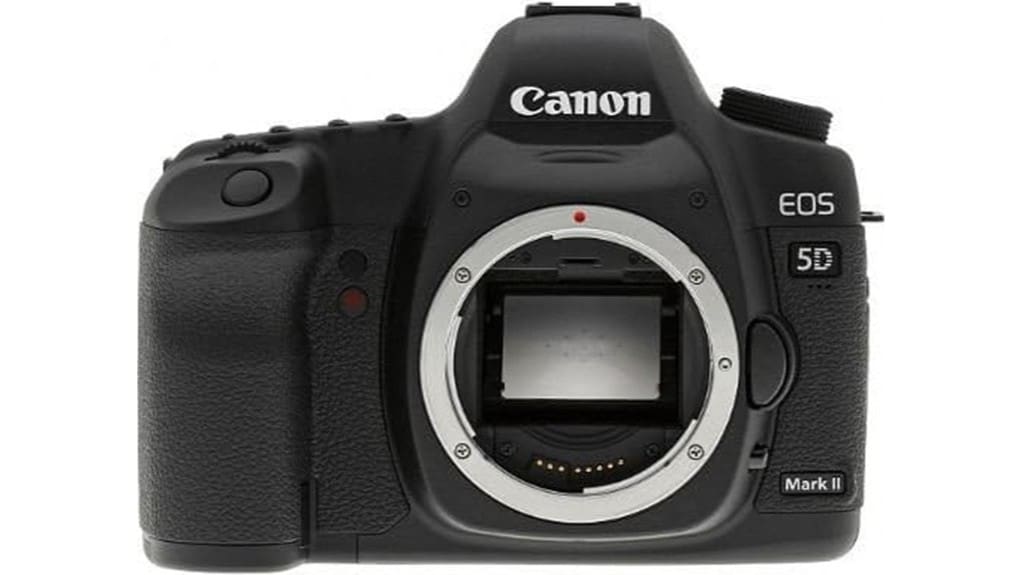
If you want full‑frame detail and reliable color at a bargain, the Canon EOS 5D Mark II delivers a 21.1MP sensor, 14‑bit RAW, and solid ISO performance to about 1600, with usable results beyond. Its nine‑point AF and 3.9 fps burst suit portraits and moderate action, while full‑HD movies are sharp though AF is limited. The metal body feels pro‑grade and battery life is strong. Keep an eye on shutter count and ports, and keep reading for deeper tests and buying tips.
Some Key Takeaways
- 21.1MP full‑frame sensor delivers detailed images with strong tonal gradation and robust RAW flexibility for highlight/shadow recovery.
- DIGIC 4 and 14‑bit A/D produce reliable color and nuanced gradients, best tuned with a calibrated monitor for editing.
- 9‑point phase‑detect AF and 3.9 fps continuous shooting suit moderate action but not fast sports or wildlife.
- Full‑HD video was groundbreaking for its time, though in‑recording autofocus and file‑size limits are dated by modern hybrids.
- Solid metal body, excellent ergonomics, long LP‑E6 battery life, and strong used‑market value with standard pre‑purchase checks.
Canon EOS 5D Mark II at a Glance: Who It’s For and What Stands Out
The Canon EOS 5D Mark II steps in as a versatile, full-frame DSLR that appeals to serious enthusiasts and prosumers who need high-resolution stills and early full‑HD video in a robust, EF‑mount body. You’ll appreciate its heritage appeal and proven build quality: a metal chassis, straightforward controls, and dependable ergonomics that suit long shoots. It’s surprisingly beginner friendly for those stepping up from crop bodies, offering intuitive exposure modes and Live View. Compatibility with Canon’s extensive lens ecosystem means you won’t lack optical choices. Overall, it’s a practical, well-supported tool for photographers prioritizing durability and lens options. This makes it a great fit for readers of sites focused on mirrorless camera gear and accessories.
Image Quality and Performance Tested: Sensor, ISO, Dynamic Range, and RAW Output
Though you won’t get the latest sensor tech, the 21.1‑megapixel full‑frame CMOS in the 5D Mark II delivers impressive detail and tonal gradation for its era, especially when shooting RAW and pushing shadow recovery. You’ll appreciate 14‑bit A/D conversion and DIGIC 4 processing for nuanced gradients and reliable color. Native ISO 100–6400 gives usable results; high iso performance is respectable up to ISO 1600, with more noise beyond but retainable detail when you expose carefully. RAW flexibility is a strength: you can recover highlights, lift shadows and adjust white balance non‑destructively, producing clean files for printing and editorial work. For best results when editing those RAW files, consider calibrating your monitor with hardware calibration to ensure accurate tones and colors.
Autofocus, Shooting Speed, and Video: Real-World Handling for Stills and Full HD Clips
When you need reliable autofocus for both stills and video, the 5D Mark II’s 9-point TTL-SIR-CT AF system delivers predictable framing for composed shots and acceptable tracking for moderate-action subjects. You’ll use phase detection in viewfinder shooting for quick lock and switch to Live View’s contrast detection for critical manual-focus confirmation. Continuous shooting at 3.9 fps handles short bursts but won’t keep up with fast sports. In movie mode Full HD clips are sharp, though autofocus during recording is limited compared with modern hybrids. Low light AF performs reasonably with bright lenses, but hunting increases as light falls. This camera is a solid choice for DSLR enthusiasts who need essential accessories and support for their photographic workflow, including tripods, filters, and camera bags to protect gear.
Ergonomics, Battery Life, and Connectivity: Body, Controls, and Workflow Considerations
Having covered autofocus and shooting responsiveness, let’s look at how the 5D Mark II’s body, controls, and power affect real-world workflow. You’ll find a substantial, well-balanced DSLR body that gives excellent grip comfort for prolonged shoots; controls are logically placed for thumb and forefinger reach, though some buttons feel dated. Battery life is solid for stills—expect multiple sessions on one LP-E6—but video clips hit the ~4 GB file limit, so plan swaps. Connectivity is basic: HDMI and USB 2.0 ports work reliably, but port placement along the left flank can feel cramped with accessories attached. For longer studio runs, consider pairing the camera with an AC adapter to keep power continuous and avoid battery swaps.
Value Assessment: Buying Used/Refurbished, What to Check, and Recommended Alternatives
Because buying a used or refurbished 5D Mark II can deliver stellar full-frame performance at a fraction of the original cost, you should approach the purchase with a checklist mindset: verify shutter count, inspect the sensor and LCD for scratches or stuck pixels, confirm the functionality of all nine AF points and Live View, test the exposure meter and flash sync, and make sure the HDMI/USB ports and card slot operate cleanly. Check for sensor wear and confirm battery health; request a used warranty or seller-return policy. Compare price against newer alternatives (e.g., used 6D, 5D Mark III) for value and feature upgrades. Keep your camera sensor pristine by using proper sensor swabs and cleaning techniques to avoid dust and spots that affect image quality.
Some Questions Answered
Does the 5D Mark II Support Modern UHS SD Cards With an Adapter?
Yes — you can use modern UHS SD cards via a CompactFlash-to-SD adapter, but note UHS compatibility is limited by the camera’s CF interface and controller. You’ll likely see reliable read/write for stills, though speeds will cap near the 5D Mark II’s UDMA CF performance. Adapter reliability varies; choose a high-quality, tested adapter to avoid dropped frames or file corruption. Don’t expect full UHS video-class throughput for long continuous recording.
Can It Be Used for Tethered Shooting With Current macOS Versions?
Yes — you can tether the 5D Mark II to current macOS, but it’s limited. You’ll use USB tethering via USB 2.0 and Canon’s EOS Utility or third‑party apps that still support legacy drivers; newer macOS may need driver workarounds or legacy OS permissions. Wireless adapters can offer remote capture but add latency and compatibility caveats. Expect slower transfer, occasional stability issues, and reliance on adapters or updated software for smooth workflow.
Is the Sensor Prone to Infrared Contamination or Hot Pixels Over Time?
Short answer: it’s not unusually prone, but you’ll see some infrared susceptibility and gradual hot pixel progression with age. You’ll find the 21.1MP full-frame sensor resists severe IR contamination under normal use, though long exposures and modified sensors increase risk. Hot pixels commonly emerge over years, especially after heavy use or high ISO, but in-camera mapping, long-exposure noise reduction, and occasional sensor cleaning will manage them effectively.
Can the Camera Be Firmware-Updated to Enable Newer Features?
Yes — you can update the camera’s firmware to get bug fixes and minor feature tweaks, but you’ll hit firmware limitations for major modern functions. You’ll apply official Canon updates via USB/CF and the menu, yet advanced capabilities (new autofocus algorithms, modern codecs) aren’t provided. Some users turn to custom hacks to add features (video tweaks, extended menus), but those carry risks, void warranties, and require careful research before proceeding.
Does the Shutter Mechanism Require a Known Service Interval Mileage?
No, there’s no manufacturer-mandated service interval mileage for the shutter mechanism. You should monitor shutter lifespan based on actuation count and follow a maintenance schedule: have curtain replacement or inspection after heavy use (typical estimates 100k–150k actuations) or if you see failures. Schedule professional servicing when you notice shutter anomalies, dust, or wear. Keep records of actuation count and service intervals to plan preventive maintenance and curtain replacement.


