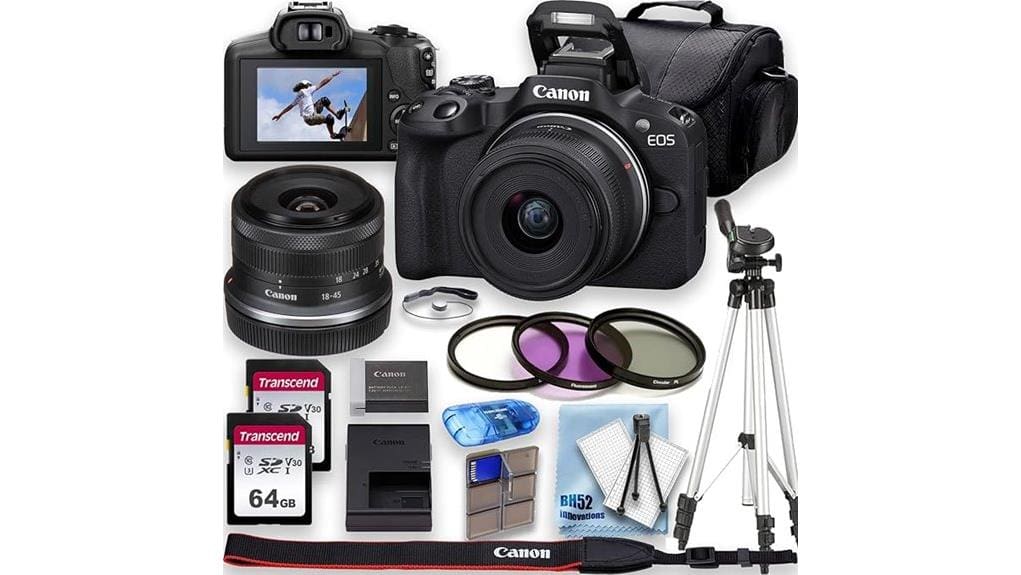

You’ll find the Canon EOS R50 is a compact, lightweight mirrorless that gives you detailed 24.2MP stills and oversampled, crop‑free 4K up to 30p with pleasing colors. It’s vlogger‑friendly thanks to a flip touchscreen, UVC webcam support, and intuitive menus, while 10‑bit capture and picture profiles let you grow creatively. Autofocus is fast and bursty, though buffer and battery limit long runs. Keep reading and you’ll get full specs, handling notes and buying tips.
Some Key Takeaways
- Oversampled UHD 4K up to 30p delivers crisp, low-noise video with accurate straight-from-camera color.
- 1080p at 120p enables smooth slow-motion clips, best used in short bursts due to recording limits.
- 10‑bit capture and picture profiles allow creative grading and improved dynamic range for serious users.
- No IBIS and modest rolling shutter; DIGIC X AF provides reliable subject tracking but watch fast pans.
- Compact, vlogger-friendly body with flip screen, UVC webcam support, USB‑C, but single MicroSD and modest battery.
Quick Verdict: Who the Canon EOS R50 Is Best For
If you want a compact, lightweight mirrorless that handles both high-quality stills and oversampled 4K video without a steep learning curve, the EOS R50 fits the bill. You’ll appreciate its entry level appeal: intuitive menus, vari-angle touchscreen, and DIGIC X processing make framing and autofocus straightforward. Vlogger ergonomics score well thanks to the flip screen, lightweight body, and UVC webcam support for quick social sharing. Creative controls like exposure, picture profiles, and 10-bit capture give room to grow without overwhelming you. Choose this if you want capable image quality, portability, and simple connectivity for online content. It’s also a great match for photographers who need essential accessories for mirrorless systems, such as compact lenses and protective cases.
What You Get in the Box and Key Specs at a Glance
Open the box and you’ll find a ready-to-shoot kit: the EOS R50 body paired with the compact RF‑S 18–45mm f/4.5–6.3 IS STM lens, a Canon LP‑E17 battery with LC‑E17 charger, R‑F‑5 body cover, EM‑200DB neck strap, lens caps, and a battery pack cover. Packaging contents also include two 64GB UHS‑I cards, a 49mm filter set, tripod, USB reader and starter kit in bundled packages. Key specs at a glance: 24.2MP APS‑C, DIGIC X, UHD 4K, 10‑bit capture, 120fps 1080p, 10fps burst, EVF and vari‑angle touchscreen. Check accessory compatibility, Color profiles and firmware updates for feature expansions. Essential gear like lenses and straps can help you get the most from your DSLR and mirrorless setup.
Image Quality and Autofocus: 24.2MP Stills and AF Performance
Having covered what’s in the box, let’s look at how the EOS R50 performs when you actually shoot: its 24.2MP APS‑C sensor and DIGIC X engine deliver detailed stills with good color fidelity and low‑light headroom for an entry/intermediate mirrorless body. You’ll appreciate Canon’s color science: skin tones and mids are pleasing straight from camera, needing minimal correction. Autofocus feels smooth and accurate—phase‑detect points lock quickly for portraits and action at 10 fps. Buffer depth with UHS‑I cards is adequate but not class‑leading; long bursts will slow write times. Overall, stills and AF match its target users. The site also offers a range of compatible accessories for enthusiasts, including lenses and camera bags accessories.
4K and Slow‑Motion Video: Real‑World Video Modes and Limits
While the R50 nails usability for creators, its video chops have practical limits you should know: it records oversampled UHD 4K (using the full 24.2MP sensor) at up to 30p for crisp detail and color, and shoots 1080p at 120p for smooth slow motion, but you won’t get higher‑frame 4K or unlimited clip lengths—the camera tops recordings at 60 minutes—and you’ll rely on the DIGIC X and AF system to keep subject tracking steady rather than in‑body stabilization. In practice you’ll see modest rolling shutter on fast pans and crop‑free 4K, but bitrate limits constrain prolonged high‑motion fidelity; short bursts of 120p work best. The site also offers LED panel options ideal for matching the R50’s video capabilities with consistent, flicker‑free lighting for creators, including adjustable color temperature and output for studio and on‑location shoots with compact setups and LED panels.
Handling, Screen, Viewfinder and Vlogging Features
Because Canon designed the R50 with creators in mind, its handling, screen and viewfinder put practical vlogging needs front and center: the compact body feels light in one hand, the vari-angle 3.0-inch touchscreen flips and rotates for selfie framing and touch-focus control, and the 2.36m-dot OLED EVF gives a clear alternative for precise composition. You’ll appreciate well-placed controls, predictable articulation points on the hinge and tilt, and a textured grip that steadies handheld shots. Selfie usability is strong — reliable AF, clear monitoring, and accessible record/start buttons make run‑and‑gun vlogging efficient and confidence-inspiring. Compact wireless remotes can further enhance vlogging workflows by enabling remote trigger and start/stop control with minimal fuss and setup, making them ideal for solo creators who need simple remote control solutions.
Battery Life, Ports, Connectivity and Media Workflow
Moving from the R50’s handling and vlogging strengths, its power, ports and connectivity shape how reliably you can shoot and move files. You get the LP‑E17 battery with LC‑E17 charger; real-world runtime is modest for heavy 4K use, so plan battery management and carry spares. Port placement is logical: USB‑C and micro‑HDMI sit within easy reach yet stay protected. Single MicroSD slot means you’ll rotate cards or offload often; the bundled dual 64GB cards help. Wi‑Fi and UVC/UAC USB streaming simplify livestreaming and file transfer, but tethered workflows still rely on cable access and card readers. Consider using a portable SSD for quick offloads and backup on location (portable SSDs)
Value Summary and Buying Recommendations (Body, Kit, or Alternatives)
If you want a compact, content-creator-friendly APS‑C camera that balances image quality, fast AF, and modern video features without breaking the bank, the EOS R50 kit is a compelling choice. You get strong 4K performance, responsive phase-detect AF, and a lightweight RF‑S 18–45mm bundle that covers everyday needs. Buy the kit if you value out-of-box readiness and included accessories; choose body-only if you already own compatible RF or adapted EF lenses to maximize lens compatibility. Resale value should stay healthy for Canon’s R lineup. Consider alternatives if you need IBIS or full-frame depth. This camera is a solid pick for drone photographers seeking compact, high-quality imaging with aerial camera gear compatibility.
Some Questions Answered
Does the Camera Support In‑Camera Vertical (Portrait) Video Recording?
Yes — you can record vertical video in-camera by rotating the EOS R50 into portrait orientation; the camera supports vertical recording and saves upright files. You’ll get 4K or Full HD clips with the same AF and exposure behavior, though framing and stabilization depend on your lens. You’ll want to confirm your editing workflow and playback devices handle the portrait files correctly, and use the vari-angle screen to monitor composition.
Can the R50 Shoot RAW Video or Output 10‑Bit RAW Externally?
No — the R50 can’t record raw video nor output 10‑bit raw externally. You’ll get 10‑bit internal UHD 4K from its processing, but raw video capture isn’t supported and there’s no RAW over HDMI capability. That means you’ll rely on 10‑bit MP4 workflows or high‑quality ProRes/LUT conversions via external recorders only if the camera output and recorder accept that format; true external 10‑bit raw remains unavailable.
Is There In‑Body Image Stabilization (IBIS) in the R50 Body?
No — the R50 has IBIS absence. You’ll rely on stabilization alternatives: lens-based Optical IS (with the RF‑S 18–45mm kit lens), electronic stabilization in video, and external solutions like gimbals or stabilized lenses. For stills you’ll benefit from fast shutter, high FPS, and good AF; for smooth handheld 4K or slow‑motion, plan on using IS lenses, a gimbal, or post‑stabilization to avoid motion artifacts.
Can the Dual Memory Cards Be Configured for Overflow or Backup?
No — you can’t configure dual recording for overflow or card mirroring on the R50 because it only has a single microSD slot in this bundle. That means you won’t get built‑in overflow or card mirroring redundancy. If you need dual recording or card mirroring for backup, you’ll have to use an external recorder, camera with dual slots, or tethered capture to your computer to achieve reliable redundancy.
Does the Camera Include a Microphone Input and Headphone Jack?
No — it doesn’t have a dedicated microphone input or headphone jack on the body. You’re limited to using the built‑in mic or relying on USB‑C UVC audio or the bundled lens’s stabilization. For better audio, you’ll need an external mic that connects via a hot shoe or USB, and you may require a monitoring adapter (USB‑C to audio interface) to monitor sound live. That adds complexity but gives higher quality and real‑time monitoring.


