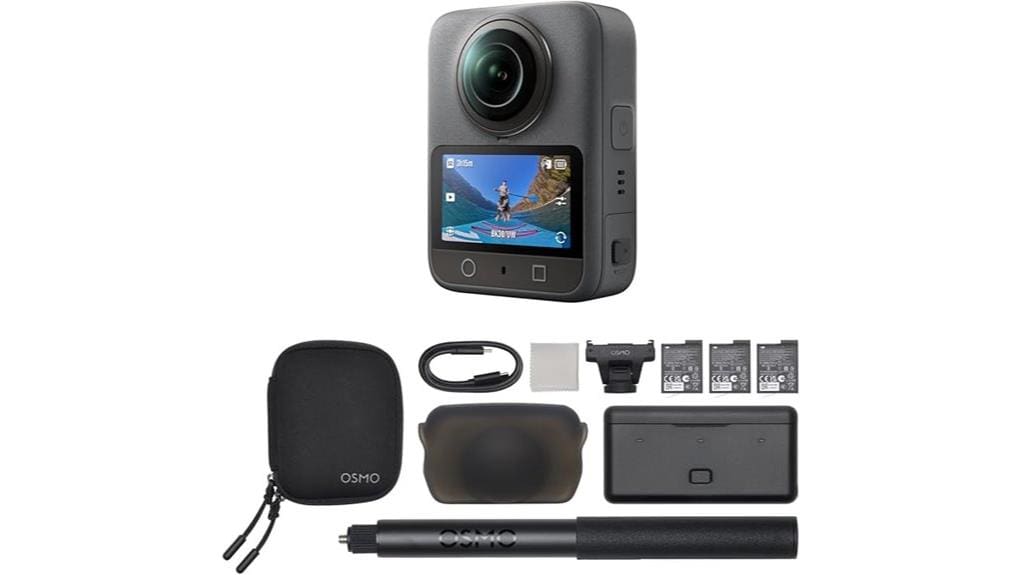
You’ll find the Osmo 360 Adventure Combo feels solid and pocketable with a 495 g magnesium chassis, tactile magnetic quick‑release mounts, and reliable controls even when wet. Image quality is strong: true 8K/30 and 4K/120 capture with 120MP stills and good low‑light performance from a 1‑inch sensor, though heavy grading can reveal banding and compression in extremes. Battery and storage support long outings, and bundled accessories speed workflow — keep going to see detailed test notes and alternatives.
Some Key Takeaways
- Rugged magnesium chassis, waterproofing, and tactile quick‑release make the Adventure Combo durable and easy to swap accessories in the field.
- Image quality is strong: 8K/30 for detailed 360°, 4K/120 for smooth dewarped crops, and 120MP stills for high-resolution crops.
- 1‑inch sensor maintains low noise in low light, though heavy grading can reveal compression and color banding in skies.
- Battery life is practical: ~100 minutes per battery, ~190 minutes combined with internal storage and three included batteries.
- Workflow is streamlined with magnetic mounts, Pano Dewarp tools, 105GB internal storage, and presets for fast editing on the go.
Hands-On First Impressions: Build, Controls, and Waterproof Performance
Although it’s compact enough to tuck into a jacket pocket, the Osmo 360 feels solid in your hand thanks to its 495 g magnesium-alloy chassis and tactile magnetic quick-release system. You notice a logical button layout that lets you change modes without fumbling; tactile switches respond crisply. The grip texture gives confident handling in wet or cold conditions, and waterproof sealing inspires trust for submerged use. Controls stay reliable through repeated mounts and drops, and the 1/4″ thread and magnetic accessories fit securely. Overall, construction and interface prioritize durability and efficient operation for active, practical shooting scenarios. Accessories like field monitors can further enhance framing and exposure control for outdoor shoots by providing real-time monitoring.
Image and Video Test Results: 8K/30fps, 4K/120fps, 120MP Stills, and Low-Light Samples
Having tested the Osmo 360’s build and controls in the field, we moved on to quantify image and video quality across its headline modes. You’ll find 8K/30fps delivers detailed 360° footage with strong fine detail and manageable dynamic bitrate behavior; compression artifacts appear only in extreme contrast shifts. 4K/120fps smoothes motion for dewarped outputs and single-lens crops with excellent clarity, though heavy grading can expose occasional color banding in skies. 120MP stills resolve impressive texture and crops, and the 1-inch sensor keeps noise low in low-light samples, preserving usable detail without aggressive processing. This camera pairs well with mirrorless camera accessories designed for immersive shooting and field convenience.
Battery, Storage, and Runtime in Real Use: How Long It Actually Records
How long will the Osmo 360 keep recording under real conditions? In real world tests you’ll see up to 100 minutes per provided battery under mixed 8K/30 and 4K/120 loads, and combined continuous recording can reach about 190 minutes using internal storage plus microSD. Heat throttling can reduce sustained 8K durations, especially in warm environments. You’ll want a practical battery swaps and charge workflow: carry the three included 1950 mAh cells and the multifunctional case, top batteries between shoots, and offload clips to the built-in 105GB before long sessions to avoid file management interruptions. Consider pairing your kit with portable power banks to extend shooting time in the field.
Accessories, Mounting Options, and Workflow With DJI Mimo (Pano Dewarp & Color Tools)
Start by pairing the Osmo 360 with the right accessories to unlock practical mounting and workflow options: the magnetic quick‑release system and 1/4″ thread make it easy to switch between handheld, pole, or tripod setups, while the 1.2 m invisible selfie stick and Osmo Action Quick‑Release Adapter give you the third‑person and follow angles 360° footage benefits. Use magnetic mounts for rapid swaps and secure positioning in dynamic shoots. In DJI Mimo, apply Pano Dewarp to extract rectilinear outputs, then use Pano Pro Color Grading. Combine presets and Workflow shortcuts to speed edits and maintain consistent color across clips. Consider magnetic mounts from best GoPro mounts for Photography Enthusiasts to broaden your mounting options with proven reliability and versatility, especially for action and mobile setups featuring magnetic quick‑release.
Who Should Buy the Adventure Combo and Alternatives to Consider
If you relied on the magnetic quick‑release system and Pano Dewarp workflow for flexible shooting and fast post, the Adventure Combo bundles the mounts, batteries, and weatherproofing that keep that setup working in the wild. You should buy it if you’re an outdoor vlogger or travel filmmaker who needs reliable waterproofing, extra runtime, and the 1.2 m invisible selfie stick for dynamic angles. It’s also useful when built‑in 105GB storage and rapid charging matter. Alternatives: choose lighter single‑lens action cameras for weight savings, or modular 360 rigs for higher bitrate and lens interchangeability if ultimate image control beats convenience. Protect your gear with a purpose‑built camera rain cover when shooting in wet or stormy conditions.
Some Questions Answered
Does It Support Live Streaming to Platforms Like Youtube or Twitch?
Yes — you can live broadcast from it to services like YouTube and Twitch. You’ll need to use the DJI Mimo workflow or compatible RTMP-capable software/hardware to handle the stream; check platform compatibility for required codecs and RTMP settings. Built-in Wi‑Fi/Type‑C output and HEVC support enable high‑quality live broadcasting, but confirm bitrate, frame rate, and app version for stable performance and any regional app availability limits.
Can I Charge the Batteries While Recording?
Yes — you can charge the batteries while recording using the Type-C USB 3.1 port, but consider Battery charging and Recording safety. You’ll want to use a high-quality cable and power source to avoid voltage drops that could interrupt recording. Charging generates heat, so monitor temperature and avoid enclosed, hot environments. If you need uninterrupted long takes, use the built-in 105GB storage and spare charged batteries to minimize thermal and power risks.
Are Firmware Updates Available OTA or Only via PC?
You can get OTA updates and PC updates. You’ll primarily update firmware over-the-air through the DJI Mimo app (downloadable from DJI’s site), which lets you install OTA updates wirelessly. If you prefer or need a wired method, you can apply PC updates via the USB connection and DJI update tool. Use OTA for convenience; use PC updates for stability, large packages, or when app compatibility/Play Store restrictions block OTA delivery.
Is RAW (DNG) Capture Supported for 360 Stills?
No — the camera doesn’t offer raw support for 360 stills; it captures 120MP JPEGs only. You’ll have to rely on the device’s automatic exposure and white balance, then use the DJI Mimo dewarp and Pano Pro color tools for post. For a dng workflow you’d need an alternative rig or separate raw-capable lenses; this unit’s pipeline and file formats are optimized for high-resolution JPEG output rather than native DNG capture.
Does It Work With Third-Party Gimbals or Stabilizers?
Yes — it can work with third-party gimbals or stabilizers, but check mount compatibility and perform balance testing first. You’ll use the Osmo’s 1/4″ thread or quick-release adapter for mechanical mounting; magnetic accessories aren’t suitable for gimbals. Due to sensor size and weight, some compact gimbals may struggle. Always balance the rig precisely, verify motor torque limits, and run brief motion tests to guarantee smooth, artifact-free stabilization before critical shoots.


