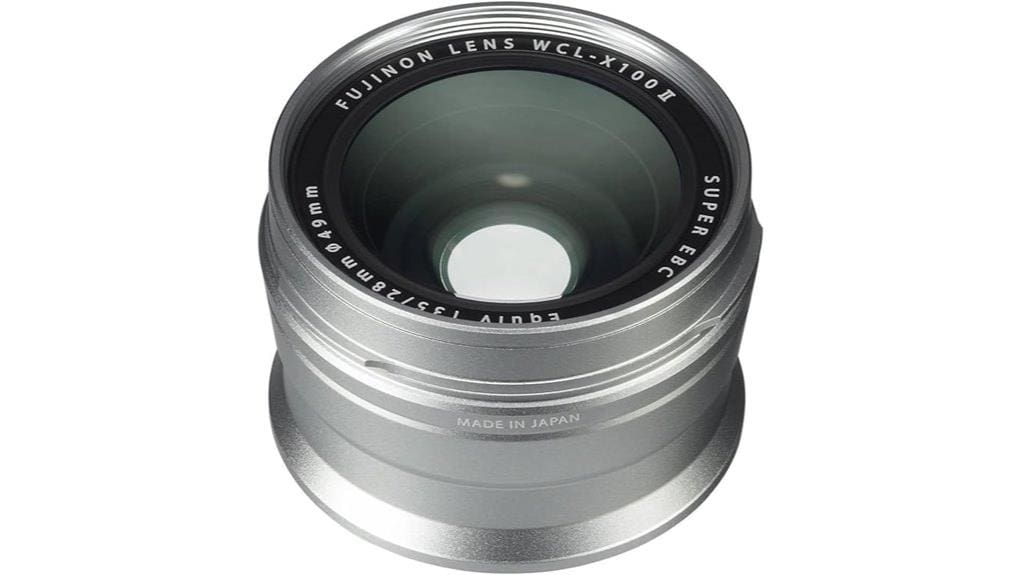

You’ll get a true-to-lens 28mm equivalent on your X100-series that keeps the original aperture and character while giving you a discreet wider field of view ideal for street and travel work. It screws on and tells the OVF to show 28mm guides, but check alignment — misthreading shifts framing. Optically it’s sharp center-wise at f/2 with improved corners stopped down, yet edges remain soft. It’s light, well made, niche, and worth it if you prioritize compact wide framing; keep going to see specifics.
Some Key Takeaways
- Converts X100-series 35mm-equivalent to ~28mm (0.8×), expanding field of view for street and travel shooting.
- Maintains original aperture and lens character, with excellent center sharpness at f/2 and improved corners by f/4–f/5.6.
- Mechanically screws on and electronically signals compatible bodies (e.g., X100F) to switch OVF framing guides to 28mm.
- Lightweight, metal construction preserves compact handling but adds slight forward balance and lacks stabilization or weather sealing.
- Best for enthusiasts wanting discreet wider framing and optical quality; skip if you need versatility, stabilization, or dramatic perspective shifts.
What the WCL‑X100 S II Is and Who Should Use It
Curious how to get wider shots from your X100-series body without swapping lenses? The WCL‑X100 S II is a compact accessory that converts the fixed 35mm equivalent to about 28mm, giving you a 0.8× wider field of view while retaining the original aperture and image quality. You’ll attach it for more environmental context, not for dramatic perspective shifts. It’s aimed at street photographers and travel shooters who want discreet, high-quality wider framing without buying a separate camera or lens. It lacks stabilization and won’t change depth of field, so know its limits before relying on it. Ideal for enthusiasts, it complements a mirrorless setup by offering extra framing options without adding much bulk or cost, especially useful for those focused on compact mirrorless photography.
How Mounting and OVF Recognition Work on X100 Cameras
When you screw the WCL‑X100 S II onto your X100-series camera, the accessory mechanically couples to the lens and electronically signals the body so the optical viewfinder switches its framing guides to the wider 28mm equivalent. You’ll notice Mount detection is instant on compatible bodies like the X100F, which adjusts the OVF guide frame without menu fiddling. Calibration is mostly automatic, but OVF calibration can drift if alignment or thread seating is imperfect; you should check guide accuracy against live framing. Physically the converter is light and tight, but minor play or misthreading will create framing errors—inspect and reseat if guides look off. Essential lens gear like converters and adapters are key for enthusiasts who want to expand their camera’s capabilities, especially when adding lens accessories to compact systems.
Real‑World Optics: Field of View, Sharpness, and Aperture Performance
Although the WCL‑X100 S II narrows the gap to a true wide angle, you’ll immediately notice it keeps the X100’s character while expanding your field of view to the 28mm‑equivalent 75.4°—useful for environmental portraits and streetscapes—yet that wider framing brings trade‑offs in edge sharpness and rendering that you should evaluate at your preferred apertures. You’ll find excellent center sharpness wide open at f/2, retaining contrast and microdetail. Stop down to f/4–f/5.6 for improved corners, though angle distortion and peripheral softness remain visible on demanding scenes. Overall, it’s a practical, characterful conversion with predictable optical compromises. For photographers using lightweight setups, pairing the adapter with a compact tripod system can help stabilize compositions and fully exploit the expanded field of view.
Handling, Build, and Included Accessories (Pouch, Manual)
While the WCL‑X100 S II doesn’t add bulk, you’ll notice its featherlight 5‑gram weight and snug bayonet fit change how the X100 feels in your hands—balancing the camera slightly forward but keeping handling nimble for street work. You’ll appreciate solid metal construction and precise tolerances; the finish matches the camera body and feels durable despite its small size. Compact ergonomics remain excellent, though the slight forward bias can affect rapid handheld framing. Fujifilm bundles a simple pouch and concise manual; accessory compatibility is straightforward with the X100 series, but expect no surprises—no stabilizer or weather sealing. Consider storing the lens accessory in a custom foam insert to protect it during transport.
Buy or Skip? Value, Compatibility, and Final Recommendation
Having covered handling and what’s in the box, it’s time to weigh whether the WCL‑X100 S II deserves a spot in your kit. You’ll appreciate its true‑to‑lens 28mm conversion, reliable autofocus recognition on X100F, and compact silver finish. For shooters wanting wider framing without sacrificing f/2 performance, it’s a neat fit. But factor in budget considerations: this accessory’s niche appeal and lack of stabilization mean it’s a specialty buy. If you value compactness and optical quality, buy; if you need versatility or cost efficiency, skip. Resale value is decent among X100 users, easing future upgrades. As with other portrait‑focused accessories from Perfect Portrait Lenses, consider how the WCL‑X100 S II fits your overall kit before committing to a purchase, since portrait lenses often target specific shooting styles.
Some Questions Answered
Does It Affect Autofocus Speed or Accuracy With X100 Series Cameras?
No — it rarely affects autofocus speed or tracking accuracy in normal use. You’ll get the same AF responsiveness because the conversion lens is optical-only; it doesn’t change the camera’s AF system. In challenging light or with fast-moving subjects you might notice slight autofocus lag or reduced tracking accuracy versus native focal lengths, but for typical shooting the impact is minimal and won’t degrade overall performance appreciably.
Can It Be Used With Third‑Party Lens Caps or Filters?
Yes — you can use third‑party caps and filter adapters, but check fit and thread size first. You’ll need caps that match the WCL‑X100 S II’s outer diameter and purpose-built filter adapters for the X100 series; cheap parts might sit loosely or vignette. Use reputable third‑party brands or Fujifilm’s adapter to avoid alignment or optical issues. Test for vignetting and secure attachment before critical shoots to prevent damage or image degradation.
Is Chromatic Aberration Noticeable in High‑Contrast Scenes?
You won’t usually notice strong chromatic aberration in high‑contrast scenes; color fringing is minimal thanks to the coatings and optical design, though it can appear at extreme edges. You’ll sometimes see slight edge softness and minor lateral fringing in demanding situations or wide apertures, but they’re easily corrected in post. Overall performance stays crisp; treat any residual color fringing or edge softness as small, fixable artifacts rather than a fundamental flaw.
Can the Lens Remain Attached While Using the Digital Viewfinder (EVF)?
Yes — you can keep the wide conversion lens attached while using the EVF, but watch front element clearance and viewfinder alignment. The lens won’t block the electronic eyepiece, yet its protruding front element can alter framing cues and the OVF guide when you switch modes. You’ll rely on the EVF’s electronic framing, so verify alignment and composition on-screen, and remove the adapter if you need unobstructed optical viewing or precise OVF guides.
Are There Any Compatibility Issues With Older X100 Firmware Versions?
Yes — you might hit firmware nuances with older X100 versions. You’ll generally get basic functionality, but backward compatibility isn’t perfect: recognition, OVF guide‑frame display and any optimized behavior can be inconsistent on outdated firmware. You should update your camera before mounting the WCL‑X100 S II to make certain full recognition and accurate framing. If you can’t update, test features first and expect some manual workarounds for full functionality.


