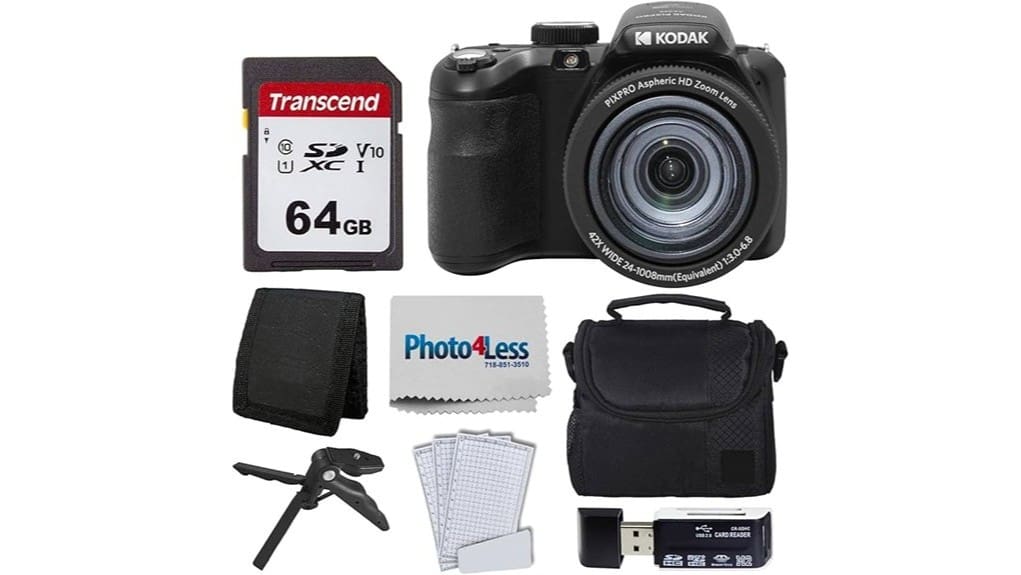
You’ll find the Kodak PIXPRO AZ425 bundle gives you huge 42x zoom and plug‑and‑play simplicity, with a preinstalled 64 GB card and handy accessories ready for travel or family use. The 20 MP CCD captures sharp daylight shots, though telephoto edges soften and noise climbs in low light. Autofocus is basic and video is casual HD, so it’s best for outdoor telephoto and hobby projects. Keep going and you’ll get more details on strengths, limits, and use cases.
Some Key Takeaways
- 20 MP 1/2.3″ CCD delivers sharp daylight images but struggles with noise and low-light detail at high ISOs.
- 42x (24–1008mm equiv.) optical zoom is the camera’s standout feature for travel and distant subjects.
- Optical stabilization helps steady telephoto shots, though edge softness increases at full zoom.
- Records HD video (commonly 720p/30fps; some listings claim 1080p) suitable for casual sharing.
- Bundle includes 64GB SD, reader, case, mini tripod, and protectors—good ready-to-shoot value for beginners.
What the PIXPRO AZ425 Bundle Includes and Who It’s For
While compact enough for everyday use, the Kodak PIXPRO AZ425 bundle gives you a complete starter kit: the AZ425BK camera with a 42x 24–1008mm zoom, a preinstalled 64 GB SD card, a small carrying case, hi-speed SD USB reader, tri-fold card wallet, table tripod/hand grip, and clear LCD protectors. You get essential accessories and a ready-to-shoot setup that suits casual travel, family events, or hobby projects. It’s positioned as an accessible option in a gift guide and for beginner photographers who want optical zoom and simplicity without extra purchases. The bundle’s included items reduce initial setup friction and ongoing costs. Mirrorless camera enthusiasts often prioritize lightweight, versatile gear for portability and ease of use, making essential accessories a key consideration.
Real-World Performance: Image Quality, Zoom Reach, Stabilization, and Autofocus
Although the AZ425’s 20 MP 1/2.3-inch CCD won’t match a larger-sensor camera in low light, you’ll get sharp, usable images in good daylight and at moderate ISOs thanks to its high-resolution sensor and lens. The 42x zoom lets you reach distant subjects without changing position, though edge detail softens at full telephoto. Optical stabilization helps steady shots, improving apparent shutter speed margins; low light performance still trails APS-C/Full Frame. Autofocus is contrast-detection with basic focus tracking and reliable single-shot locks for static subjects. Watch for mild chromatic aberration and limited high contrast handling at extreme exposure ranges. For outdoor shooters needing support for long-reach lenses and stable framing, consider pairing the camera with a heavy-duty tripod for improved stability and composition.
Video, Display, Battery Life, and Usability in Daily Shooting
Beyond stills, the AZ425 handles everyday video and handling duties with straightforward, if unremarkable, competence. You’ll record HD clips (720p at 30fps; some listings note 1080p) that suit casual sharing but won’t satisfy demanding projects. The 3.0-inch, 460k-dot LCD gives clear framing and decent display visibility outdoors when shaded, though bright sun reduces contrast. Battery longevity is adequate for a day of intermittent shooting thanks to the lithium-ion pack, but you’ll want a spare for extended outings or heavy video use. Controls are simple, menus intuitive, and the bundle’s accessories aid practical daily use. For extended outings, consider carrying a spare camera battery to ensure uninterrupted shooting.
Strengths and Limitations Compared to Similarly Priced Compact Superzooms
When you compare the PIXPRO AZ425 to other compact superzooms in its price range, its 42x optical zoom and 24–1008mm equivalent reach clearly stand out for travel and wildlife shots, but its 1/2.3″ CCD sensor and mainly 720p video cap its low-light and high-detail performance. You’ll appreciate the solid build quality and simple ergonomics, which feel dependable for casual use. Autofocus and stabilization work well in good light, yet noise rises quickly at higher ISOs. Compared to rivals offering larger sensors or sharper video, the AZ425 trades sensor finesse for reach and affordability. For shooting performance and storage considerations, pairing it with high-speed memory can help maximize burst shooting and buffer clearing.
Should You Buy This Bundle? Value, Recommended Use Cases, and Final Verdict
If you need extreme reach on a modest budget and prioritize straightforward handling over low-light finesse, the Kodak PIXPRO AZ425 bundle is a sensible buy—you get a 42x 24–1008mm equivalent zoom, a useful accessory pack (64 GB card, case, tripod/grip, card reader), and simple, reliable operation for travel, wildlife, and casual telephoto shots. You’ll like it if you want plug-and-play convenience and focal length flexibility without breaking the bank. Consider budget alternatives if you need better low-light performance or faster autofocus. Expect decent long term durability for casual use; pros seeking image quality should look elsewhere. This camera pairs well with a quality waterproof camera bag for photographers who need to keep gear dry while shooting outdoors.
Some Questions Answered
Does the Bundle Include a Spare Battery or External Charger?
No, the bundle doesn’t include a spare battery or external charger. You get the camera with an installed 64 GB card, a small camera bag, USB card reader, tripod/hand grip, screen protectors and accessories, but only the single lithium‑ion battery is provided. If you’ll be shooting a lot, you’ll want to buy a spare battery and/or an external charger separately to guarantee uninterrupted use and faster recharging between shoots.
Can the Camera Connect Wirelessly to Smartphones or Apps?
No — the camera doesn’t offer wireless sharing or app integration. You won’t find Wi‑Fi, Bluetooth, or a companion app for remote control or instant transfers. You’ll need to remove the SD card or use the included USB card reader to move photos to your phone or computer. This wired workflow is straightforward but lacks the convenience of built‑in wireless features for quick sharing or app‑based camera control.
Is There a Microphone Input for Improved Audio Recording?
No — the camera doesn’t have a microphone input, so you can’t plug in an external microphone directly. You can still improve audio by using external recorders or audio adapters that capture sound separately and sync in post, or by using a USB audio solution if compatible with your workflow. That means you’ll record better sound off-camera, then combine tracks during editing for higher-quality audio in your videos.
Does the Camera Support RAW Image Capture?
No — the camera doesn’t offer Raw support; it records photos as JPEG only, so you won’t get Lossless capture. You’ll be working with 8-bit JPEG files from the 20 MP sensor, which limits post-processing latitude compared with RAW. If you need true Raw or lossless workflows, you’ll want a different model that explicitly lists RAW/DCF file support and higher bit-depth capture for more flexible editing and tonal recovery.
Are Firmware Updates User-Installable via USB?
Yes — you can install firmware via USB by copying the manufacturer’s firmware file to an SD card or connecting the camera to a computer, following Kodak’s firmware process instructions. You’ll want to follow steps precisely, since update risks include bricking the camera, corrupting settings, or voiding warranty if interrupted. Back up files, guarantee full battery, use the exact firmware for AZ425, and don’t disconnect during installation.


