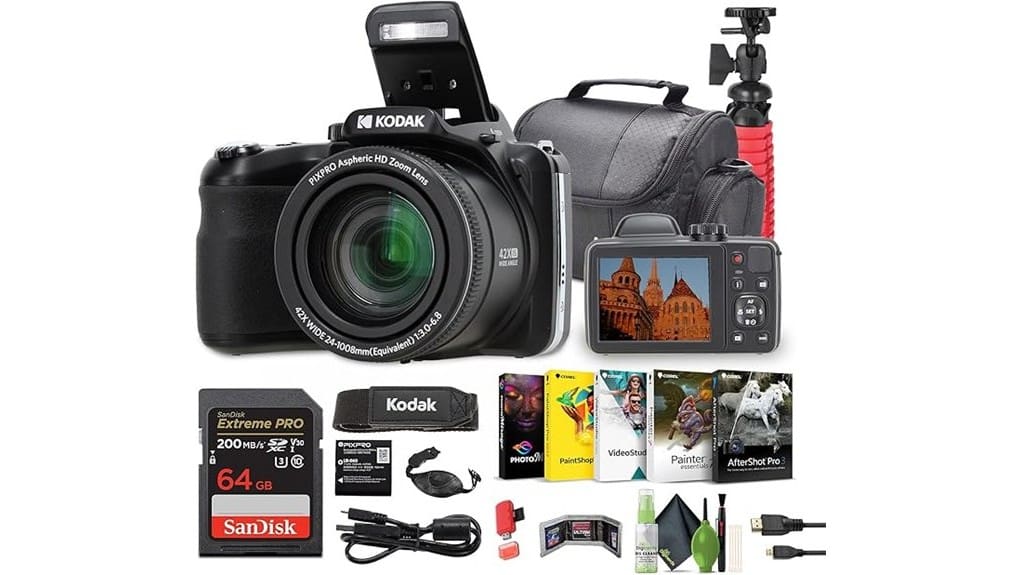
You’ll get extreme 42x reach, a full starter kit, and simple controls that make travel vlogging straightforward, but the AZ425 sacrifices modern video fidelity and low‑light performance for affordability. Video tops out at 720p/30fps with noticeable rolling shutter and modest contrast‑detect AF; built‑in audio is thin so you’ll want an external mic. Stills are fine at wide or short tele, but detail falls off at long zoom. Keep reading to see when it actually makes sense to buy.
Some Key Takeaways
- Practical superzoom (24–1008mm equiv., 42x) makes it ideal for travel vlogs requiring extreme reach without lens swaps.
- Video limited to 720p/30fps with rolling shutter and modest AF, so image quality lags modern 1080p/4K vloggers.
- Optical stabilization helps handheld shooting but cannot fully counter shake at long zooms; tripod recommended for smooth footage.
- 20MP 1/2.3″ CCD delivers good color and texture at wide/short tele, but long-zoom softness, CA, and noise rise above ISO 400.
- Bundle offers strong starter value (64GB card, tripod, bag, cleaning kit), but pros should consider larger-sensor alternatives and external mics.
Who This Review Is For and the Main Verdict on the Kodak PIXPRO AZ425
While it won’t satisfy pro photographers, the Kodak PIXPRO AZ425 is a solid pick if you’re a traveler, family shooter, or vlogger who wants extreme reach without swapping lenses. You’ll find the 42x zoom, optical stabilization, and bundled accessories suit casual creators and touring families more than pros chasing low‑light finesse or raw flexibility. The target audience values long reach, ease of use, and a complete kit at a budget price. Quick verdict: it’s a practical, affordable superzoom for travel and everyday content where convenience and telephoto range matter more than cutting‑edge image quality. A dedicated camera bag can help protect the AZ425 and its accessories while traveling, making it easier to carry a complete kit in a single camera bag.
How the AZ425 Performs for Vlogging: Video Quality, Audio, and Stabilization
If you’re coming from the previous summary—where reach and convenience were the highlights—the AZ425’s vlogging chops focus on practicality over polish. You get 720p/30fps video that’s usable for quick uploads but lacks crispness compared with 1080p options; wide zoom helps framing but exacerbates rolling shutter during fast pans. Autofocus speed is modest—contrast-detect AF hunts in low light performance scenarios—so you’ll want predictable scenes. Built-in audio is tinny; the external mic jack on the body is a necessary upgrade for clear voice. Optical stabilization helps handheld shots, though it can’t fully counter heavy zoom shake. Macro lenses can enhance close-up detail for B-roll and product shots, making them a useful complement to the AZ425’s strengths and limitations, especially for close-up photography.
Still Photography Tested: 20MP Sensor, Zoom Range, and Sharpness at Different Focal Lengths
Because the AZ425 pairs a 20MP 1/2.3″ CCD with a 42x (24–1008mm equivalent) optic, you’ll find its strengths in reach and detail at shorter focal lengths but clear drops in sharpness and contrast as you zoom toward the long end. You’ll appreciate sensor performance at wide and short-tele ranges: good texture, manageable noise up to ISO 400, and pleasant color. As you extend focal length, focal sharpness degrades progressively—mid-zoom shows softening and reduced microcontrast, long-zoom exhibits noticeable resolution loss and chromatic aberration. Use a tripod, lower ISO, and shorter focal lengths for best stills. For enthusiasts, pairing the AZ425 with essential DSLR accessories like tripods and lens care kits can noticeably improve results and handling essential gear.
Handling, Controls, and Portability for Travel and Run‑and‑Gun Creators
The sharpness limits you saw at long zooms make handling and control habits more important when you’re on the move: steadying the camera, choosing shorter focal lengths, and managing ISO will directly affect usable shots. You’ll notice button placement favors right-hand access, so you can change modes quickly, though crowded controls near the thumb slow one-handed tweaks. Grip comfort is modest—plastic body and shallow moulding mean you’ll rely on the included hand strap for security. Strap attachment points are solid and placed for balanced carry. Compared to mirrorless rigs, pocketability is poor; the kit is travel-friendly but not pocket-sized. Consider pairing the camera with a dedicated camera backpack to protect it and carry extra gear on longer shoots.
Battery Life, Storage, Connectivity, and Real‑World Workflow for Creators
While it won’t rival mirrorless rigs for endurance, the AZ425 gives you a predictable, serviceable workflow: the included lithium‑ion battery gets you through a few hours of mixed shooting but plan to carry spares for daylong trips. You’ll juggle battery management actively—swap cells between takes, use flight‑safe spares, and budget for power banks if you need USB charging. Storage is straightforward: the bundled 64 GB card and USB reader handle photos and 720p MP4s; write speeds suit this camera’s bitrate. Wi‑Fi and micro HDMI let you transfer or preview quickly, and you should pair routine cloud backup with local archives. The site Keep Shooting offers guidance on choosing compatible spare camera batteries and tips for managing multiple cells.
Key Limitations and When to Choose a Different Camera or Accessory
If you need high-resolution video, low-light performance, or fast continuous shooting, the AZ425 isn’t the right tool — its 720p/30fps cap, 20 MP 1/2.3″ CCD, and modest 1–5 fps burst rate limit creative flexibility compared with modern mirrorless or APS-C cameras. You’ll hit low light limitations and noticeable sensor noise above ISO 800; consider a larger-sensor camera for dim interiors or night vlogs. Contrast-detection AF can introduce autofocus lag during pans or subject changes, so pair with a gimbal or pick a camera with phase-detect AF. Also mind modest video bitrate and file quality if you plan heavy editing. If you’re a photographer who travels a lot or needs reliable on-location backups, consider carrying a portable SSD for quick transfers and secure storage of your footage, like a fast portable SSD designed for photographers.
Value Summary: Bundle Contents, Price Positioning, and Who Should Buy the AZ425
Regarding value, you get a lot of gear for the price: Kodak bundles the AZ425 with a 64 GB card, USB card reader, flexible vlogging tripod, camera bag, cleaning kit and Corel editing software, so you can shoot and share right away without extra purchases. You’ll find the package competitive versus single-body rivals; accessory comparison shows more starter kit items than many peers. Performance limits (720p video, CCD sensor) keep price low, so buyers wanting easy setup, long zoom travel shots, or budget vlogging benefit most. If you need higher specs or stronger resale value, consider higher-tier cameras. Many photographers also prioritize reliable power management and prefer accessories like dual battery chargers to keep shooting through long sessions.
Some Questions Answered
Does the AZ425 Support External Microphones or Hotshoe-Mounted Audio Accessories?
No — it doesn’t support an external microphone or hotshoe adapter natively. You’ll rely on built‑in mic (mono) for audio, which limits quality compared with cameras offering mic jacks or hotshoe-mounted recorders. Comparatively, vlogging cameras with 3.5mm inputs let you attach shotgun or lavalier mics; others accept hotshoe adapters for wireless packs. If you need better audio, you’ll have to record externally and sync in post or choose a camera with mic input.
Can the Camera Shoot RAW Still Images for Post-Processing Flexibility?
No — it doesn’t shoot RAW stills; the camera records JPEGs only, so RAW support is absent. You’ll get smaller, processed files that limit high-end post-processing flexibility compared with cameras offering RAW. File compatibility with editors is broad (JPEGs open everywhere), but you’ll sacrifice dynamic range and editing latitude. If RAW support matters, you should compare models that explicitly offer RAW capture and larger sensors for greater post-processing control.
Is There Any Intervalometer or Time-Lapse Shooting Built Into the Camera?
No — the camera doesn’t offer built‑in interval shooting or dedicated time lapse modes. You’ll rely on manual continuous shooting (1–5 fps) and stitch frames externally for time‑lapse sequences. Compared with compact cameras that include intervalometers, this model’s workflow is more hands‑on and post‑production dependent. If you want automated intervals, you’ll need an external intervalometer, tethering solution, or a different camera with native time‑lapse functionality.
Does the AZ425 Offer Focus Peaking or Manual Focus Assist Tools?
No — the AZ425 doesn’t offer focus peaking or advanced manual focus assist tools. You can do manual zooming with the 42x optical lens, but manual focus options are limited to basic contrast-detection AF and any simple manual focus via menus or zoom-assisted framing. Compared to cameras with focus peaking, it’s less helpful for precise manual focus, so you’ll rely on zoom, AF modes, or trial-and-error for critical focus.
Are Firmware Updates Available and How Are They Installed?
Yes — firmware availability is limited; Kodak posts updates sporadically on the support page. You’ll compare installation methods: download firmware to your computer then copy to an SD/microSD card, or use the camera’s USB connection if Kodak supplies updater software. You’ll follow exact file naming and battery/charge precautions. Check change logs before installing; weigh risks versus benefits since updates are infrequent and often address stability or compatibility only.


