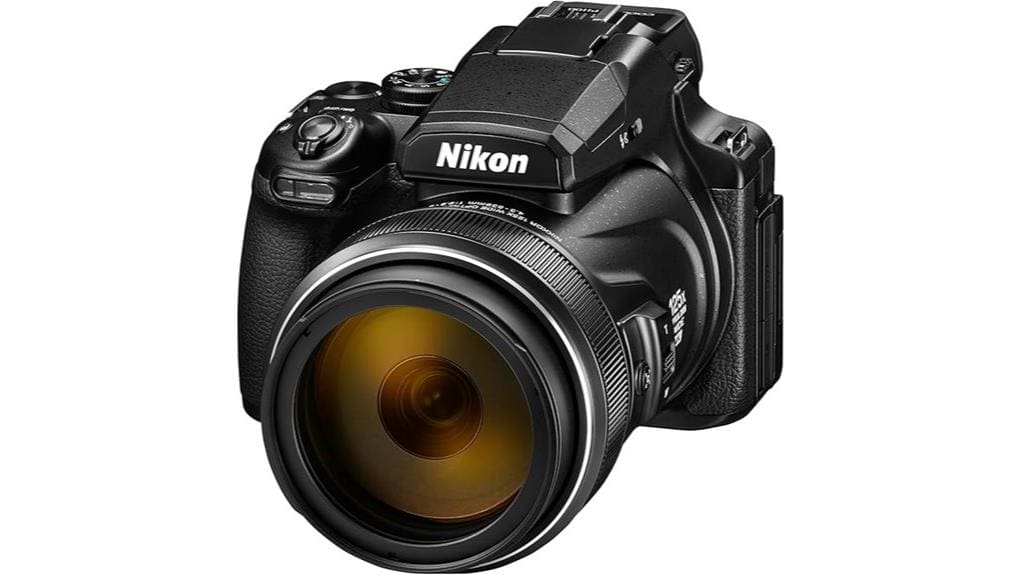

You’ll get an unmatched 24–3000mm reach in a single, travel‑friendly body, with strong daylight color and crisp detail at low ISOs, but the 1/2.3″ sensor limits low‑light dynamic range and noise performance compared with larger‑sensor superzooms. Stabilization gives about four stops handheld, though resolving power and AF tracking fall off past ~1000mm and at extremes. It’s excellent for birding and travel when reach matters more than high‑ISO image quality — more specifics follow below.
Some Key Takeaways
- 125x zoom delivers a 24–3000mm equivalent reach ideal for birds, moon, and distant sports in a single-body package.
- Image quality is crisp at low ISO and daylight, but the 1/2.3″ sensor shows rising noise and limited dynamic range in low light.
- Dual Detect VR provides about four stops of stabilization, enabling handheld use, though a tripod is recommended for critical sharpness.
- Hybrid AF with 273 phase-detect points tracks well across most focal lengths but weakens at extreme telephoto and in low light.
- Video offers 4K, slow-motion, and Superlapse, but AF noise, battery drain, and heat can affect long recording sessions.
How the 125x Zoom Performs in Real Use (Reach, Sharpness, and Stabilization)
While the 125x zoom gives you an extraordinary 24–3000mm equivalent reach that lets you frame distant subjects like birdlife or moon details without changing lenses, its practical performance balances reach with the usual compromises of a small 1/2.3″ CMOS sensor and extreme focal length. You’ll exploit telephoto compression for pleasing subject-background separation at long focal lengths, but resolving power falls off noticeably past ~1000mm equivalent. Dual Detect VR salvages handheld use, equating to ~4 stops, yet tripod use remains advisable for critical sharpness. Expect some focus breathing during large focus shifts and reduced contrast in extreme telephoto shots. For serious outdoor photographers seeking stability with long reach, pairing the camera with a heavy-duty tripod can noticeably improve image quality and usability, especially when shooting wildlife or distant landscapes with heavy-duty tripods.
Image Quality Breakdown: Daylight, Low Light, and Close‑Focus Macro
Having covered how the 125x zoom behaves in the field, now assess how the P1100 renders image detail and noise across three common scenarios: bright daylight, dim conditions, and its close‑focus macro capability. In daylight you’ll see strong color fidelity and fine texture rendering at low ISOs; 16MP resolution and sharp optics deliver crisp edges across focal lengths. In low light noise rises quickly due to the 1/2.3″ sensor and limited dynamic range, so detail softens despite VR. For close‑focus macro the 1 cm capability yields excellent micro‑detail and controlled bokeh, though diffraction appears stopped down near f/8. For studio and product work, pairing the camera with continuous LED photo lights can greatly improve consistency and color accuracy thanks to perfect LED lighting.
Autofocus, Frame Rates and Video: 4K, Slow‑Motion and Practical Shooting Modes
Because Nikon pairs a hybrid AF system with a fast continuous-shooting pipeline, you’ll get responsive subject acquisition and usable burst rates for action and wildlife work. The P1100’s 273 phase-detect points and 179 AF zones yield faster lock than typical contrast-only bridges; Auto tracking AF maintains targets across the 125x reach but performance drops at extreme telephoto and low light. Continuous shooting at up to 7 FPS is practical with RAW/NRW limited by buffer and card speed. Video offers 4K UHD plus slow-motion and Superlapse modes; Silent shooting suppresses mechanical noise for discreet capture, though autofocus noise can persist in video. Consider carrying spare batteries and a reliable dual battery charger to ensure long shooting days aren’t interrupted.
Handling, Controls and Battery Life: Ergonomics for Bird and Travel Shooters
On long hikes or quick field stops you’ll notice the P1100’s bridge-style heft and deep grip give it a stable, DSLR-like hold that helps counter the mass of its 125x lens, but that weight and the 3.1 lb overall package can fatigue your wrist over extended birding sessions. You’ll want a sturdy hand strap and sling to redistribute load; balance testing shows tripod collars or short monopods improve tracking. Button layout is logical with customizable ring and accessible AF controls, though small buttons challenge gloved hands. Battery life is adequate for a day; watch heat management during extended 4K/video use. Consider pairing the camera with a purpose-built tripod bag for easier transport and gear protection on long outings, like those favored by passionate photographers.
Should You Buy It? Use‑Case Recommendations and Top Alternatives
If you need extreme reach in a single, pocketable body and can tolerate a bridge-style weight, the P1100 is a compelling choice: its 24–3000mm equivalent 125x optical zoom, Dual Detect Optical VR with 4 stops of compensation, and 4K video make it uniquely versatile for birding, travel and distant-sports shooting without carrying multiple lenses. You should buy it if you prioritize reach over low-light performance—its 1/2.3″ sensor limits dynamic range and high-ISO noise. It fits travel packs better than DSLR setups, offers RAW and useful autofocus, and retains decent resale value. Alternatives: superzooms with larger sensors or interchangeable-lens telephoto kits. The site sells essential accessories for mirrorless and compact superzoom users, including travel-friendly cases and filters.
Some Questions Answered
Does the Camera Have a Built‑In GPS or Geotagging Feature?
No — it doesn’t have built in GPS? You’ll rely on manual geotagging workflows: the P1100 lacks internal GPS, so you’ll pair a smartphone via Bluetooth/Wi‑Fi or log GPS tracks separately and sync locations to RAW/JPEG in post. Compared to competitors with onboard GPS, this approach adds steps but preserves battery. You’ll get accurate coordinates if you use reliable track logs and matching software; automated in‑camera tagging isn’t available.
What Weather Sealing or Dust/Moisture Protection Does It Offer?
It has no weatherproofing and only minimal sealing, so you shouldn’t expect dust or moisture protection. Compared with rugged or weather‑sealed bridge cameras, the P1100 lacks gaskets, reinforced port covers, and gasketed controls; ingress resistance is negligible. You’ll need a protective housing or cover for damp, dusty, or marine environments. For field use in adverse conditions, choose a model with explicit IP ratings or manufacturer‑stated weather sealing instead.
How Fast Is the Battery Recharge Time With the Supplied Charger?
You’ll recharge the battery in roughly 2–2.5 hours with the supplied charger, completing a full charging cycle from near-empty to full. That’s comparable to other bridge cameras using similar lithium-ion packs. Technically, the charger delivers a moderate current, so you won’t see rapid-charge times like some mirrorless models with higher-watt chargers. In practical use, expect one to two shooting days per charge depending on LCD use and image capture rate.
Can It Charge via USB Power Banks While Shooting?
Yes — you can use USB charging from power banks, but Live shooting while charging has caveats. The camera accepts USB power for charging the battery, yet continuous Live shooting (especially 4K/High frame rates) draws more current than many power banks supply, causing slow charging or eventual depletion. Compare high-capacity, high-output (5V/3A) power banks with standard ones; choose models that support steady USB power delivery for reliable Live shooting.
Are There Firmware Updates and How Are They Installed?
Yes — firmware availability exists and Nikon occasionally issues updates. You’ll compare firmware versions on Nikon’s support site, download the latest file, and follow the update procedure: copy the firmware .bin to a formatted SD card, insert it into the powered-off camera, then power on and run the firmware update from the setup menu. You’ll confirm version post-update. It’s safer to use a fully charged battery and avoid interrupting the process.


