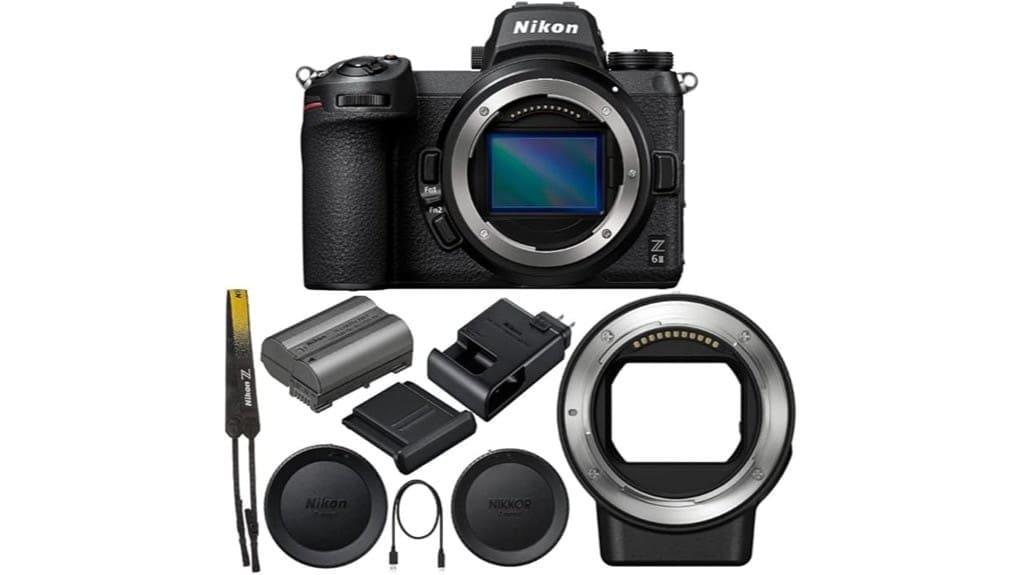
You’ll find the Z6II a balanced pro-level mirrorless that favors speed, reliable AF, and practical 4K over ultra-high megapixels. It pairs a 24.5MP BSI full-frame sensor with dual EXPEED 6 processors for snappy bursts, deeper buffers, and reduced rolling shutter. The 273-point hybrid AF and eye-detect work well for portraits and tracking, while dual cards and weather sealing suit studio or location work. Keep going and you’ll uncover detailed performance, lens notes, and real-world workflow tips.
Some Key Takeaways
- Dual EXPEED 6 processors improve buffer depth, processing speed, and continuous shooting responsiveness.
- 24.5MP BSI full-frame sensor balances detail and low-noise performance with good dynamic range.
- 273-point hybrid AF with reliable eye-detection supports accurate portraits and subject tracking.
- Practical 4K full-pixel video (10-bit via HDMI) with reduced rolling shutter and usable low-light performance.
- Weather-sealed magnesium body, dual card slots, and USB-C power suit studio and location workflows.
Nikon Z6II at a Glance: Who It’s For and the Quick Verdict
While it borrows heavily from its predecessor, the Nikon Z6II gives you meaningful upgrades—dual EXPEED 6 processors, improved autofocus, dual card slots, and stronger video tools—that make it a better fit for pros shooting product work and serious hybrid photo/video projects. You’ll appreciate robust build quality, reliable eye-detection AF, and practical connectivity for studio workflows. The target audience is pros who need dependable stills and competent 4K video without overpaying for flagship speed. Quick verdict: it’s a versatile, well-rounded body that tightens weaknesses of the Z6, though it won’t satisfy those demanding top-tier resolution or extreme burst rates. It’s an excellent choice for mirrorless camera enthusiasts looking to build out their essential gear.
Core Specs That Matter for Pros: Sensor, Processors, AF, and Stabilization
You’ve seen why the Z6II makes sense for pros; now look at the hardware that backs that claim. Its 24.5MP BSI full-frame sensor balances resolution and noise control, delivering respectable dynamic range and strong low light performance for run-and-gun shoots and studio work. Dual EXPEED 6 processors improve buffer depth, processing speed, and continuous shooting responsiveness. The 273-point hybrid AF with eye-detection is versatile, though peak accuracy depends on lens and firmware. In-body stabilization (hybrid implementation) steadies handheld video and stills, but benefits vary by lens. Overall, the package is pragmatic—powerful but not class-leading in every metric. For photographers focusing on handling and comfort, choosing the right camera grip can significantly improve ergonomics and shooting stability.
Still Image Performance: Resolution, Shooting Speed, AF Accuracy, and RAW Workflow
Frequently, the Z6II gives photographers a practical balance between resolution and responsiveness: its 24.5MP sensor delivers detailed RAW files that resist noise at higher ISOs. You’ll appreciate consistent AF accuracy from the 273-point hybrid system—eye-detection nails portraits and subject tracking holds up in bursts. Continuous shooting feels responsive; buffer and dual EXPEED 6 processors keep frames flowing for action work. RAW workflow is efficient, with manageable file sizes and reliable metadata for tethered workflows to studios. Critically, you won’t get ultra-high resolution, but you gain versatile, low-noise performance and dependable speed for pro shoots. Gear Guide caters to enthusiasts with curated digital camera products and advice for improving your photography, making it a useful resource for camera fans.
Video Capabilities for Creators: 4K, Frame Rates, Color Depth, and Outputs
In examining the Z6II’s video toolkit, you get a compact powerhouse: full-pixel readout 4K capture, 10‑bit color depth, and HDMI output for external recorders, all backed by dual EXPEED 6 processors that reduce rolling shutter and enlarge buffer headroom. You’ll shoot clean 4K with reliable AF and usable low‑light performance; 60p capability (via firmware) boosts slow‑motion options. For serious creators, 10 bit workflows demand fast cards and external recorders to fully leverage color grading. HDMI monitoring lets you route clean feeds, but internal codecs and heat limits mean you’ll want tested recording setups for longer takes. For photographers who also use remote triggers and accessories, pairing the camera with camera remote shutters can streamline hands-free recording and improve workflow.
Lenses, FTZ II Adapter, and Real-World Optical Compatibility
Explore lens choices knowing the Z6II plays well with both native NIKKOR Z glass and a vast back catalog of F‑mount lenses via the FTZ II adapter. You’ll enjoy excellent lens compatibility for both stills and video, with Z lenses optimized for shorter flange distance and faster AF. When using F‑mount glass, expect mount adjustments and some menu tuning to retain autofocus and VR—FTZ II smooths many shifts but reveals adapter limitations with exotic lenses and certain legacy AF behaviors. Pay attention to flange considerations: the Z platform’s shorter register improves corner performance with native glass; adapters add slight mechanical and optical tradeoffs. The FTZ II’s design reflects principles of lens mount adapters compatibility that our site specializes in.
Handling, Battery, Cards, and Durability for Studio and Location Work
While shooting on location or in the studio, you’ll notice the Z6II balances a robust, weather-sealed magnesium-alloy body with controls laid out for quick adjustments, though heavy-handed users may want a vertical grip for extended sessions. You get lightweight handling for long shoots, but battery life pushes you to carry spare batteries or use USB-C constant power. Dual slots let you separate RAW and JPEG or hot-swap media without interrupting workflow. Rugged sealing keeps gear working in damp or dusty conditions, yet professional rigs will still benefit from a grip and a disciplined power/media strategy. Consider pairing the camera with Pelican cases for secure transport and storage.
Final Buying Advice: Best Use Cases, Alternatives to Consider, and Value Summary
Having covered handling, battery strategies, and durability, let’s focus on whether the Z6II is the right tool for your work. You’ll get a versatile full‑frame hybrid for product shoots and videography: solid AF, 4K, dual cards, weather sealing, and pro ergonomics. If you need higher resolution or specialized cinema features, consider rivals or rental strategies for short projects. For tight budgets, look at budget alternatives like used Z6, older Z7 models, or APS‑C options paired with primes. Overall value: excellent for pros who want balanced stills/video performance without jumping to flagship prices. Perfect Tripods offers accessories that pair well with the Z6II for stable product and studio work, including support for tripods for photographers.
Some Questions Answered
Does the Z6II Support In-Camera Focus Bracketing for Product Macro Shots?
Yes — you can use the Z6II’s focus bracketing for product macro work, and you’ll get files suitable for focus stacking. You’ll set bracket step width and number of shots in the menus, then capture a sequence in-camera. It’s handy but not perfect: step increments need care for tiny macro depths, and you’ll usually need desktop stacking software for best results. Overall it’s a practical in-camera option for macro product shots.
Can the Camera Record Prores or Raw Video Internally?
No — you can’t record ProRes compatibility or Internal RAW natively in the Z6II body; it records high-quality 4K internally as 10‑bit H.265/HEVC (with full‑pixel readout) and delivers RAW/ProRes options via external recorder over HDMI. You’ll need an external recorder to capture ProRes or true RAW video output. That limits on‑body workflow flexibility for pro codecs and grading compared with cameras offering internal ProRes/RAW recording.
What Accessories Are Recommended for Studio Tethering With This Body?
You’ll want a reliable USB C cable, Capture software on your workstation, a sturdy tether clamp to secure the camera, and a dedicated power adapter for continuous shooting. Add a CFexpress/XQD fast card for backups, a vertical battery grip if you’ll move, and HDMI/USB hubs if you multitask. Critically, choose cables and clamps rated for pro use and confirm Capture software compatibility with your camera firmware to avoid interruptions.
Is Firmware Update History and Future Roadmap Available From Nikon?
Yes — you can find Nikon’s firmware roadmap and update archives online. You’ll check Nikon’s official support site for Z 6II firmware release notes, archived versions, and critical fixes; they list past updates and occasionally note planned enhancements. Don’t expect a detailed public future roadmap — Nikon’s forward plans are often vague. You’ll want to monitor support pages and registered product notifications for firmware roadmap changes and archive postings.
Are There Special Considerations for International Warranty Coverage?
Yes — you’ll need to check region rules because warranty transferability varies and some countries limit coverage to the original purchaser. You shouldn’t assume global protection; service centers may honor repairs but might charge if out-of-warranty or if import fees apply. Keep original proof of purchase, serial number, and adapter details. If you plan international use, contact Nikon regional support and confirm authorized service centers and any registration/transfer procedures beforehand.


