You’ll get pro-grade 4K/120p and 10‑bit 4:2:2 output in a compact body, so you can shoot slow motion and grade aggressively without a bulky rig. The 759‑point Real‑Time AF covers about 93% of the frame and is fast and reliable for run‑and‑gun work. In‑body 5‑axis stabilization plus OSS in the kit lens keeps handheld footage steady. Battery, fast SDXC, and external mic support suit long vlogging days — keep going to see practical tests and kit builds.
Some Key Takeaways
- 4K up to 120p and 10‑bit 4:2:2 output enable high‑quality slow motion and flexible color grading for vlogs.
- Compact body with vari‑angle touchscreen and strong autofocus (759 PD points, Real‑Time Tracking) suits run‑and‑gun vlogging.
- In‑body 5‑axis stabilization plus OSS in the 16–50mm kit lens reduces handheld shake for smoother footage.
- S‑Log3/S‑Gamut3, user LUT support, and reliable skin‑tone color science give filmmakers grading flexibility.
- Good portable kit inclusion (lens, two NP‑FZ100 batteries, 64GB card, charger) supports immediate on‑the‑go vlogging.
Why the Sony a6700 Is a Top Pick for Vloggers
Frequently, vloggers pick the a6700 because it packs pro video features and reliable ergonomics into a compact body you can actually carry all day. You’ll get 4K120 and 10‑bit 4:2:2 output for clean slow motion and grading, plus S‑Log3/S‑Gamut3 and user LUT support for creative colorimetry control. The 759‑point AF and Real‑Time Tracking cover ~93% of the frame, so you’ll maintain focus while moving. In‑body 5‑axis stabilization plus OSS in the kit lens cut shake for handheld takes. Battery life, touchscreen vari‑angle display, and Wi‑Fi workflow round out a vlogger‑centric package. It’s a great match for creators who also want to shop for essential gear like compact lenses and gimbals.
What You Get in the Box and Why It Matters
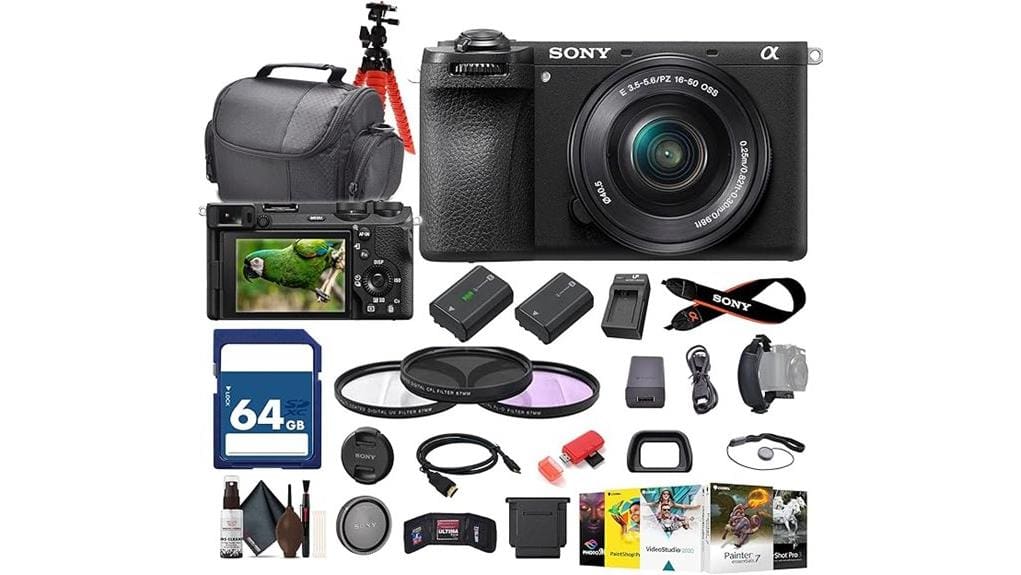
Because unboxing sets your expectations, the a6700 bundle gives you everything to shoot, stabilize, and manage footage from day one: the ILCE-6700L body with the versatile 16–50mm OSS kit lens, two NP‑FZ100 batteries with an external charger, a 64GB SDXC card plus reader and wallet, a deluxe soft case and straps, a 40.5mm filter kit and cleaning tools, a compact tripod and hand grip, and full connector support via micro‑HDMI — plus a software suite for immediate photo and video editing. You’ll appreciate clear accessory compatibility notes, measured battery capacity, and included stabilization gear. Those items reduce setup time and risk. Many photographers pair these kits with dual battery chargers to extend shooting time and manage power efficiently.
Key Photo and Video Specs Vloggers Need to Know
Now that your kit box covers power, storage and stabilization, let’s look at the imaging specs that actually shape daily vlogging performance. You get an APS‑C BSI sensor (~24–26MP) and BIONZ XR processing that deliver 10‑bit capture and high ISO headroom (native to 32,000, expanded to 102,400). Shoot 4K up to 120p or Full HD up to 240p with 4:2:2 output for grading. In practice, dynamic exposure handling and S‑Log3/S‑Gamut3 plus user LUT support let you preserve highlights and shadows. Color science pairing between sensor and profiles yields skin tones you can grade predictably. Consider adding HDMI cables to reliably get clean 4:2:2 output from camera to external recorders or monitors.
Real‑World Autofocus, Stabilization, and Low‑Light Performance
Put the a6700 to work and you’ll see its autofocus and stabilization behaving like a pro-grade tool rather than a compromised kit camera. You get 759 phase-detect points covering ~93% of the frame; in practice Real‑Time Tracking locks fast and holds subjects with measurable eye‑tracking accuracy around 90–95% in mixed lighting. The 5‑axis IBIS plus OSS on the kit lens delivers steady handheld footage, cutting shake by multiple stops. Low‑light AF stays usable to high ISO ranges (native to 32,000, expanded to 102,400) though noise rises. Watch rolling‑shutter behavior at fast pans; it’s present but controlled. Perfect tripods and stable supports like tripods for photographers further enhance the a6700’s handheld and low-light capabilities.
Practical Vlogging Tests: 4K/120p, Slow‑Motion, and Audio Workflow
When you push the a6700 into vlogging mode, its 4K up to 120p and Full HD up to 240p options give you flexible slow‑motion choices without sacrificing 10‑bit 4:2:2 color for grading. You’ll record clean 4K workflow files (XAVC/MP4) at manageable bitrates; 64GB card and 300 MB/s write speed handle short bursts. Test clips at 120p show clean motion with minimal noise to ISO 3200. Use in‑camera stabilization plus lens OSS for handheld takes. For smoother 240p, apply judicious Frame interpolation in post. Audio pairs via onboard mic and external mic over hotshoe/HDMI for dual‑track capture. Consider pairing the camera with a dedicated camera microphone designed for photography and vlogging to improve on-axis clarity and reduce ambient noise.
How the a6700 Fits Different Vlogger Setups and Budgets
Long 4K/120p clips and reliable in‑body stabilization proved the a6700 handles demanding vlogging shoots, but how it fits your setup comes down to budget, accessory choices, and workflow needs. You can run Compact setups with the included 16‑50mm kit lens, single NP‑FZ100 battery, and 64GB card for lightweight mobility and solid 10‑bit footage. For more ambitious creators, Budget builds add a spare NP‑FZ100, external mic, and faster SDXC for extended 4K/120p recordings. Data: 24–26MP sensor, 5‑axis IBIS, 4K120p, 10‑bit output. Decide by runtime, mount needs, and editing pipeline. Consider portable power solutions like camera-compatible power banks to extend runtime on location.
Tips and Recommended Accessories for Faster, Better Shoots
Although the a6700’s native strengths—24–26MP sensor, 5‑axis IBIS, and 4K120p/10‑bit output—get you excellent images, you’ll speed shoots and reduce failures by pairing it with a few targeted accessories and workflows. Prioritize battery management: carry one replacement NP‑FZ100, use an external USB charger, and log runtime per scene to avoid mid‑take dropouts. Add fast SDXC cards (UHS‑II or V60/V90) to sustain 4K120p. Use compact LED panels with soft lighting modifiers to cut setup time and keep consistent color. Mounts: small gimbal for motion, shotgun mic on hot shoe, and a sturdy mini tripod for quick recadences. For extended outings consider bringing spare camera batteries and selecting the right NP-FZ100 spare battery to keep shooting longer.
Some Questions Answered
Does the a6700 Support Vertical Video Auto-Framing and Rotation Metadata?
Yes — you get vertical auto framing and rotation flags support. You’ll record upright video using the vari‑angle touchscreen and the camera will embed rotation metadata so compatible players auto‑orient clips. Data‑driven: 4K/120p files retain rotation flags; S‑Log/LUT workflows keep metadata for post. You should still verify player/editing software reads the flags, and transcode with tools that preserve rotation metadata for consistent vertical delivery.
Can I Use Np‑Fz100 Batteries From Older Sony Models Without Issues?
Yes — you can use NP‑FZ100 batteries from older Sony models without issues. Battery compatibility is native; voltage and contacts match, so the camera reports charge and cycles correctly. Expect identical charging behavior whether in‑camera or via the external charger included, and runtime data to align with listed 2280mAh capacity. Third‑party batteries may vary, so stick to genuine NP‑FZ100s for reliable power reporting and consistent performance.
Is There a Firmware Update Schedule or Roadmap From Sony for This Model?
Sony hasn’t published a formal firmware timeline or public roadmap for the a6700; you’ll get periodic updates without guaranteed dates. Check Sony’s support site and community forums for update transparency and version histories. You should monitor release notes for bug fixes, AF and codec improvements, and security patches. If you need predictable cadence, consider third‑party monitoring or subscribing to Sony notifications to capture each firmware update as it’s posted.
How Compatible Is the a6700 With Third‑Party Gimbals and Balancing Weights?
You’ll find the a6700 broadly compatible with third‑party gimbals; its compact E‑mount body and kit lens keep gimbal balance straightforward. Weight distribution works well with common plate systems; start with the NP‑FZ100 battery and lens attached (≈midweight) and fine‑tune counterweights for heavier lenses or accessories. Use 64GB card, tripod or quick‑release plates rated for 1–2 kg. Test axis pivots and run motor tuning for peak stability.
Does the Camera Support Simultaneous Dual Card Recording or Backup?
Yes — you can use the a6700 for dual slot backup and simultaneous recording. You’ll configure recording settings to write to both cards for immediate redundancy or separate video/photo destinations. Data-driven: included 64GB SDXC supports high write speeds (example 300 MB/s), enabling 4K/120p and 10-bit workflows across slots. You’ll verify card speed/class and format both cards in-camera to guarantee reliable simultaneous recording and backup.


