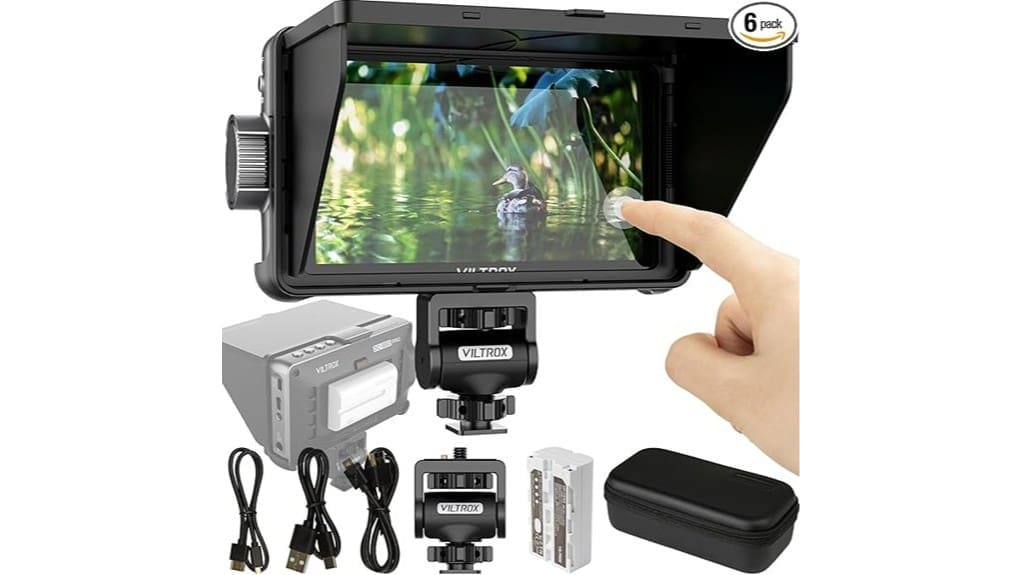

You’ll find the Viltrox DC-550Pro a compact, well-built 5.5″ 1920×1080 touchscreen that handles 4K HDMI pass-through and quick menu navigation via touch and gyroscope. Colors sit on a Rec.709 base with usable skin tones and easy 3D LUT loading for on-set matching. Monitoring tools like false color, waveform and focus peaking are practical, and NP-F550 power keeps it light for run-and-gun work. Keep going if you want full test notes and alternative options.
Some Key Takeaways
- Compact 5.5″ 1920×1080 touchscreen with responsive touch controls and gyroscope auto-orientation for fast framing and menu navigation.
- 4K HDMI input and pass-through output enable monitoring while recording and easy monitor chaining on 4K-capable cameras.
- Accurate Rec.709 base with 3D LUT support via SD card, natural skin tones, and a recommended calibration workflow for critical color.
- Useful on-set tools include false color, waveform, focus peaking, brightness readouts, and de-squeeze for anamorphic lenses.
- Field-ready build with included sunshade hood, NP-F550 battery, three cables; best for solo shooters and indie filmmakers.
VILTROX DC-550PRO At a Glance: Detailed Specs and What’s in the Box
While you’ll notice its compact size at first glance, the VILTROX DC-550PRO packs a surprising set of pro features into a 5.5″ touchscreen that weighs just 267 g. You get 1920×1080 resolution, 4K HDMI in/out, and useful tools like waveform, false color, and de-squeeze. The box includes a sunshade hood, NP-F550 battery, three cables, and a manual. Check battery compatibility for alternatives if you need longer runtimes. Build materials feel solid for field use, with responsive touch controls and a gyroscope that auto-flips. Overall, it’s a well-rounded, portable monitor that serves run-and-gun shoots. This monitor is ideal for photographers looking to “Enhance Your Photography” with external displays and accessories for improved on-set monitoring external camera monitors.
Real-World Image Quality and Color: Rec.709, 3D LUTs, and Calibration Notes
Because accurate color and usable preview matter on set, the DC-550PRO’s Rec.709 base and 3D LUT support give you reliable starting points for judging exposure and color in real-world shoots. You’ll appreciate decent color fidelity out of the box—skin tones look natural and contrast holds up under typical lighting. Loading custom 3D LUTs via SD card is straightforward, so you can mimic delivery looks or camera profiles quickly. For best results include the monitor in your calibration workflow: verify with a known chart, apply a LUT, then recheck exposure. It’s practical, predictable, and focused on usable on-set results. For enthusiasts who care about true-to-life photos, integrating monitor calibration tools into your setup helps maintain consistent color across devices and prints, especially when referencing calibration targets.
Monitoring Tools Tested: False Color, Waveform, Brightness, Focus Assist, and De-Squeeze
Test the DC-550PRO’s monitoring tools and you’ll find a compact set that’s practical on real shoots. You’ll use false color for quick exposure mapping—reds warn you of clipping, blues show underexposure, greens hit target zones—making decisions fast. Waveform gives granular luminance info and audio levels, so you can trust what you see and hear. Brightness readouts show incoming image values and real-time shifts, useful under changing light. Focus assist with selectable focus peaking helps nail critical sharpness, and the de-squeeze option restores anamorphic proportions. Overall, the toolset is focused, reliable, and geared toward efficient monitoring. These features make the DC-550PRO a handy addition for photographers and videographers working with field monitors on location.
Usability in the Field: Touchscreen, Gyroscope, Sunshade, Battery Life, and Connectivity
Usually, you’ll find the DC-550PRO built for quick, on-set use: the responsive 5.5″ touchscreen and gyroscope make framing and menu navigation fast, the included sunshade keeps visibility solid in bright conditions, and Sony NP-F550 compatibility gives a lightweight, swap-and-go power solution. You’ll appreciate touchscreen responsiveness for quick focus pulls and LUT swaps; the gyroscope auto-flip saves time when you tilt the monitor. The sunshade actually improves contrast outdoors. Battery longevity is adequate for short shoots—carry spares for long days. Connectivity is straightforward: 4K HDMI in/out lets you feed cameras and monitors without fuss. If you’re shooting outdoors, pairing the monitor with continuous LED lighting can further improve image clarity and color consistency.
Who Should Buy It and Alternatives to Consider (Best Use Cases and Comparable Monitors)
If you need a compact, color-accurate on-camera monitor that’s easy to mount and quick to operate, the VILTROX DC-550PRO is a strong choice — especially for solo shooters, indie filmmakers, and videographers who value portable power and straightforward 4K pass-through. You’ll like it if you’re a budget filmmaker, run vlogging setups, or need reliable exposure and LUT tools on the go. It’s best for handheld rigs, run-and-gun shoots, and DSLRs. Consider alternatives like the Atomos Shinobi for HDR monitoring, SmallHD Focus for brighter daylight use, or Feelworld T7 for an even cheaper option. This monitor complements an enthusiast’s kit for mirrorless cameras and other portable setups.
Some Questions Answered
Does It Support Touchscreen Gestures With Third-Party Camera Apps?
No — it won’t pass touchscreen gestures through to third-party camera apps. You’ll get local touch controls on the monitor (menu navigation, focus assist, LUT selection), but gesture compatibility with external apps isn’t supported. For app integration you’ll rely on HDMI signal only; the monitor doesn’t act as a touchscreen controller for camera apps. If you need touchscreen control inside apps, you’ll have to use the camera or a compatible device.
Can Firmware Be Updated via USB or SD Card?
Yes — you can update firmware via SD card, not USB. You’ll download firmware files to an SD card, insert it, then follow on-screen firmware procedures to install updates. Be aware of update limitations: only specific firmware versions and file formats work, and interrupted updates can brick the unit. You should back up settings, use a fully charged battery or AC power, and follow Viltrox’s instructions precisely to avoid problems.
Is the NP-F550 Battery Hot-Swappable During Recording?
No, the NP-F550 battery isn’t hot-swappable during recording—you’ll cause a power interruption if you swap it. You should plan for continuous power (DC input or dual battery solution) for critical takes. If you must change batteries, stop recording first, swap or use a dummy/AC adapter, then resume. This avoids dropped frames, corrupted files, and monitoring loss. You’ll want backup power or workflow adjustments to stay safe on set.
Does It Output Audio to External Speakers or Headphones?
Yes — you’ll get audio passthrough and can monitor sound via the headphone jack. The monitor passes HDMI audio to its output, so you can route signal onward and listen through headphones. That said, don’t expect mixer-grade controls; volume adjustment is basic and audio monitoring depends on source HDMI stream. If you need detailed level control or balanced outputs, you’ll want an external audio interface or field mixer.
What Mounting Options and Thread Sizes Does It Use?
You get versatile mounting: the monitor supports VESA compatibility for cage or arm mounting, and you can use a Rod clamp for rig setups. It uses 1/4″‑20 threading on its standard mounts and includes or works with a 3/8″‑16 adapter for larger studs, so you won’t need custom hardware. You’ll find switching between tripod, cage, or rod setups straightforward and reliable for run-and-gun or studio use.


