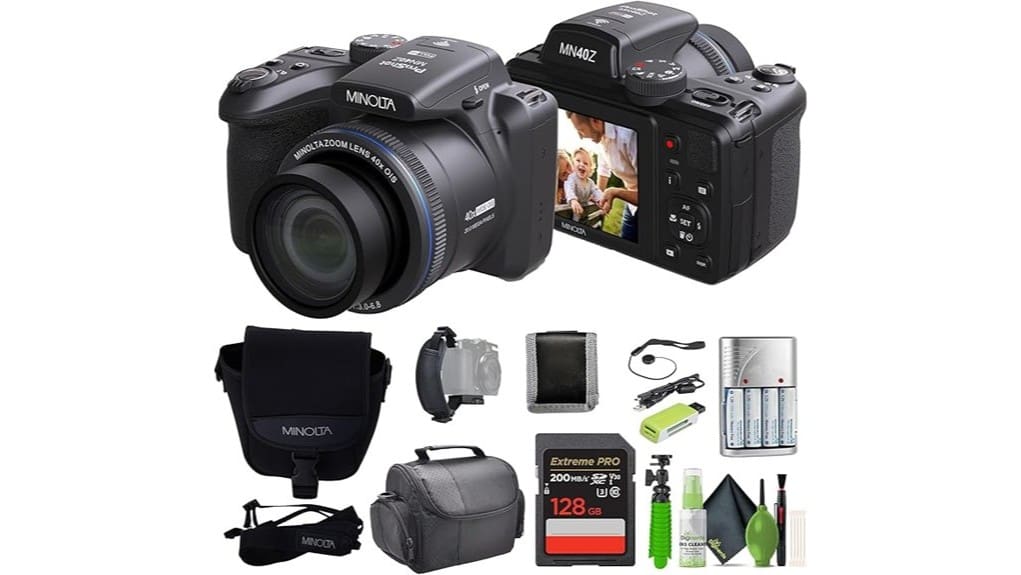
You’ll find the Minolta MN40Z gives you a lot for the price: a 20MP sensor, a massive 24–960mm (40x) RidgeMaster zoom, and useful optical stabilization for mid-tele handheld work. It’s sharp at wide and short tele, but contrast and detail drop past ~400–600mm, and low-light noise plus slow contrast-detect AF limit action shots. Video is 1080p/30 with basic audio options. Keep scrolling to see full test notes, sample images, and alternatives.
Some Key Takeaways
- 20MP sensor with 24–960mm (40x) RidgeMaster lens delivers sharp wide-to-short-tele images, losing detail around 400–600mm.
- Effective optical stabilization supports handheld shooting into mid-tele, but extreme zoom benefits from tripod or faster shutter speeds.
- Modest low-light performance with rising noise and limited usable ISO; on-camera LED recommended for video.
- 1080p/30fps video with rolling shutter; selectable mono/stereo audio but no external mic jack.
- Ergonomic, sub-4-pound body with 3″ fixed LCD, EVF, and AA NiMH power; good controls but fixed-screen limits angles.
Real-World Snapshot: Key Specs and What They Mean for Photos and Video
Although it’s a bridge camera, the MN40Z combines a 20 MP CMOS sensor, a 24–960 mm (40x) RidgeMaster lens, and optical image stabilization to give you flexible framing and usable detail across long telephoto reaches, while its 1.5x crop factor and single contrast-detect AF point mean you’ll need to manage expectations for low-light performance and fast action tracking. You’ll appreciate framing options and stabilised telephoto shots, but dynamic lighting and lowlight noise limit usable ISO. Portrait bokeh is achievable at longer focal lengths but lacks subject isolation finesse. Action stitching or sequences will show focus lag and motion blur under challenging conditions. For stable telephoto shooting and hands-free composition, consider pairing the MN40Z with a dedicated tripod for better support and sharper results.
Image, Zoom, and Stabilization Performance: 20MP Sensor, 24–960mm (40x) Lens, and IS Tested
Moving from how the MN40Z frames and tracks subjects, let’s look specifically at how its 20 MP CMOS sensor, 24–960 mm (40x) RidgeMaster lens, and image stabilization work together in real shooting. You’ll find sharp results at wide and short tele settings; detail holds surprisingly well until around 400–600mm where diffraction and contrast drop. Stabilization tests show effective handheld reach into mid-tele ranges, though motion blur returns at extreme zoom without faster shutter speeds or support. Low light performance is modest—noise rises quickly. Watch for chromatic aberration on high-contrast edges, especially at long focal lengths and wide apertures. For shooters aiming to maximize smooth footage, pairing the MN40Z with a compatible handheld gimbal can significantly improve stabilization and tracking for both stills and video, especially when using handheld gimbals to reduce camera shake.
Handling, Battery Life, and Ergonomics: Weight, Controls, Screen/Viewfinder, AA Battery Use
Because the MN40Z tips the scales at just under 4 pounds, you’ll notice its presence immediately—this heft gives a stable platform for long-tele shooting but can tire your hands over extended walks or all-day shoots. The heavy weight aids steadiness but pushes you toward tripod use for marathon sessions. Controls are logically grouped; the button layout is clear, with textured dials and reachable playback/drive buttons. The 3″ fixed LCD and electronic viewfinder deliver sharp previews, though the fixed screen limits angles. Using 4x AA NiMH batteries keeps spares cheap and swap-ready, but expect moderate runtimes compared with proprietary packs. Consider pairing the camera with a camera backpack designed for photographers to carry it and accessories comfortably.
Video, Audio, and Connectivity: 1080p Capture, Mic Options, Wi‑Fi, HDMI, and Card Support
Capture video confidently with the MN40Z’s 1080p/30fps recording: it delivers clean Full HD footage suitable for casual shoots and web uploads, though you won’t get higher-frame-rate or 4K options. You get selectable mono or stereo microphone modes, but there’s no dedicated external microphone jack, so expect onboard audio limits for interviews or vlogs. Wi‑Fi lets you transfer clips and enable quick sharing; use the USB port for file transfers and the HDMI output for clean playback on monitors. Single SD/microSD slot supports up to 128GB UHS-I cards, and you can offload files to cloud backup workflows. Consider pairing the camera with an on-camera LED light for improved low-light performance and more consistent exposure when shooting video with the MN40Z on-camera LED lights.
Verdict and Buyer Guide: Strengths, Limitations, Who Should Buy, and Top Alternative Picks
While it won’t compete with mirrorless hybrids, the MN40Z offers a compelling blend of reach and simplicity for casual shooters and travelers who want a single, affordable camera with strong zoom, Full HD video, and straightforward controls. You’ll appreciate its 40x lens, RAW capture, and bundled accessories, but expect limitations in low‑light AF, single AF point, and rolling shutter. Consider long term durability of the AA‑powered design and check accessory compatibility (tripod, mics). If you value ease and price, buy it. If you need pro image quality or frequent software updates and robust post purchase support, consider Canon SX70 or Sony RX100 alternatives. This camera is a good fit for mirrorless camera enthusiasts looking for complementary travel gear.
Some Questions Answered
Does It Have a Built-In Flash and Hot Shoe for External Strobes?
No, it doesn’t list a built in flash or a hot shoe for external strobes. You’ll rely on ambient light, high-ISO performance, or add-on lighting via continuous LED panels or off-camera wireless solutions. Given the bridge form factor and AA power, Minolta prioritized portability and simplicity over advanced flash systems. If flash capability matters, you’ll want a camera with TTL hot shoe support or plan on using external lighting that mounts separately from the camera.
Can It Shoot Time-Lapse or Interval Photography Natively?
No — it doesn’t offer a built‑in interval timer for native time‑lapse capture. You’ll need an external intervalometer or a tethered app if the camera’s Wi‑Fi supports remote triggering. Without native interval control you can still create time‑lapses by manually shooting frames, but consistency and exposure ramping are harder and risk motion blur in long exposures. External solutions give reliable intervals and smoother exposure shifts.
What Weather Sealing or Dust Resistance Does It Offer?
No, it doesn’t offer dedicated weather sealing; there’s no IP rating or sealed controls, so you shouldn’t count on protection from rain or dust. You’ll need to avoid heavy moisture and grit, and consider using covers or a rain sleeve. Internal desiccant packs in the bundle can help reduce humidity inside storage, but they don’t substitute for sealed construction. Treat the camera as weather‑resistant only with added precautions.
Is There In-Camera RAW Processing and Editing Capability?
No — the camera doesn’t offer full in camera processing for RAW files; you’ll need to convert RAW on a computer. You can, however, make basic JPEG adjustments in camera and perform simple in camera processing like exposure and color tweaks. White balance tweaking is available for JPEG capture and can be applied before shooting or to processed JPEGs, but advanced RAW editing and localized edits aren’t supported in-camera.
Does It Support External Microphones via a 3.5mm Jack?
No — it doesn’t support an external mic via a 3.5mm jack. You’ll rely on the camera’s built‑in audio input options (mono/stereo microphone technology listed) and internal recording. That limits audio quality and direct external mic control. If you need better sound, plan to record audio separately with an external recorder or use a camera with a dedicated external mic jack and sync audio in post for professional results.


