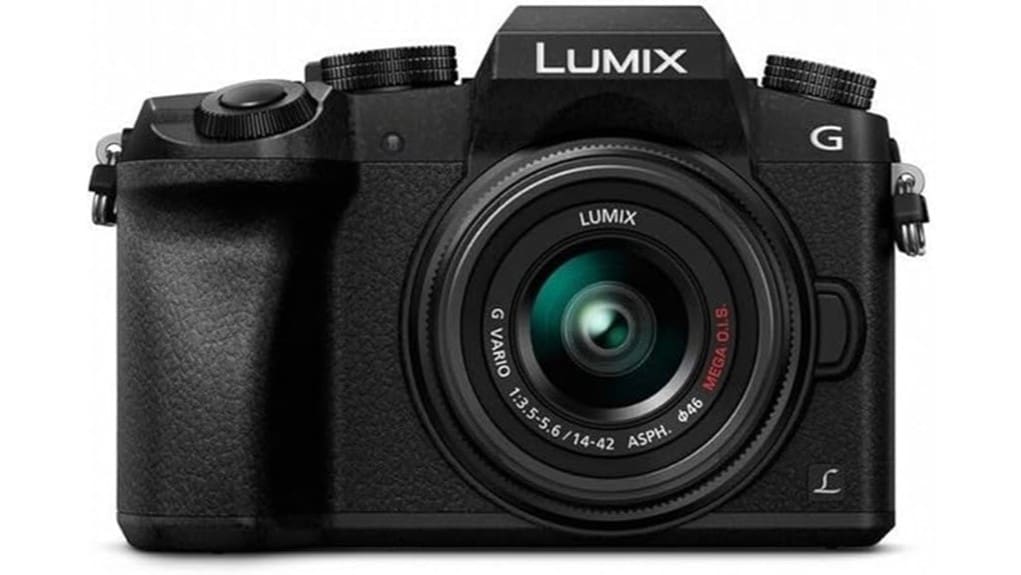
You’ll find the Panasonic Lumix G7 is a compact, affordable 4K mirrorless that’s great if you’re starting out, vlogging, or traveling light. Its 16MP Micro Four Thirds sensor (no low‑pass filter) gives crisp daylight detail and 4K PHOTO provides usable frame‑grabs, while lens‑based MEGA O.I.S. plus digital support helps steady clips. Autofocus is competent in good light and 7 fps is useful for action, though low‑light noise and rolling shutter limit pros — more specifics follow.
Some Key Takeaways
- Compact, affordable 4K-ready mirrorless ideal for beginners, vloggers, and travel photographers needing a lightweight Micro Four Thirds kit.
- 16MP MFT sensor (no low‑pass filter) yields punchy daylight detail; RAW needed for best crops and highlight/noise control.
- 4K UHD recording and 4K PHOTO provide detailed footage and usable ~8MP frame-grabs; fast UHS cards recommended.
- Contrast‑detect AF (49 points) and 7 fps continuous shooting work well in good light but can hunt in low contrast and have buffer limits.
- Stabilization relies on lens MEGA O.I.S. plus digital support; not a gimbal or IBIS substitute, and battery life is modest.
Panasonic Lumix G7 4K Review: Who This Camera Is Best For
If you’re after a compact, affordable mirrorless that punches above its weight in both stills and video, the Panasonic Lumix G7 is a strong choice. You’ll appreciate its 4K video, articulating touchscreen, and light Micro Four Thirds body if you’re a beginner vlogger needing clear footage and easy framing. Travel photographers benefit from the small kit lens, decent autofocus, and broad lens ecosystem that keeps weight and cost down. Advanced amateurs will like manual controls and 4K PHOTO for action. It’s less ideal if you demand top-tier low‑light performance or full‑frame depth of field. If you’re building out your kit, consider essential accessories for mirrorless systems like lenses and batteries to get the most from the G7.
Image Quality and 4K Photo: Sensor, No Low‑Pass Filter, and RAW Results
Because Panasonic paired a 16‑MP Micro Four Thirds sensor with no low‑pass filter, you get punchier detail and crisper edges than many rivals in this class, especially when shooting JPEGs or extracting 4K PHOTO frames. You’ll notice improved microcontrast and resolution in daylight and controlled lighting; fine textures render cleanly without obvious ringing. 4K PHOTO delivers usable ~8MP frames for fast action, though RAW captures remain superior for critical crops. Plan a disciplined raw workflow to tame highlights and noise; with careful processing the G7’s sensor detail and dynamic range produce impressively sharp, usable stills. This makes the camera a solid choice for enthusiasts using telephoto lenses in wildlife and sports photography.
Video Performance: 4K UHD Recording, Stabilization, and Audio Options
When you switch the G7 into video mode, its 4K UHD (3840 x 2160) recording gives you detailed footage and useful frame-grabs from the 4K PHOTO capability, though you’ll want fast UHS cards (U3/V30+) to sustain long clips. You’ll get clean detail and good color, but watch for rolling shutter on quick pans; it’s noticeable compared with higher-end bodies. Stabilization relies on MEGA O.I.S. in lenses plus optional digital support — effective for light handheld work but not a gimbal replacement. Audio options are sensible: a 3.5mm mic input improves capture, while onboard mic is adequate for reference. For people pairing the G7 with tripods, choosing a compatible tripod head can significantly improve stability and framing.
Autofocus, Continuous Shooting, and Real‑World Speed Tests
Having covered video handling and stabilization, let’s look at how the G7 locks focus and keeps subjects moving during stills and video. You’ll find contrast-detect AF with 49 points delivers accurate results in good light; continuous-servo AF (AF-C) holds moving subjects reasonably well but can hunt in low contrast. Focus tracking works best with predictable motion and distinct subject contrast. Continuous shooting at 7 fps is useful for action sequences, yet real-world throughput depends on card speed and buffer performance. With UHS-I cards the buffer fills after several RAW frames; JPEG bursts last longer, so plan accordingly. For photographers shooting extended bursts or 4K video, choosing fast storage like CFexpress memory cards can significantly improve workflow and reduce wait times.
Lenses, Built‑In Features, and Shooting Flexibility (14–42mm Kit + MFT)
How versatile do you need your kit to be? The G7’s bundled 14–42mm f/3.5–5.6 with MEGA O.I.S. covers everyday wide-to-tele needs and keeps weight low, while lens adaptability to the Micro Four Thirds ecosystem opens specialty primes and zooms. You’ll get reliable JPEG/RAW capture, lens-based stabilization, and lens corrections that aid sharpness. Creative framing benefits from the compact optics and the 4K PHOTO mode for extracting decisive moments. Objectively, the kit lens is competent but limited in low light and shallow depth; invest in faster MFT glass for expanded flexibility and image quality. This model is a great fit for DSLR enthusiasts and photographers looking for essential gear and portability with mirrorless advantages like compact lenses and EVF essential gear.
Handling, Controls, EVF/Articulating Touchscreen, and Battery Life
Although compact in its layout, the G7’s controls give you fast, tactile access to core settings, with responsive front and rear dials and a sensible arrangement of assignable buttons that let you tailor the camera to your workflow. You’ll appreciate solid grip comfort for longer shoots, though larger hands may find the body a touch snug with heavier lenses. The OLED EVF is bright and detailed, aiding composition, while the articulating 3.0-inch touchscreen is responsive for touch AF and menu navigation. Menu ergonomics are generally clear, but deep submenus slow access. Battery life is modest; carry a spare for extended 4K work. If you plan to carry lenses and accessories for outings, consider a dedicated camera bag to protect your gear and stay organized.
Value, Accessories, and Alternatives to Consider Before You Buy
Comfortable handling and a responsive control layout make the G7 pleasant to use, but before you commit you should weigh what you get for the price: a capable 4K-ready mirrorless body with a kit 14–42mm MEGA O.I.S. lens, solid ergonomics, and professional-style controls versus limitations like modest battery life, lens-based stabilization only, and a 16MP Micro Four Thirds sensor. You’ll appreciate strong accessory compatibility—external mics, flashes, remotes, and many MFT lenses—but assess long‑term value: sensor size and future lens upgrades may limit low‑light reach. Compare to newer 4K mirrorless rivals with better IBIS or higher-resolution sensors before buying. Gear Guide for Enthusiast Photographers and Camera Fans highlights related accessories and kits to consider when evaluating the G7’s ecosystem and value, including recommended lenses and add-ons for enthusiast photographers.
Some Questions Answered
Does the G7 Support In-Camera Time-Lapse Creation?
Yes—you can create time-lapse sequences in-camera using the G7’s interval shooting to capture frames, then assemble them into a time lapse montage externally or via the camera’s built-in playback features. You’ll set interval, number of shots and exposure settings; the camera records JPEG/RAW frames and offers convenient 4K PHOTO extraction. It’s flexible and practical, though you’ll usually compile the final montage on a computer for better control and encoding.
Can the Camera Tether to Computers for Studio Shooting?
Yes — you can tether the camera to a computer via USB tethering for studio work, but functionality is limited. You’ll get Live view on the computer using Panasonic’s software or compatible third‑party apps, letting you review composition and exposure. You won’t get full professional tethering features like instant RAW transfer or advanced capture control; expect basic image transfer and remote Live view with USB 2.0 speed constraints and occasional latency.
Is Bluetooth Available for Remote Control or Geotagging?
No — the camera doesn’t offer Bluetooth remote or Geotagging support. You’ll rely on built‑in Wi‑Fi for remote control and image transfer, which is reliable for basic tethering and phone-based control. If you need Bluetooth remote or native Geotagging support, you’ll have to use external solutions: a Bluetooth intervalometer/remote or a GPS logger that embeds location in EXIF later. Overall, the camera’s wireless is capable but not Bluetooth-enabled.
What Weather Sealing Rating Does the G7 Have?
The G7 doesn’t have an official weather sealing rating. You shouldn’t expect IP-class dust or water protection; its weather resistance and environmental durability are limited to typical consumer mirrorless construction. You can use it in light, cautious conditions, but you’ll want added protection—rain covers, sealed bags, or careful handling—for serious outdoor work. For rigorous, wet, or dusty environments, choose a camera with documented sealing and an IP or manufacturer durability spec.
Can It Charge Batteries via USB While In-Camera?
No, you can’t charge the battery in-camera via USB power. The G7 requires you to remove the battery and charge it in the supplied external charger; USB is limited to data transfer and powering some accessories. For continuous use you’ll need spare batteries or an external USB power bank feeding a dummy battery adapter into the camera’s battery compartment. That workaround lets you use battery charging alternatives but isn’t official USB charging.


