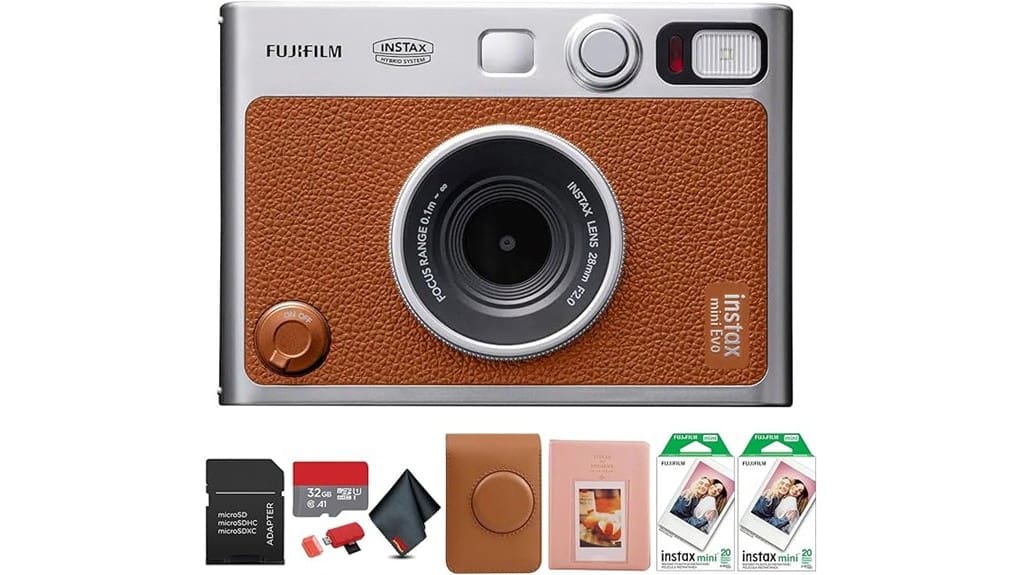
You’ll get a tactile, metal‑trimmed hybrid that makes instant prints and digital backups feel deliberate and satisfying. The 3.0″ LCD and textured dials let you frame, tweak exposure/white balance, and pick from 100 lens×film combos for punchy, contrast‑forward Instax prints with warm skin tones. Dual shutter buttons suit portrait or landscape shooting, and prints archive to microSD with reprint ability. Battery life is moderate and film costs add up — keep going to see practical tips and verdicts.
Some Key Takeaways
- Hybrid digital‑to‑print design delivers punchy, contrast‑forward Instax prints with vivid colors and warm, natural skin tones.
- Metal dials, textured film effects, and 100 lens×film combinations enable precise, tactile creative control.
- 3.0-inch LCD, Bluetooth remote, and microSD backup provide convenient framing, wireless shooting, and digital archiving.
- Smooth, satisfying print lever and sturdy assembly give a premium tactile experience and better perceived resale value.
- Bundled accessories and included film make it travel‑ready, though film costs and moderate battery life are practical limits.
Hands-On Verdict: Is the INSTAX MINI EVO Worth Buying?
Cut through the nostalgia: the INSTAX MINI EVO blends tangible instant prints with flexible digital control, and you’ll notice the difference from the moment you frame a shot on its 3.0-inch LCD and toggle through one of 100 lens-and-film combinations. You’ll appreciate precise toggles, consistent exposure, and tactile feedback that make composed images repeatable. Consider long term durability—metal dials and solid assembly suggest it’ll endure casual travel. That build quality supports stronger resale value later. Watch for firmware updates that refine features, and tap into user community growth for profiles, tips, and sample galleries that speed your creative workflow. Rediscover analog pleasures with dedicated film camera gear and accessories catered to enthusiasts.
What the MINI EVO Does Best: Design, Build, and Print Experience
Feel the solid click of metal dials and the smooth, deliberate action of the print lever—the MINI EVO’s design puts tactile satisfaction at the center of the experience. You’ll notice retro controls: textured effect and film dials that index precisely, dual shutter buttons shaped for portrait or landscape, and a sturdy tripod mount. The brown finish and compact weight feel thoughtfully balanced in your hand. Tactile feedback from knobs and the lever reassures you as settings change. Printing is immediate and satisfying—film ejects with a soft hum, a clear image appearing on stock sized for wallets and albums you’ll actually use. Perfect tripods support stable shots when using compact cameras like this.
How It Performs Day-to-Day: Image Quality, Controls, and Connectivity
When you shoot with the MINI EVO, the camera delivers punchy, contrast-forward prints that favor vivid colors and crisp midtones—skin tones can lean warm but stay natural in most lighting. You’ll control exposure, white balance, and focus precisely via tactile dials and the 3.0-inch LCD, switching lens and film effects for sharp portraits or saturated landscapes. In low light performance, the built-in flash helps but noise and softness increase; stick to closer subjects or use tripod and flash. Connectivity is smooth: microSD backup, Bluetooth transfers, and app remote shooting. Expect moderate battery life; carry a charger for long outings. This camera is a great fit for people who enjoy photography and want to capture moments anywhere with portable prints.
Real-World Use Cases: Who Should Buy This Camera and How to Use the 100 Creative Combos
If you’re into tactile photography with instant rewards, the MINI EVO fits a range of real-world needs—from parties and travel to creative studio play—by letting you print polished, frame-ready Instax Minis right after you capture them. You’ll want this if you document trips: use travel journaling combos (high-contrast lens + vintage film) to create cohesive mini-collections. For events, pick bright film effects and bold lens filters for memorable party favors. In creative workshops, demo different lens×film pairs to teach tone and mood. It also makes thoughtful gift giving—preprint curated images for recipients, ready to display. Consider pairing the camera with a sturdy camera backpack to protect your gear while traveling.
Value Checklist: Bundle Contents, Media Costs, Limits, and Final Recommendation
Although the MINI EVO looks like a simple toy, the bundled package gives you a near-complete instant-photo workflow out of the box: the camera itself, a brown shoulder bag, microfiber cloth, two 10-pack Instax Mini film twin packs (40 exposures total), a 64-pocket 3″ photo album, a 32GB microSD card plus USB card reader and microSD-to-SD adapter — everything you need to shoot, store, print, and archive without hunting for accessories. You get immediate value: tactile controls, reprint ability, and archiving on microSD. Consider film costs per exposure versus digital backups; frequent printers face ongoing expense, but conserving selects yields long term savings. I recommend it. Many photo enthusiasts also pair instant cameras with digital frames to display favorites continuously.
Some Questions Answered
Does the Camera Support Third-Party Instax Mini Film Brands?
Yes — you can use third party compatibility with Instax Mini film variants, but you should test brands for consistent exposure and color. You’ll get prints that look similar in size and format, though film longevity and color stability can vary between manufacturers. Inspect edge seals, expiration dates, and store film cool/dry. Shoot a few test frames to check tone, contrast, and fading risk before committing to important shoots or long-term archiving.
Can I Charge the Camera via USB-C Power Banks?
Yes — you can use USB C charging with a power bank to recharge the INSTAX MINI EVO. You’ll connect the camera’s USB-C port to a powered bank or USB-C charger; check the bank’s output (5V/1–2A typical) for Power bank compatibility and stable current. Carry a quality cable, keep the camera off while charging, and avoid high-voltage PD-only banks unless they support 5V; that prevents charging issues and guarantees reliable top-up power.
Is the Internal Battery User-Replaceable?
No — the internal battery isn’t user-replaceable; you’ll need a service replacement if it fails. You’ll see no removable battery door, so don’t pry the compact body. If charging stops working or capacity drops, contact Fujifilm support or an authorized repair center for a proper service replacement to avoid damage. Keep receipts and warranty info handy, and photograph serial numbers and ports before sending the camera for service.
Does It Print Borderless or Only With Instax Frames?
It prints with Instax frames only; you can’t do true borderless prints. You’ll control image crops and print layouts on the EVO’s LCD or app before printing, so you can position subjects and choose frame styles. Use the 100 creative combinations and framing tools to optimize composition; zoom and crop on-screen to avoid cutting important details. Final prints always include the Instax Mini border and any selected decorative layout.
Can I Update Firmware Without the App?
No — you can’t update the firmware without the app. Fujifilm supplies a firmware updater through the INSTAX MINI EVO app and official support pages, but there’s no supported manual installation via microSD or USB. You’ll need to use the app’s Bluetooth or USB workflow to transfer and apply updates. If you want manual installation, contact Fujifilm support for any unpublished firmware updater tools or step-by-step guidance before proceeding.


