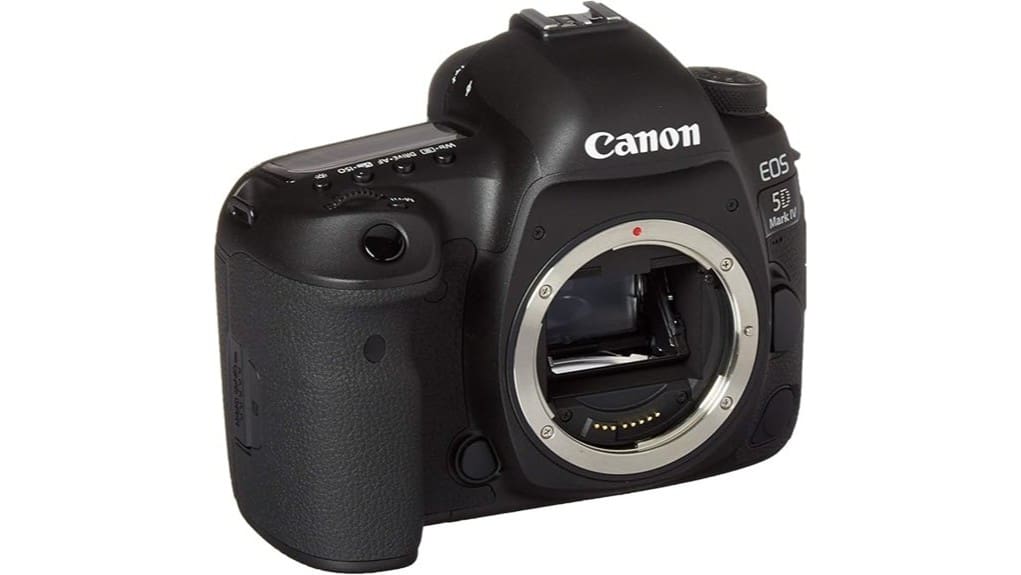
You’ll get a rugged full‑frame 30.4MP workhorse that delivers neutral tones, good microcontrast and reliable AF with 61 points (41 cross‑type) for tracking. DIGIC 6+ sustains JPEG bursts to 7 fps, and ISO performance is strong to 32,000 with usable results higher with NR. DCI/UHD 4K is available (Motion JPEG, crop), plus dual card slots, solid ergonomics and weather sealing. Keep an eye on warranty and shutter count—more specifics follow.
Some Key Takeaways
- 30.4MP full-frame sensor delivers high-detail images with neutral tonality and good dynamic range at base ISO.
- 61-point AF (41 cross-type) and 7 fps continuous shooting suit action and event photography.
- DCI 4K/UHD video available, but uses Motion JPEG with crop and large file sizes.
- Robust magnesium-alloy body, weather sealing, and comfortable grip support professional use.
- For renewed units, insist on ≥90-day warranty, inspect shutter count, AF, ports, and dual-slot functionality.
Real-World Image Quality and Performance: Sensor, AF, ISO, and Use-Case Results
When you push the 30.4 MP full‑frame CMOS in the 5D Mark IV, it delivers high-detail stills with a neutral tonal balance and good microcontrast, and the DIGIC 6+ keeps processing fast enough for sustained JPEG output at up to 7 fps. You’ll find dynamic range adequate for recoverable highlights and midtone separation at base ISO. Autofocus tracking uses the 61-point system with 41 cross-type sensors to maintain subjects in motion reliably. Low light performance is competent to ISO 32000, with usable results beyond when noise reduction’s applied. Color fidelity is consistent across modes and lighting conditions. The camera pairs well with mirrorless-compatible lenses commonly recommended for enthusiasts.
Handling, Ergonomics, and Durability for Professionals
Having seen how the sensor, AF and ISO behave in real shooting, it’s equally important to assess how the 5D Mark IV feels in hand and holds up under professional use. You get substantial grip comfort for all-day shoots; the deep, textured grip stabilizes heavy lenses. Button layout is logical: primary controls are reachable without changing grip, and custom buttons suit quick workflow adjustments. Build quality is robust with a magnesium-alloy chassis that resists flex. Weather sealing around seams and controls gives confidence in adverse conditions, though rigorous saltwater exposure should still be avoided. Overall, ergonomics favor professional reliability. Consider protecting your kit during transport with a durable Pelican case for added security.
Video Capabilities and Audio/Connectivity for Hybrid Shooters
Although the 5D Mark IV is primarily a stills workhorse, it gives hybrid shooters a capable video toolkit with 4K capture, robust audio I/O, and modern connectivity for fast workflows. You’ll record DCI 4K or UHD at 24/30p using Motion JPEG; expect heavy file sizes and crop implications. Dual 3.5mm jacks let you monitor and feed external mics while the HDMI C output supports external monitoring and clean feeds for recorders. Built‑in Wi‑Fi and NFC enable tethering and Wireless audio control with compatible devices. USB 3.0 and Canon N3 remote support complete a practical on‑set connectivity suite. Consider adding HDMI accessories to ensure reliable monitoring and recording when using the camera with external recorders and monitors.
Storage, Cards, and Workflow: Dual-Slot Setup and Post-Processing Tips
Because the 5D Mark IV gives you two distinct card slots—UHS-I SD in Slot 1 and CompactFlash UDMA 7 in Slot 2—you can build a workflow that balances speed, redundancy, and capacity to match specific shoots. Configure Slot 1 for primary capture (fast UHS-I/CF write), Slot 2 for overflow or instant backup. Use RAW to CF when throughput matters, SD for JPEG or proxy video. Implement strict memory management: card labeling, ingest logs, and checksum verification on import. Adopt Backup workflows: 3-2-1 principle, mirror copies, periodic integrity checks, and standardized folder naming for consistent post-processing. Consider investing in large capacity memory cards and reliable card readers to streamline shoots and transfers.
Buying Advice for Renewed Models: Warranty, Inspection Checklist, and Who Should Buy
When you consider a renewed Canon EOS 5D Mark IV, prioritize warranty length, seller reputation, and a strict inspection checklist to reduce risk and guarantee operational parity with a new body. You should confirm warranty duration (90-day minimum, longer preferable), verify reseller reputation through reviews and return metrics, and demand documented servicing. Use an inspection checklist: sensor health, shutter count, AF accuracy, LCD/touch responsiveness, ports, dual-slot function, and firmware. Your buyer profile matters: pros needing full-frame reliability or advanced amateurs who accept no-battery/remote exclusions. If the seller’s warranty and reputation are solid, a renewed 5D Mark IV is a pragmatic buy. Consider also protecting your renewed body with a hard shell camera case for transport and storage to prevent damage during travel and shooting, and to preserve resale value by minimizing wear to the camera’s finish and controls; see hard shell camera cases for options.
Some Questions Answered
Does the Camera Include Batteries and a Remote in the Renewed Package?
No — battery included? No; batteries aren’t provided. You’ll need to supply your own battery and charger. Remote excluded? Yes; the remote is not included in the renewed package. You’ll get the camera body and listed accessories only, with a 90-day limited warranty. Plan for additional purchases if you need a spare battery, charger, or remote control to achieve uninterrupted shooting and remote operation.
Is Dual Pixel RAW Processing Supported in Third-Party Software?
No — third-party apps generally don’t natively support Dual Pixel RAW processing. You’ll need Canon’s Dual Processing Workflow or Raw editing plugins that explicitly add DPRAW support to extract microadjustments (bokeh shift, ghosting correction, fine-tune highlight recovery). Some plugins or updated RAW editors can read DPRAW metadata, but full functionality usually requires Canon’s tools or specialized plugins. Check plugin documentation for explicit Dual Pixel RAW compatibility before relying on third-party workflows.
Can the Shutter Achieve 1/80000 With Electronic Front Curtain Only?
No — you can’t reach 1/80000 using electronic front curtain only. The camera’s maximum 1/80000 specification implies an extremely high shutter capability that isn’t provided by electronic front-curtain alone; the mechanical and electronic shutter modes determine top speeds. You should use the proper electronic or mechanical shutter mode per specs, since relying on electronic front curtain for speed can affect shutter durability and image artifacts. Check manufacturer details for confirmed maxs.
Are UHS-II Cards Fully Compatible in the SD Slot?
No — UHS II compatibility is limited: the SD slot supports UHS-I bus speeds, so UHS II cards will work but only at reduced throughput. You’ll get backward compatibility for reading/writing files, but Slot bandwidth restricts transfer rates to UHS-I/U3 limits (up to the slot’s ~100 MB/s practical write ceiling). Use UHS II only for capacity and future-proofing; don’t expect the native UHS II maximum speeds.
Is the LCD Usable for Touch Focus During Live View Video?
Yes — you can use the LCD for Touch AF during Live View video, though it’s limited. The Screen Sensitivity lets you tap to select AF points and initiate Dual Pixel focusing, improving your Video Workflow for quick subject shifts. Expect single-touch point selection rather than full touchscreen gestures; continuous tracking via touch is modest. For critical pulls or complex tracking, you’ll still rely on manual adjustments or external focus tools.


