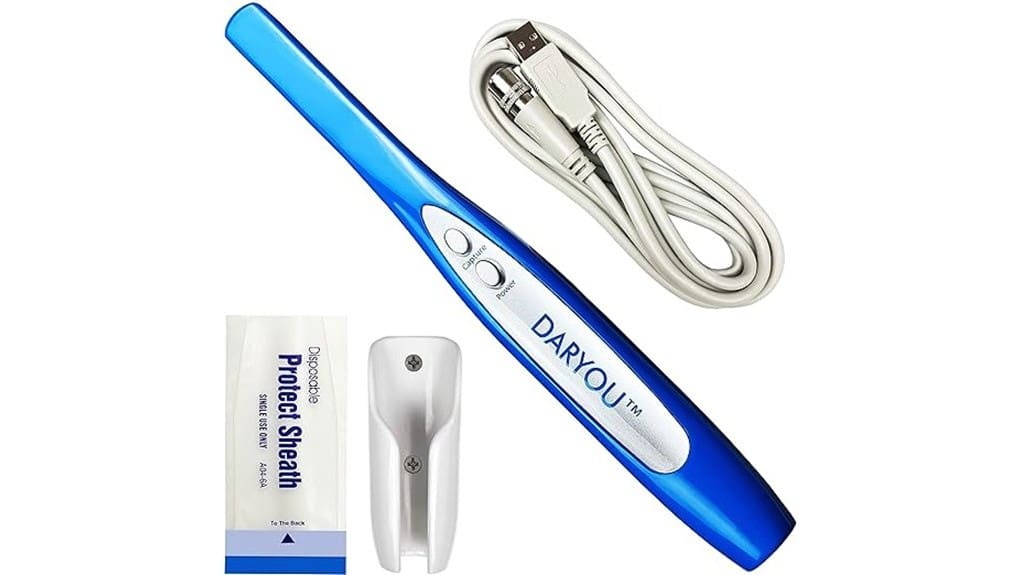
The DY-50 is a lightweight USB intraoral camera that gives 1600×1200 stills and 640×480 video, with auto-focus, anti-fog optics, and a driver-enabled capture button for hands-on documentation. It’s plug-and-play with Windows and includes a holder, 2 m cable, 50 disposable sheaths, and capture software. Image detail is good for routine exams but video isn’t HD; build is lightweight plastic and durable with careful handling. Continue for specifics on workflow, maintenance, and alternatives.
Some Key Takeaways
- Affordable USB plug-and-play intraoral camera with 1600×1200 stills and 640×480 video for routine clinical documentation.
- Lightweight 34 g ergonomic handset with thumb-reachable capture button and included driver for hands-on capture.
- Auto-focus, anti-fog non-spherical optics give sharp images when lighting and distance are controlled, though JPEG compression may show artifacts.
- Includes 2 m USB cable, 50 disposable sheaths, holder, and vendor capture software; compatible with Windows 10/8/7/XP.
- Not ideal for users needing HD video, macOS or networked integration; consider premium wireless alternatives for advanced workflows.
What the DY-50 Offers: Key Specs and Package Contents
Although compact and lightweight, the DY-50 delivers clinical-grade intraoral imaging with clear specifications and a complete starter package: it captures stills at 1600 x 1200 and video at 640 x 480 in JPEG format, connects directly via a 2 m USB cable to Windows 10/8/7/XP without extra hardware, and features auto-focus, anti-fog non-spherical optics, automatic power-off, and a 34 g handset; the unit ships with one camera, one holder, one USB cable, and 50 disposable sheaths, and includes drivers plus capture software to enable the physical capture button or to operate independently of practice imaging suites. You’ll appreciate the ergonomic handset and measured weight balance for steady intraoral positioning; battery life isn’t applicable due to USB power, reducing downtime and charging variables. Seamless paper backdrops can be used to create clean, consistent backgrounds for product and clinical photography with the DY-50, helping emphasize details and color accuracy in images featuring dental tools or intraoral setups, especially when paired with optimal lighting and positioning for consistent backgrounds.
How Image and Video Quality Perform in Practice
Building on the DY-50’s listed optics and resolution, image and video performance in practice tends to be reliable for routine intraoral documentation. You’ll capture 1600×1200 stills that show fine surface detail; 640×480 video is sufficient for dynamic demonstrations but lacks high-definition clarity. The auto-focus and anti-fog lens maintain consistent sharpness if you control lighting conditions and distance. JPEG compression reduces file size but can introduce compression artifacts around high-contrast edges; avoid excessive post-processing. For standard exams and patient education the output is clinically usable, though specialists requiring diagnostic-grade imaging may find limitations in video resolution. Proper maintenance and use of lens cleaners can help preserve optical clarity and extend the camera’s useful life.
Compatibility and Capture Workflow With Practice Software
Integrating the DY-50 into your practice workflow is straightforward: the camera connects via its 2 m USB cable directly to a Windows 10/8/7/XP workstation with no extra hardware, and the included driver enables the physical capture button for hands-on use. You’ll map the device via USB mapping to an available COM/USB port and confirm recognition in device manager. Button integration is supported by listed imaging suites; configure capture hotkeys if needed. Driver troubleshooting steps include reinstalling the driver, checking port conflicts, and testing with the vendor’s capture app. Workflow automation is achievable through supported practice software that accepts direct capture and tagging. Many clinics also maintain dedicated cleaning supplies and protocols for imaging tools, including camera-compatible sensor cleaning fluids, to ensure optimal hygiene and image quality.
Ergonomics, Durability, and Everyday Usability
With the DY-50 confirmed as a straightforward USB device in your operatory, assess how its physical design supports routine clinical use. The 34 g handset balances for extended use, promoting hand comfort during quadrant scans; the capture button sits within reach for thumb activation. The 2 m cable length limits tugging but may require routing to avoid strain. Included 50 sheaths enable sterile handling; smooth housing permits quick sheath changes and wipe-downs. Auto-off reduces unintended heating. Plastic construction is lightweight but may show wear; expect routine clinical knocks to test finish longevity. Overall, functionally practical with basic durability. Consider adding a dedicated screen protection to preserve LCD surfaces from scratches and smudges.
Who Should Buy the DY-50 and Alternative Options to Consider
Although aimed at practices needing reliable, no-frills intraoral imaging, the DY-50 best suits clinicians who prioritize easy USB setup, lightweight handling, and compatibility with a wide range of imaging software. You’ll appreciate its 34 g handset, 2 m cable, and driver-enabled capture button for streamlined workflows. Choose it if you need general affordability, portable compatibility, and broad Windows support without extra hardware. Consider alternatives if you require higher video resolution, networked integration, or macOS support—premium models add wireless connectivity, enhanced optics, and expanded software ecosystems. Match choice to clinical volume, IT constraints, and imaging expectations. For maintaining image quality and device longevity, pair the DY-50 with proper sensor cleaning practices and camera sensor care.
Some Questions Answered
Is the DY-50 Compatible With macOS or Linux Computers?
No — the DY-50 isn’t provided with Mac compatibility and doesn’t include Linux drivers. You’ll be limited to Windows 10/8/7/XP with the included driver and capture software; the USB direct-connect and capture button are supported only on listed Windows imaging packages. If you need macOS or Linux, you’ll have to test generic USB webcam support, rely on third-party drivers/emulation, or request vendor-provided drivers or firmware updates.
Can the Camera Be Sterilized or Autoclaved Between Patients?
No — you shouldn’t autoclave the camera. Follow a sterilization protocol using only compatible disinfectants and barrier methods: use the supplied disposable covers for each patient, change sheaths between uses, and clean external surfaces per manufacturer instructions. Avoid submerging, high-heat, or steam sterilization that could damage optics, electronics, or the auto-focus mechanism. Document your cleaning steps and verify compatibility with your infection-control policy.
Does the Capture Button Work With Wireless USB Hubs or Extenders?
No — the capture button typically won’t function reliably through wireless USB hubs or extenders. You’ll encounter wireless latency and hub compatibility issues that can block the low‑level HID signals the button uses. For consistent capture-button operation, you should connect the DY‑50 directly to a host USB port or a powered, wired USB hub known to pass HID/button signals. Test your specific extender before clinical use to confirm functionality.
Are Replacement Sheaths or Bulbs Sold Separately and Where to Buy?
Yes — replacement sheaths and spare bulbs are sold separately. You can buy replacement sheaths (sterile disposable covers) and spare bulbs from dental supply distributors, the camera manufacturer’s parts store, or large dental marketplaces (e.g., Dental Dealer, Patterson, Henry Schein) and online retailers like Amazon that list compatible items. Check product listings for compatibility with the DY-50, order quantities (sheaths often in packs of 50), and confirm bulb type/spec before purchase.
What Warranty and Technical Support Are Included With Purchase?
You get a Manufacturer warranty covering defects in materials and workmanship for a specified period; check your sales invoice for exact duration. You’ll also have Technical support via the manufacturer for installation, driver issues, and troubleshooting; contact methods typically include phone and email. You’ll need proof of purchase for warranty claims, and support may require firmware/driver updates. Extended service plans or on-site repairs may be available for purchase.


