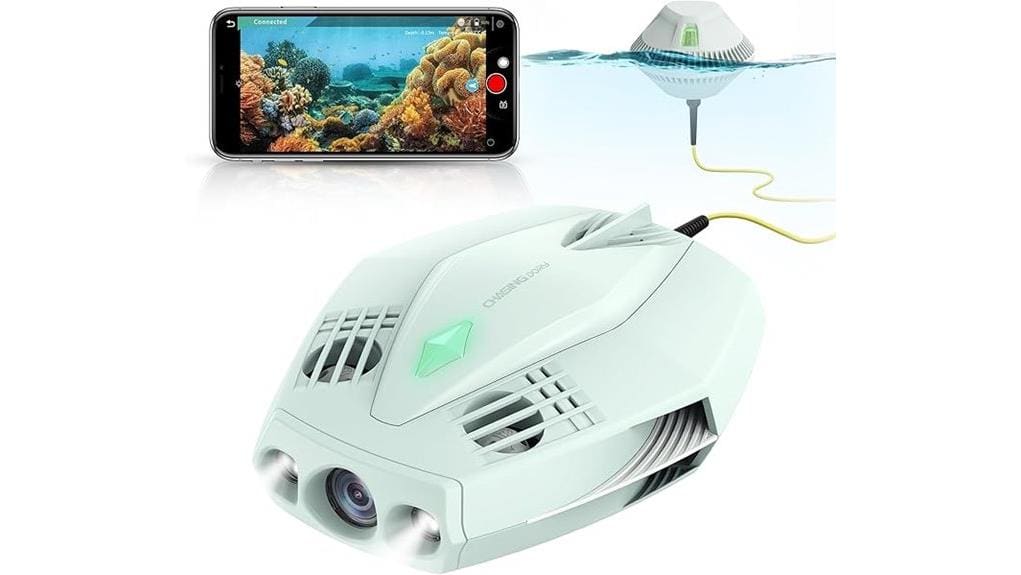

You’ll find the Chasing Dory is a palm-sized, budget-friendly 1080p underwater drone that’s ideal for snorkeling, fishing, pool use, and basic surveys. It records crisp daytime footage with true-color restoration and streams live at 720p, but it lacks image stabilization and struggles in low light. The 49 ft depth rating, 1‑hour runtime, and tethered Wi‑Fi make it an accessible tool for hobbyists, educators, and NGOs, and the app/gamepad controls are simple to master—keep going to see specifics and trade-offs.
Some Key Takeaways
- Palm-sized, lightweight underwater drone offering 1080p recording and 720p live streaming, ideal for casual users and educators.
- True-color processing reduces blue/green cast, but limited low-light performance and no onboard image stabilization.
- 49 ft depth rating and 49 m tether make it suitable for snorkeling, fishing, and pool use but limit deep transects.
- About one-hour runtime per 4800 mAh battery; carry spares and reduce light output to extend sessions.
- Controlled via CHASING GO2 app or gamepad, with dual-operator mode and a floating Wi‑Fi buoy for stable tethered control.
Dory At a Glance: Key Specs, Price Positioning, and Who It’s For
Want a pocketable underwater camera that’s built for casual explorers and hobbyists? You get a palm-sized, waterproof drone (97 x 74 x 36 mm, <2.5 lbs) with 1080p capture, prime f/1.6 lens, 49 ft depth, ~1-hour runtime, Wi‑Fi tether and app/gamepad control. Price positions it as an accessible entry-level tool for snorkeling, fishing and pool use rather than professional cinematography. You’ll appreciate portability and streaming for social sharing; educators and NGOs can use it for beginner education and basic marine conservation surveys. It’s aimed at hobbyists wanting simple deployment and reliable, budget-conscious performance. Consider pairing it with protective housings to extend durability and peace of mind during field use.
Real-World Image and Video Performance: 1080p Footage, Color Restoration, and Low-Light Results
Although the DORY records at 1080p and streams live at 720p, don’t expect professional-grade stabilization or resolution—what you get is clear, usable footage for casual sharing and documentation. You’ll capture crisp detail in well-lit conditions; the CMOS sensor and f/1.6 lens handle daylight and near-surface scenes reliably. True color restoration helps reduce blue/green cast, but expect some post-shot color grading to match reference tones. Low-light performance is limited—headlights aid visibility but introduce hotspots and contrast loss. Lack of image stabilization means occasional motion blur during maneuvers; steady piloting minimizes artifacts for usable clips. For shoots near water, consider using a floating camera strap to keep your camera afloat and protect gear during surface launches and recoveries.
Handling and Control: CHASING GO2 App, Dual-Operator Mode, Wi‑Fi Buoy, and Tether Usability
When you pilot the Chasing Dory via the CHASING GO2 app, controls are straightforward and responsive, with gamepad-style inputs for thrust, tilt, depth lock, and camera tilt that make basic maneuvers intuitive. You’ll find dual-operator mode useful for complex shots: one person drives while the other adjusts tilt and framing. The floating Wi‑Fi buoy maintains a stable link, though buoy latency can appear when range or interference increases; plan movements accordingly. Tether usability is pragmatic—49 m gives reasonable reach but restricts long transects. Battery pairing is simple through the app, with clear status indicators during setup. This compact 1080P explorer is well suited for hobbyists who also use high-resolution drones for aerial photography.
Battery, Storage, and Dive Endurance: Runtime, Memory Options, and Practical Tips to Extend Sessions
Battery life and storage are the two limits you’ll manage on the DORY: its 4800 mAh pack gives about an hour of runtime per charge, and footage is recorded to a user-supplied microSD card (supporting UHS Class 4/V60/C4 speeds). You should follow battery maintenance: store partially charged, avoid extreme temperatures, and cycle monthly to preserve capacity. For memory management, format cards in-camera, use high-quality cards, and swap spares between dives. To extend sessions, plan staged dives, carry a charged spare battery, reduce headlight output when possible, and monitor app telemetry so you retreat with ample reserve. Consider using a dedicated battery charging hub to manage and maintain multiple spare packs efficiently.
Decide If It’s Right for You: Strengths, Trade-Offs, Alternatives, and Recommended Use Cases
If you need a compact, easy-to-use underwater camera for casual dives, snorkeling, fishing, or pool-side social sharing, the Chasing Dory delivers strong value with its palm-sized build, 1080p live streaming, true-color processing, and convenient app/gamepad controls. You’ll appreciate strengths like portability, easy pairing for social platforms, and suitability for hobbyist marine biology observation. Trade-offs include limited depth, one-hour runtime, no stabilization for night photography, and reliance on tethered Wi‑Fi. Consider alternatives (higher-end ROVs for research, action cams on rigs). Buy extra budget accessories, spare batteries, and track software updates to maximize usefulness. Capture stunning aerial photos with complementary drone camera gear to expand your creative toolkit and share diverse perspectives with others using drone cameras.
Some Questions Answered
Does DORY Support External Controllers or USB Tethering for Extended Range?
No — DORY doesn’t support external controllers via USB tethering for extended range. You’ll use remote pairing through the CHASING GO2 app and the floating Wi‑Fi buoy; dual-operator remote pairing is supported for shared control. Wired tethering isn’t provided as a data/USB extension option — the unit relies on its 49 m tether to the buoy and Wi‑Fi link for control and live streaming, with no native USB control pass-through.
Can Firmware Updates Be Applied Over Wi‑Fi or Require Computer Connection?
Yes — you can apply firmware updates wirelessly via the CHASING GO2 app using the Wi‑Fi buoy; the wireless updater delivers OTA packages to DORY. Be aware of OTA limitations: large updates may require stable connection, sufficient battery, and compatible app/device versions, otherwise you’ll need a wired computer method if provided. You should follow manufacturer instructions and back up settings before updating to avoid interruptions or corruption.
Is the Drone Safe for Use in Saltwater Without Extra Maintenance?
Yes — you can use it in saltwater, but you’ll need regular maintenance. Corrosion testing isn’t mentioned as built‑in, so rinse thoroughly with fresh water after each use, dry electronics and connectors, and inspect seals. Consider adding a sacrificial anode or using corrosion inhibitor sprays if you’ll operate frequently in marine environments. Follow manufacturer service and warranty guidance to avoid voiding coverage and to make certain long‑term reliability.
Are Replacement Batteries or Spare Parts Readily Available?
Yes — replacement batteries and spare parts are reasonably available. You can buy battery availability through Chasing’s official store, authorized dealers, and major online retailers; common spares (propellers, seals, Wi‑Fi buoy) are sold separately. You should verify compatibility and warranty coverage before purchase. Keep spare batteries on hand for extended outings and stock critical spare parts to reduce downtime; shipping times and regional dealer presence will affect accessibility.
Can the Camera Record Depth and GPS Metadata With Videos/Photos?
No — the camera itself doesn’t embed GPS embedding or depth stamps directly into recorded video/photos. You’ll get depth and telemetry in the CHASING GO2 app during live sessions and in accompanying log files, but the media files lack onboard GPS/depth metadata by default. If you need embedded stamps, you’ll have to export app logs and overlay them in post, or use third-party software that merges telemetry with your video and images.


