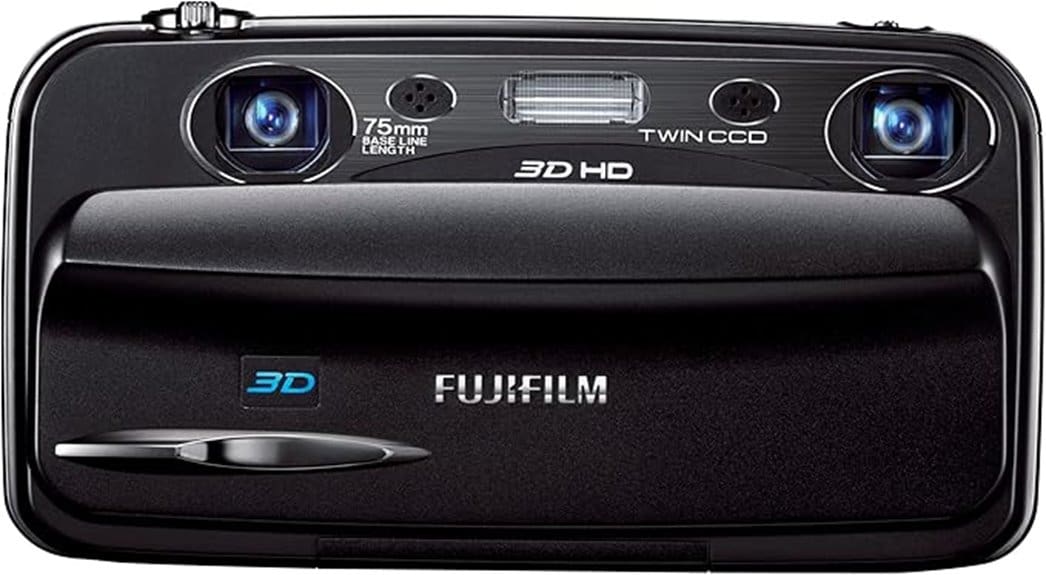

You’ll get authentic glasses-free 3D stills and 720p 3D movies from the Fujifilm FinePix Real 3D W3, with dual CCDs and a 3.5″ autostereoscopic screen that delivers convincing depth in daylight. Expect mild color saturation, JPEG smoothing of fine detail, and a 10MP limit from small 1/2.3″ sensors. Autofocus and optical stabilization help, but low-light performance and battery life are modest. Keep reading to see practical tips, sample strengths, and real-world tradeoffs.
Some Key Takeaways
- Dual-lens dual-CCD design delivers authentic glasses-free 3D stills and 720p 3D movies with convincing depth and natural parallax.
- Image quality is modest: 10MP sensors, mildly saturated JPEGs, smoothed fine detail, and limited low-light performance.
- Contrast-detect AF and optical stabilization work well in daylight but AF hunting and shutter/ISO limits cause issues in dim scenes.
- 3.5″ autostereoscopic LCD provides immediate glasses-free 3D review but loses effect off-axis; mini‑HDMI enables compatible HDTV playback.
- Best for novelty-seekers wanting compact native 3D; modern alternatives offer higher resolution, better low-light and RAW/workflow support.
Fujifilm FinePix Real 3D W3 At a Glance : Specs You Need to Know
Although it looks like a compact point‑and‑shoot, the Fujifilm FinePix REAL 3D W3 packs a unique dual‑lens, dual‑CCD system that lets you shoot both 2D and glasses‑free 3D photos and 720p 3D movies; you’ll get 10 effective megapixels from its 1/2.3″ sensors, a 3x optical zoom (35–105 mm equivalent), and a 3.5″ autostereoscopic LCD for immediate 3D playback. You’ll evaluate specifications like dual lens alignment tolerance, shutter range, ISO up to 1600, and file formats. Note battery life is modest for 3D shooting. Menu layout is straightforward but layered; accessory compatibility includes HDMI, USB, SD/SDHC, and tripod. This camera is ideal for photographers who want to rediscover joy in compact point-and-shoot photography.
Real-World 3D Photo and Video Performance : Image Quality, Autofocus, and Stabilization
How well does the W3 translate its dual‑lens hardware into usable 3D images and motion? You’ll find convincing depth perception in daylight: stereo pairing and 3x zoom yield clear separation and natural parallax. Color fidelity is generally accurate but leans toward mild saturation; JPEG processing smooths fine detail. Autofocus is contrast‑detect and competent in single and AF‑C modes, though hunting appears in low contrast scenes and can induce motion artifacts in 720p movies. Optical stabilization helps handheld shots, but limited shutter range and ISO ceiling reduce low light performance, producing noise and softer 3D definition at higher sensitivities. For maintaining camera and lens clarity during 3D shoots, consider using lens cleaning to protect image quality and avoid scratches on optical surfaces.
Usability and Display : Glasses-Free 3D Screen, Controls, Battery, and Handling
Good daylight 3D capture only goes so far if you can’t review shots on the camera, and that’s where the W3’s glasses‑free 3D display and physical controls come into play. You’ll appreciate the 3.5″ autostereoscopic LCD for immediate parallax review; depth is clear at typical viewing distances but loses effect off-axis. Buttons are tactile and logically placed, aiding one‑handed operation, though small keys can challenge gloved use—glove compatibility is limited. Menu responsiveness is generally good; screens redraw quickly and touchless navigation feels snappy. Battery life is modest for extended 3D shooting, so carry spares for full-day use. Consider customizing your kit with gear ID stickers to keep multiple batteries and accessories organized.
Pros, Cons, and Who Should Buy the W3
If you want one of the few pocketable cameras that shoots and displays true 3D without glasses, the W3 delivers a compelling mix of features: twin lenses and CCDs for authentic stereoscopic stills and 720p 3D movies, a bright 3.5″ autostereoscopic LCD for immediate parallax review, and an all‑in‑camera workflow that outputs 3D to compatible HDTVs via mini‑HDMI. You’ll appreciate convincing 3D capture, compact handling, and HDMI output. Trade‑offs include modest resolution, limited low‑light performance, and aging battery life. Given its niche appeal and uncertain price trajectory, buy only if you prioritize novelty and native glasses‑free 3D. For photographers who need reliable connectivity to modern displays and monitors, consider also investing in a quality micro HDMI cable to ensure consistent 3D output.
Alternatives and Value : Comparable Cameras and Whether the W3 Is Still Worth It
Having outlined the W3’s strengths and compromises, it helps to compare it against comparable options to judge value. You’ll find its glasses-free 3D, compact build, and HDMI output unique, but price competitiveness vs. used compact and mirrorless cameras is weak. Modern alternatives offer higher resolution, better low-light performance, and ongoing software support—important for RAW workflows and firmware fixes. If you prioritize 3D novelty, the W3 still wins; if image quality, upgrade. Lack of aftermarket lenses limits versatility compared with interchangeable-lens systems. Assess whether novelty outweighs practical needs before buying. Also consider whether a high-resolution camera drone might better serve photographers seeking aerial perspectives and cutting-edge sensors.
Some Questions Answered
Does the W3 Support RAW Photo Capture?
No, the W3 doesn’t support RAW capture. You’ll be limited to JPEG files, which constrains advanced post-processing for stereo processing and depth mapping workflows. That means you can’t extract full sensor data or perform heavy tone/color recovery before combining stereo pairs. If you need true RAW for precise depth mapping or professional stereo pipelines, you’ll want a camera offering RAW output or shoot tethered with RAW-capable dual setups for more flexible post-production.
Can Firmware Be Updated by Users?
Yes — you can update the camera’s firmware, but user accessibility is limited. Firmware updates are provided by Fujifilm; you’ll download files to a computer, copy them to an SD card, and follow on-screen install steps. That process is straightforward if you follow instructions, yet risks remain (power loss, incorrect files). Evaluate firmware version notes before updating and guarantee full battery and compatible files to minimize failure and data loss.
Is the Camera Compatible With Modern SDXC Cards?
No — the camera won’t natively support SDXC cards. You’ll need to stick with SD/SDHC media and mind memory speed limits; the W3’s controller was designed for SD/SDHC and may not recognize SDXC capacity or exFAT formatting. If you must use larger cards, you can try card adapters that reformat or present partitions, but compatibility isn’t guaranteed and performance may suffer. Test any setup before important shoots to verify reliability.
Can It Shoot 3D Time-Lapse Sequences?
No — you can’t record native 3D time-lapse sequences directly with the camera’s firmware. You can, however, capture interval shots and create stereoscopic intervalometry workflows externally: you’ll trigger sequences at intervals, then perform depth map processing and alignment on a computer to produce 3D time-lapse output. This requires precise tripod stability, consistent exposure and focal settings, and post-processing to generate stereo pairs and depth maps for final encoding.
Are Replacement Batteries Still Available?
Yes — you can still find replacement batteries for the W3. You’re likely to locate original Fujifilm cells sporadically, but third party batteries are widely available from online retailers and camera shops. Evaluate capacity, reviews, and warranty before buying; some suppliers also offer battery adapters for common newer packs. You’ll want to confirm voltage and connector compatibility, and prefer sellers with return policies to avoid mismatched or low-quality replacements.


