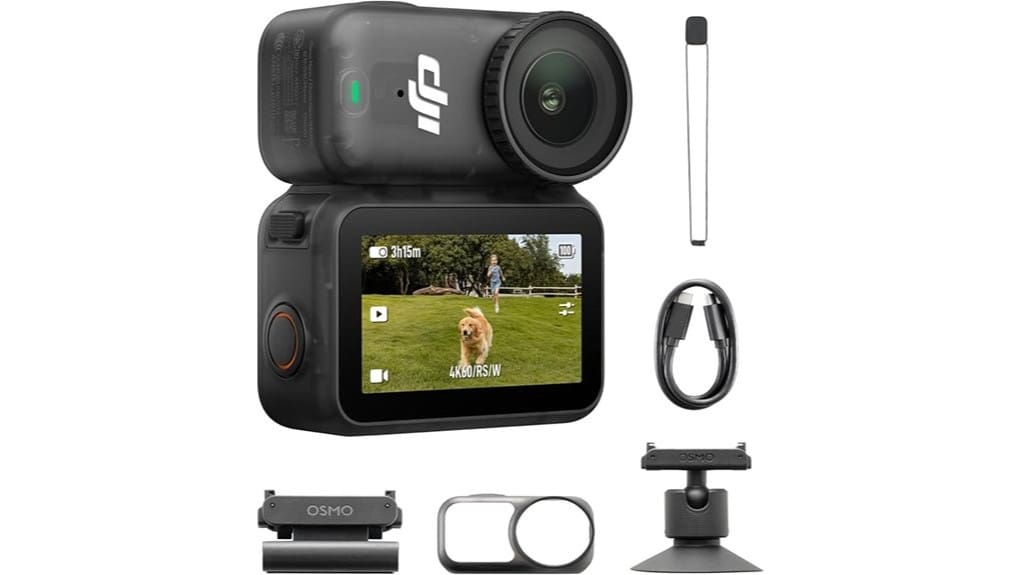
You’ll like the Osmo Nano Standard Combo if you want pocketable 4K/60 footage with a 1/1.3″ sensor, 10‑bit color and D‑Log M for grading. It’s great for drone shooters and POVs thanks to magnetic mounts, solid audio with mic support, and about 200 minutes real battery life. It’s lightweight, waterproof to 10 m, and easy to use, but app access, low‑light performance and extreme stabilization are limited. Keep going to see comparisons, limits and accessory picks.
Some Key Takeaways
- Compact pocketable action camera offering 4K/60 video and a 1/1.3″ sensor for crisp image quality and better low-light performance.
- 10-bit color and D-Log M enable extensive color grading headroom for professional-looking footage.
- Magnetic mounting system and lightweight design provide versatile hands-free POV setups with hat, chest, and Vision Dock compatibility.
- Built-in 64 GB storage, microSD expansion, and ~200 minutes real-world battery life support extended shoots with fast charging.
- Limitations include occasional stabilization issues in extreme motion, reduced low-light performance, and DJI Mimo app requiring direct download from DJI.
Quick Verdict: Should You Buy the DJI Osmo Nano Standard Combo?
While it’s compact enough to carry everywhere, the Osmo Nano Standard Combo still delivers pro-level footage, so you should consider it if you want a pocketable camera that shoots 4K/60 with a 1/1.3″ sensor, 10-bit color and a 143° ultra-wide view. You’ll get impressive image capability in a tiny package, plus useful mounting accessories for hands-free POVs. Battery health is solid with long runtimes and fast charging, but monitor cycles if you rely on long trips. Choose this if you want lightweight, versatile capture with strong footage; skip it if you need professional rigs or advanced stabilization. It’s an excellent match for photographers who also shoot aerial content with high-resolution drones.
What the Osmo Nano Gets Right: Sensor, Video Quality, and Audio Options
Because DJI packed a 1/1.3″ sensor, 4K/60 capability, and 10-bit color into a pocketable body, the Osmo Nano punches well above its size for everyday creators and serious hobbyists alike. You’ll get crisp low-light performance and a wide field of view that keeps subjects detailed without heavy noise. The 10-bit footage and D-Log M give you real headroom for color grading, preserving highlights and midtones thanks to solid dynamic range. Audio is flexible: dual microphones handle ambient capture, and you can plug in external mics for cleaner sound with effective wind reduction in breezy scenes. It also pairs seamlessly with external camera monitors to provide a larger, clearer preview and more precise framing for photographers and videographers.
Real-World Use: POV Mounting, Battery Life, Waterproofing, and Day-to-Day Handling
When you clip the Osmo Nano to a hat, chest mount, or the Vision Dock, its magnetic mounting system makes hands-free POV shooting effortless and stable, letting you focus on the action rather than fiddling with gear. You’ll appreciate lightweight portability and steady 143° views for immersive clips. Battery life reaches about 200 minutes in real use, so full-day outings are realistic with occasional charging. Waterproof testing to 10 m means you can confidently capture swims and splashes; Vision Dock offers only IPX4 splash resistance. Daily handling is intuitive—controls are simple, accessories click on securely, and storage is ample. The Float Grip is a useful accessory for preventing loss and improving buoyancy when shooting around water camera float grips.
What to Watch Out For: App Availability, Storage, and Limitations in Low Light or Stabilization
The Osmo Nano’s reliable waterproofing and long battery life make it great for all-day POV shooting, but there are a few practical limits you should know before buying. App availability is inconsistent: DJI Mimo was removed from Google Play, so you’ll need to download the latest app from DJI’s site, which can be a hassle on some phones. Built-in 64 GB plus microSD expansion reduces immediate worry, but storage limits matter if you shoot lots of 4K/60fps—manage files or carry spares. Expect reduced performance in low light and occasional stabilization issues during extreme motion; plan shots accordingly. Keep your lenses and sensor clean with regular brush cleaning to maintain image quality.
How It Compares and Who It’s Best For: Alternatives, Price Trade-Offs, and Final Recommendation
If you’re weighing the Osmo Nano against rivals, focus on what you value most: image quality, portability, or price. The Nano shines on image quality and portability—1/1.3″ sensor, 4K/60, 10-bit color—while its accessory ecosystem and magnetic mounts beat many pocket rivals. Consider alternatives if you need cheaper action cams or flagship stabilization. Factor in software updates user experience: download DJI Mimo from DJI for best performance. Price trades favor long term resale given built-in storage, durability, and brand support. Recommendation: buy if you prioritize compact, high-quality POV footage; skip if budget or advanced stabilization tops your list. We also recommend pairing the Nano with on-camera LED accessories to brighten low-light shots and enhance color fidelity.
Some Questions Answered
Does the Osmo Nano Support External USB-C Live Streaming?
Yes — you can use external streaming via USB-C, and it’ll handle live feeds reliably. You’ll connect the Osmo Nano to a host device or encoder and stream, but you should check supported live bitrate limits for your setup to guarantee stable quality. It supports 4K capture, though practical streaming may use lower bitrates. You’ll want a compatible app or encoder and a solid connection to avoid dropped frames during live streaming.
Can I Use the Camera While It Charges via Power Bank?
Yes — you can use the camera while it charges via a power bank. The Osmo Nano supports battery passthrough, so it stays powered during long shoots, but power management can limit charging speed and heat may affect performance. For reliable continuous use, choose a high-quality power bank with stable output and fast-charge support. Monitor temperature and battery indicators to avoid interruptions and preserve long-term battery health.
Are Firmware Updates Easy Without the Google Play App?
Yes—you can update firmware without Google Play, but it’s a bit more hands-on. You’ll download firmware files from DJI’s site, use firmware transfer through USB or SD, then follow steps for manual flashing via the device or Vision Dock. It’s straightforward if you follow DJI’s instructions, but expect more steps than an in-app update. If you’re not comfortable, wait for official app support or seek guided help.
Does the Magnetic Mount Interfere With Phone Signals or Compass?
No — the magnetic mount generally won’t cause noticeable magnetic interference with phone signals, but it can affect compass sensors nearby. You should remove the camera or move it a short distance away when using compass-dependent apps, and perform a quick compass calibration after mounting if you notice odd readings. Overall, you’ll get reliable phone performance for calls/data, but be mindful of compass calibration for navigation-sensitive tasks.
Is the 64 GB Built-In Storage User-Replaceable or Removable?
No — the 64 GB built-in storage isn’t user replaceable; it’s fixed inside the unit. You can’t swap a removable module for that internal space. You’ll rely on the built-in capacity plus microSD expansion for more room. For long shoots, plan around the internal 64 GB and carry spare microSD cards; that’s the most practical way to extend recording time without service or internal hardware changes.


