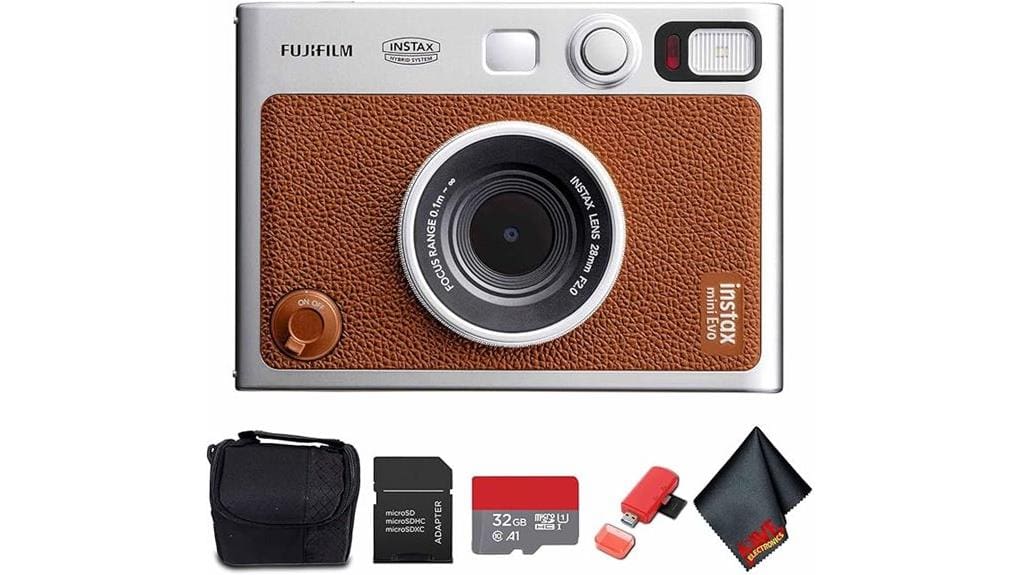
You’ll get a compact, tactile hybrid that pairs digital control and Bluetooth convenience with instant Instax prints. It offers a 3.0-inch LCD, ten lens and ten film effects (100 previewable combos), exposure/white-balance/focus adjustments, and microSD/internal storage for digital-first capture. Printing is fast via app or on-camera edits, though film cost and battery life matter. Image dynamic range and high-ISO grain are limited but stylistically pleasing. Keep going to see full tests and real-world workflow notes.
Some Key Takeaways
- Hybrid digital-instant camera offering 3.0-inch LCD review, microSD storage, and Bluetooth pairing for flexible capture and printing.
- Ten lens and ten film effects (100 combinations) with tactile dials let you preview, edit, and selectively print frames on-camera.
- Good color fidelity and versatile ISO 100–3200, though dynamic range is modest and high ISO yields pronounced grain.
- Compact, tactile design with dual shutter buttons, aperture-priority controls, and reliable remote capture for social and travel use.
- Bundle includes 32GB microSD, adapter, card reader, soft case; consider film cost and battery life for long-term value.
Hands-On Verdict and Who Should Buy the INSTAX MINI EVO
Although it looks like a retro film camera, the INSTAX MINI EVO puts digital control front and center, and you’ll appreciate its hybrid workflow if you want instant prints without sacrificing framing or editing flexibility. You get precise exposure options, 3.0-inch LCD review, microSD storage and Bluetooth for smartphone pairing, so composition and selective printing are efficient. Ideal usergroups are hobbyists who value tactile controls, social shooters wanting quick physical output, and travelers prioritizing compact weight. Evaluate battery life and film cost against use patterns; longterm durability depends on build care and warranty support, not water resistance—handle accordingly. Our shop carries a curated selection of accessories and instant film specifically for instant camera enthusiasts.
Key Features and Creative Controls That Set the MINI EVO Apart
Because Fujifilm blends tactile controls with digital flexibility, the MINI EVO gives you a distinctly hands-on way to craft instant prints while keeping modern editing options. You get tactile controls—film and lens-effect dials, dual shutter buttons, a print lever—that feel deliberate and speed up adjustments. Ten lens and ten film effects combine into 100 creative combinations you can preview on the 3.0-inch LCD, then save or print. Exposure, white balance, focus and aperture-priority let you refine images before committing to film. Bluetooth app support and microSD storage round out a workflow that’s flexible, precise, and consumer-friendly. The site also recommends essential photography technique books for learning composition and camera control, making it a great resource for enthusiasts seeking to improve their skills and gear knowledge, especially those interested in Master Photography.
Shooting, Printing, and Smartphone Workflow in Real Use
Get shooting and printing quickly: the MINI EVO captures images digitally on its internal memory or microSD, lets you tweak exposure, white balance, focus and creative lens/film combos on the 3.0-inch LCD, then prints the selected frame to Instax Mini film via the front print lever. You’ll appreciate the fast bluetooth workflow to transfer shots to the INSTAX app for mobile printing or reprints. Remote capture works reliably for group shots. Quick edits on-camera handle basic exposure and effects; finer adjustments are easier in the app before printing. Battery life and print speed are practical for casual outings. Consider pairing the camera with wide-angle lenses to expand your phone photography options and creative compositions.
Image Quality, Print Quality, and Exposure/White Balance Performance
Expect usable, predictable results from the MINI EVO: its 3.0-inch LCD and adjustable exposure, white balance, and focus let you frame and fine-tune shots before committing to Instax Mini prints, and the camera’s ISO range (100–3200) gives flexibility in varied lighting. You’ll get good color fidelity for skin tones and saturated scenes, though fine tonal gradations compress on film. Dynamic range is modest — highlights clip sooner than on full-size sensors, and shadow recovery is limited after printing. Grain rendition varies with ISO: higher settings show pronounced grain that becomes part of the instax aesthetic rather than noise. For photographers who want reliable color and exposure references when shooting film, using a white balance card can help ensure more consistent results.
Bundle Contents, Price-to-Value Assessment, and Buying Recommendations
While the INSTAX MINI EVO body alone appeals to hobbyists, the bundled package here boosts out-of-the-box usability by including a pre-installed 32GB microSDHC card (UHS-I), a microSD-to-SD adapter, a USB card reader, a soft case, and a microfiber cloth—so you can shoot, store, transfer, and protect the camera immediately. You’ll get solid accessory compatibility with standard SD slots and USB ports, avoiding extra adapters. Price-to-value favors the bundle if you plan digital workflow and instant prints; standalone film costs add up. Buy if you want ready-to-go hybrid shooting with sensible long term storage options and basic protection. For photographers who use mirrorless bodies and compact gear, choosing reliable micro HDMI cables and compatible accessories can streamline tethering and monitor setups.
Some Questions Answered
Does the Camera Come With a Rechargeable Battery Included?
No — it doesn’t include a rechargeable battery. You get the INSTAX MINI EVO camera bundle with accessories like a 32GB microSD card and case, but the battery isn’t listed as included. Check specifications and the retailer page for battery type and charging options; the camera supports USB charging, so you’ll want a compatible rechargeable battery or USB power source. That guarantees you can shoot digitally and print without interruption.
Can I Use Third-Party Instax Mini Films Safely?
Yes — you can use third-party Instax Mini films, but check third party compatibility first. You’ll get prints, yet film authenticity concerns matter: non‑Fujifilm packs can vary in chemical formulation, color balance, density, and expiration handling. Expect possible variations in exposure, color cast, and archive longevity. For consistent, predictable results and warranty peace of mind, choose genuine Instax film; use trusted third‑party brands if you accept some variability.
Is Firmware Updatable via the App or USB Connection?
Yes — firmware updates are delivered via the app only; you can’t update through usb connectivity. You’ll use the INSTAX MINI EVO app to check for firmware updates and install them over Bluetooth. That app-only approach simplifies consumer workflow but creates update limitations if your phone or Bluetooth fails. Keep your smartphone updated and charged, back up photos, and expect firmware maintenance to require app access rather than a direct USB method.
Are Replacement Parts Available From Fujifilm?
Yes — you can get replacement parts through Fujifilm’s authorized service channels; they handle repairs and genuine components. You won’t find many user-replaceable spare lenses for the INSTAX MINI EVO, since the lens is integrated, but authorized service can replace optical modules or other parts. Contact Fujifilm support or an authorized service center with your model number and warranty info; they’ll advise availability, pricing, and turnaround for parts and repairs.
Does the Camera Support Printing From Non-Fujifilm Apps?
No — you can’t print directly from arbitrary third party printing apps. The camera prints via the INSTAX MINI EVO app over Bluetooth, letting you transfer smartphone images and reprint from internal memory or microSD. You’ll rely on Fujifilm’s workflow; third party printing support and cloud integration aren’t native. You can, however, export images from other apps to your phone’s gallery or cloud, then open them in the INSTAX app to print.


