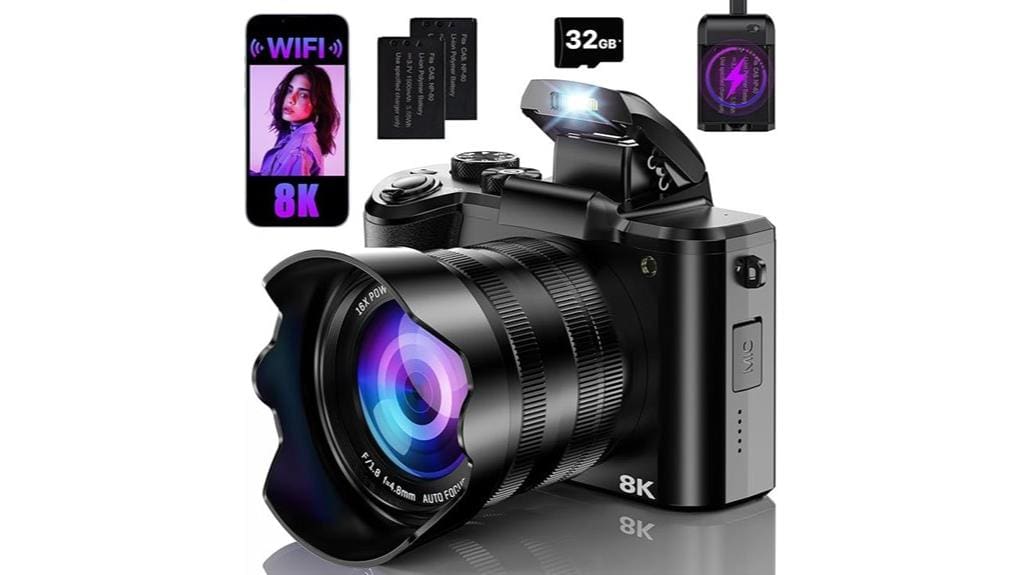

You’ll find the FlyFrost DC226 marketed as an “8K/88MP” camera, but don’t expect true large‑format imaging: it uses a 1/4‑inch 12MP photosite array with heavy upscaling, aggressive JPEG processing, and limited dynamic range, so fine detail, low‑light performance, and synthetic depth effects are constrained. Video files record 8K containers yet rely on interpolation and heavy compression; stabilization and AF are digital and situational. If you want compact specs over real sensor performance, it works—keep going to see specifics.
Some Key Takeaways
- Marketed as “8K” and “88 MP,” but native sensor is a 1/4″ 12MP chip with heavy interpolation and processing.
- Image detail limited by small sensor and fixed lens; upscaling yields artificially sharpened, not true high-resolution photos.
- JPEG-only output, aggressive denoise/sharpen, and inconsistent color profiling cause banding, oversaturation, and reduced dynamic range.
- Video records 8K but small sensor, heavy compression, and digital stabilization limit usable detail and low-light performance.
- Best for beginners/vloggers needing a portable, spec-driven camera; use controlled lighting, extra batteries, and higher-capacity SD cards.
Is the FlyFrost DC226 True 8K for Photography or Marketing Copy?
While FlyFrost markets the DC226 as an “8K digital camera,” you should treat that claim with caveats: you’ll need to separate marketing vs.technical reality. The body advertises 8K video capture and an 88 MP still spec, yet the photo sensor is a 1/4-inch CMOS with a 12 MP photosensitive chip — sensor reality limits native detail, dynamic range, and noise performance. The 8K label reflects video encoding capability and interpolation rather than true large-format imaging. You should expect digitally enhanced upscaling, aggressive processing, and constrained low-light performance; treat marketing terms skeptically and verify sample images. Product shots for online stores often benefit from using a light box photo tent to control lighting and show true detail.
What the DC226’s Key Specs Mean for Real-World Photos
Because the DC226 combines a tiny 1/4-inch, 12MP photosensitive chip with heavy digital processing and upscaling claims, you should expect its real-world stills to differ markedly from the advertised “88 MP” number: resolution, dynamic range, and noise performance will be constrained by sensor size and pixel pitch, so fine detail and low-light fidelity will lag true large-sensor cameras despite software sharpening and interpolation. You’ll find depth maps are algorithmic, useful for segmentation but coarse and prone to edge haloing. Dynamic range is limited, reducing highlight/headroom. Subject isolation relies on software, so low light performance and bokeh look synthetic rather than optical. Proper sensor maintenance and cleaning techniques can help maximize whatever native image quality the small sensor provides.
How Image Quality Performs: Resolution, Color, and Noise
Given the sensor and processing trade-offs noted above, you’ll see the DC226 produce images that look artificially sharpened and upsampled rather than genuinely high-resolution. You’ll encounter the megapixel myth: 88 MP numbers stem from interpolation of a 12 MP photosite array, so fine detail is limited by a 1/4-inch sensor and fixed lens optics. Color profiling is inconsistent; automatic white balance and JPEG-only output force aggressive in-camera tuning, yielding oversaturated tones and banding in subtle hues. Noise control uses heavy denoise and sharpening, preserving midtones but smearing shadows and fine texture under low light. Keep your camera sensor pristine with regular cleaning using sensor swabs to avoid spots and artifacts that degrade image quality.
Video, Stabilization, and Slow Motion: Is 8K Usable?
If you expect native, practical 8K footage from the DC226, you’ll need to temper that expectation: the camera records 8K UHD files, but the 1/4-inch CMOS and heavy in-camera processing limit usable detail and low-light performance. You’ll get impressive resolution numbers, yet fine detail softens and noise rises above ISO thresholds. Motion stabilization relies on 6-axis digital anti-shake — effective for minor handheld drift but not a substitute for optical or gimbal stabilization during pans. Slow-motion modes and 60fps cap reduce temporal aliasing, but bitrate considerations bite: compressed MP4/AVI files show macro-blocking and banding under complex motion. Consider pairing the DC226 with a camera slider to achieve smoother, more professional-looking motion shots.
Autofocus, Shooting Modes, and Continuous Shooting in Practice
While the DC226 packs advanced autofocus modes and fast burst rates, you’ll notice its practical performance blends strengths with clear limits: the hybrid AF (contrast/phase/eye/face detection) locks quickly on high-contrast subjects and faces, but with only a single selectable AF point and a basic AF-S mode the system struggles to track erratic motion or small, fast subjects reliably. You’ll get predictable autofocus behavior for portraits and static scenes, with reliable face/eye priority. Shooting modes cover Auto, Program, Manual and scene presets usefully, but lack nuanced customization. Burst performance (up to 30 FPS) is impressive numerically yet limited by buffer depth and JPEG throughput. For fisheye enthusiasts, pairing the DC226 with specialized optics can unlock creative distortion effects that emphasize wide-angle perspectives.
Battery, Storage, Connectivity, and Portability for Vloggers
After testing autofocus and burst behavior, you’ll find battery life, storage, connectivity and portability make or break the DC226’s usefulness for vloggers. You get two rechargeable lithium‑polymer cells and a cradle charger; real‑world 8K recording and 30 FPS bursts drain batteries quickly, so you’ll swap often. SD compatibility is solid—single slot, 32 GB included, 120 MB/s write rating—but large 8K files demand higher capacities and backups. Wi‑Fi wireless transfer and iSmart DV2 app work reliably for quick clips, though transfer speeds lag compared with wired USB. The camera’s travel size is excellent for handheld and gimbal use. For longer shoots consider carrying USB camera battery chargers to keep spare batteries powered on the go.
Who Should Buy the DC226 : Use Cases, Limitations, and Alternatives
For vloggers and casual creators prioritizing ultra‑high resolution and portability, the DC226 delivers attractive specs—8K/4320p capture, an 88‑MP still mode, dual lenses, and built‑in Wi‑Fi—in a compact package you can toss on a gimbal or carry all day. You should consider it if you’re a Beginner vloggers or Travel photographers who value resolution, simple touchscreen controls, and long battery life. Limitations: small 1/4″ sensor, no optical zoom, heavy JPEG compression, limited low‑light performance, and single SD slot. Alternatives: mirrorless entry models for low‑light and interchangeable lenses, action cams for weatherproofing and stabilization. This camera pairs well with essential mirrorless camera accessories like extra batteries and compact gimbals for better handling.
Some Questions Answered
Does the DC226 Include a Protective Carrying Case in the Package?
No — the DC226 package doesn’t include a protective carrying case. You get the camera, two batteries, a charging cradle and a 32 GB SD card, but not a protective sleeve or custom inserts. You’ll need to buy a case separately if you require drop protection or organized storage with custom inserts. For transport, choose a padded case rated for electronics and sized for dual-lens compact cameras to guarantee secure fit and shock absorption.
Can the Camera Charge Both Batteries Simultaneously on the Cradle?
Yes — you can charge both batteries simultaneously on the cradle. The cradle design accommodates the two rechargeable lithium‑polymer batteries and supports simultaneous battery charging, providing efficient battery charging for extended shoots. You’ll want to verify proper seating and power connection; charging indicators show individual battery status. Note the package includes two 27.6 g batteries and a cradle charger, but charging speed may vary with ambient temperature and power source quality.
Is There Any Bundled Editing or Desktop Software Included?
No — the package doesn’t include a bundled editing suite. You get the camera, batteries, charging cradle and a 32 GB SD card, but no proprietary desktop integration software. You’ll rely on third‑party editors or the iSmart DV2 mobile app for transfers and basic adjustments. For full 8K workflow and 88 MP files, plan desktop software that supports high bit‑depth JPEGs and large resolutions; consider dedicated RAW/codec tools for best results.
What Warranty Service Process and Customer Support Contact Are Available?
You file warranty claims through FlyFrost’s support channels: email, phone, or the website’s service portal. You’ll need proof of purchase, serial/DC226 info, and failure details; they authorize repair, replacement, or return under a one‑year warranty. Expect remote troubleshooting first, then RMA instructions and prepaid shipping for covered units. Keep records of all communications; escalate via support channels if responses are slow or if you need warranty enforcement.
Are There Firmware Updates and How Are They Installed?
Yes — FlyFrost publishes a firmware roadmap and provides firmware updates. You’ll get updates via Wi‑Fi (over‑the‑air through the iSmart DV2 app) or by downloading firmware files to your SD card/PC and installing via USB. Updates fix bugs, improve autofocus and add features; follow release notes, make sure batteries charged and don’t interrupt flashing. You’ll find firmware roadmap schedules and update methods on FlyFrost support pages and release announcements.


