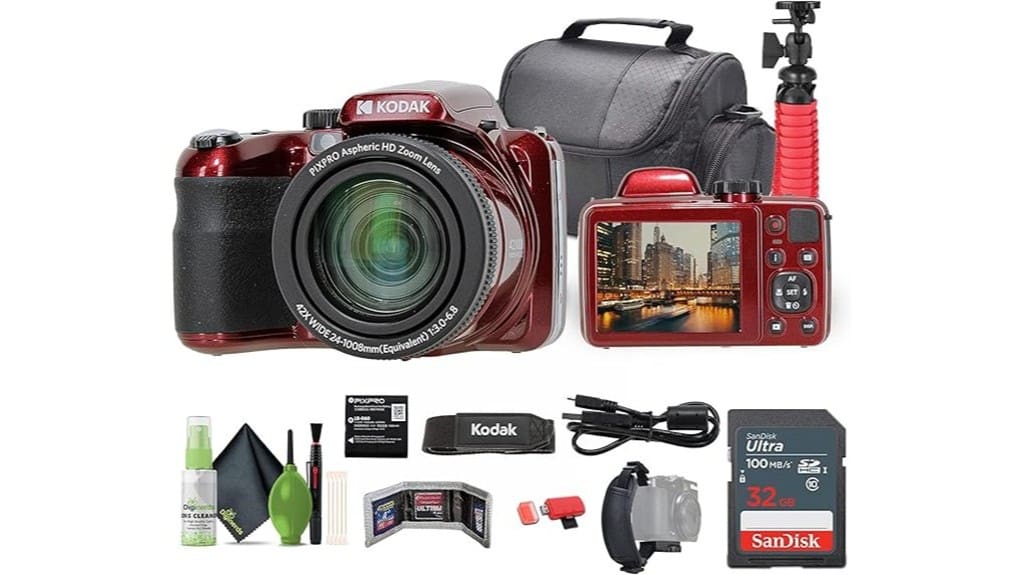
You’ll get a ready-to-shoot 20MP superzoom kit that’s ideal for casual vloggers and travel shooters who want long reach and useful accessories without paying for pro-level low-light or fast-AF performance. The bundle includes a red AZ425, 32GB card, flexible tripod, padded bag, card reader and cleaning kit so you’re set for quick outings. Expect pleasant JPEGs, 720p vlogs, and notable softness/noise at high ISO and long zoom—keep a tripod handy to learn why.
Some Key Takeaways
- 20MP 1/2.3″ sensor delivers good JPG colors but detail softens above ISO 400, limiting low-light image quality.
- 24–1008mm (42x) zoom offers extreme reach but sharpness, contrast, and focus degrade at long focal lengths.
- 720p video with stabilization is vlog-ready, though AF hunts and compression can cause softness and blockiness.
- Bundle includes red AZ425, 32GB card, flexible tripod, padded bag, card reader, cleaning kit, and vlogger accessories.
- Best for casual travelers and beginner vloggers seeking convenience and value; avoid if you need 4K, fast AF, or larger-sensor performance.
How the Kodak PIXPRO AZ425 Bundle Is Packaged and What’s Included
Unpack the Kodak PIXPRO AZ425 bundle and you’ll find everything needed to start shooting right away: the red AZ425 camera, a 32 GB memory card preinstalled, a flexible vlogging tripod, a padded camera bag, memory card wallet, USB card reader (SD/microSD), hand strap, cleaning kit, and extra vlog-focused accessories. You’ll notice a tidy packaging presentation: components are snug, labeled, and protected. The unboxing experience feels organized and consumer-friendly, minimizing setup friction. Accessories suit travel and vlogging, though materials lean budget. Overall, the bundle offers clear value for a starter creator, prioritizing practicality over premium finishes. The included tripod and accessories align with Perfect Tripods’ focus on gear that enhances stability and portability for photographers and videographers, making it a sensible choice for those looking to improve camera stability.
Real‑World Image and Video Performance: 20MP Photos and 720p Vlogs
While the AZ425’s 20MP sensor promises detailed stills, real-world results reveal trade-offs you should know: images show good color and decent resolution at base ISO, but fine detail softens quickly as noise suppression rises past ISO 400. You’ll appreciate dynamic color rendering and pleasant JPEG tones for social sharing, yet noise handling becomes aggressive in dimmer scenes. Video at 720p is usable for vlogs; motion stabilization helps handheld clips, though contrast-detect AF hunts occasionally. Pay attention to bitrate impact on clarity—higher motion and compression reveal blockiness. Overall, capable for casual vlogging with mindful exposure and framing. Consider using proper lens cleaning and maintenance to preserve image quality and reduce flare from dust on the glass, especially for lens cleaning routines.
Zoom, Stabilization, and Low‑Light Behavior: Testing the 24–1008mm Lens and OIS
Push the AZ425’s 24–1008mm zoom and OIS to their limits reveals a camera that’s impressively versatile for its class but shows clear compromises: the 42x reach delivers useful framing from wide 24mm landscapes to distant 1008mm telephoto, yet sharpness and contrast drop noticeably at long focal lengths, and the optical stabilization only partly masks handshake—especially beyond ~300mm equivalent where tripod use becomes advisable. You’ll notice focus softness and chromatic fringing at extreme tele, occasional zoom creep when angled down, and stabilization artifacts during panning. In low light the small 1/2.3″ sensor forces higher ISO, limiting usable detail. Consider pairing the camera with a heavy‑duty tripod for improved stability and framing at long focal lengths.
Vlogger‑Ready Features and Extras in the Bundle (Tripod, Mic Options, Storage)
The AZ425’s bundled extras make it genuinely vlogger-friendly right out of the box: the flexible vlogging tripod and camera bag mean you can start shooting stable, framed clips on location, and the included 32GB card plus USB card reader cover basic storage and transfer needs. You’ll appreciate the compact tripod’s grip and quick setup; the bag keeps accessories organized. There’s a practical memory card wallet and cleaning kit. Mic options are limited—no shoe-mounted mic—but the bundle supports using a lapel microphone via third-party adapters. Battery backup is essential; bring spare rechargeable cells for long sessions since runtime’s modest. For tabletop shooters, the compact tripod is especially handy for small-scale setups and sturdy support.
Who Should Buy the AZ425 Bundle and When to Choose a Different Camera?
If the bundled tripod, storage, and basic vlogging tools fit your immediate needs, the AZ425 is a sensible grab for casual travel shooters and beginner vloggers who want long reach without swapping lenses. You’ll appreciate 42x zoom, 24mm wide-angle, and stabilisation for sightseeing and handheld clips. Choose it if you’re a budget vlogger prioritizing convenience, low cost, and a ready-to-go kit over low-light prowess or interchangeable lenses. Pick a different camera if you need 4K video, larger sensor performance, fast autofocus, weather sealing, or professional audio inputs—those demands exceed the AZ425’s compact, entry-level design. For mirrorless camera enthusiasts looking to expand later, consider essential gear that complements your camera and shooting style.
Some Questions Answered
Does the Camera Support External Microphones via a 3.5mm Jack?
No — the camera doesn’t offer a 3.5mm external mic input. You’ll need to rely on its built-in microphone or use workarounds. There’s no hot shoe for mounting a dedicated shotgun mic either, so you can’t attach typical on-camera audio gear directly. If you want better sound, you’ll have to record audio separately with an external recorder and sync in post, or use an external rig that captures audio independently.
Can the AZ425 Shoot RAW Files for Advanced Editing?
No — the AZ425 doesn’t offer RAW support; it only saves JPEGs. That limits your Advanced processing options because you’ll lack the uncompressed sensor data photographers use for heavy tonal, color, and noise corrections. You can still tweak JPEGs for social or travel use, but if you need maximum latitude for exposure recovery, fine-detail sharpening, or high-end color grading, you’ll want a camera with native RAW output instead.
What Is Official Battery Life (Shots/Video Minutes) per Charge?
The official battery longevity is modest: Kodak specifies roughly 260 shots per charge and around 90–100 minutes of continuous 720p video recording. You’ll find the frame capacity for burst shooting limited by buffer and battery; expect fewer frames per charge during heavy use (continuous autofocus, flash, zoom). For longer sessions carry spare batteries or portable power; real-world numbers will drop with temperature, LCD use, and frequent zooming or stabilization.
Is There Built‑In Wi‑Fi or Bluetooth Connectivity for Transfers?
No — the camera doesn’t offer built‑in connectivity like Wi‑Fi or Bluetooth, so you won’t get native wireless transfers. You’ll need to use the included 32GB card with a USB card reader or connect the camera to your computer via USB for file copying. That limits quick phone-to-camera workflows, but wired transfers remain reliable and fast for managing large 20MP photos and MP4 video files.
Can the Camera Charge via USB While in Use?
No, you can’t charge via USB while shooting — the camera lacks USB charging capability and doesn’t support battery passthrough. You’ll need to use the removable rechargeable battery and swap to a charged spare or use an external charger. For extended vlogging sessions, carry extra batteries or a powered external recorder; relying on USB charging mid-use won’t work, so plan around the camera’s limited charging capability and battery management.


