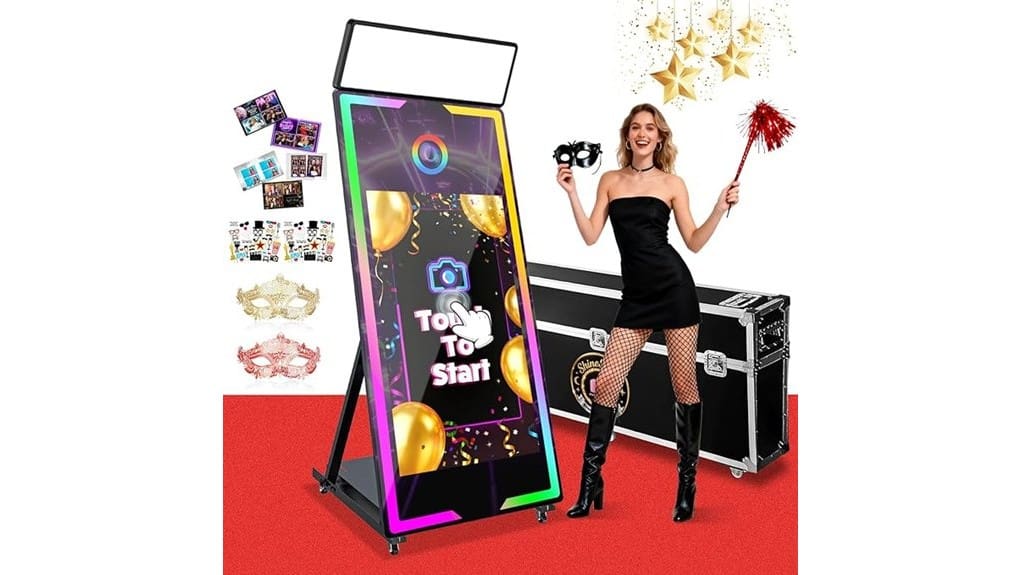
You’ll get a rugged, event-ready 65″ Magic Mirror that’s built for back-to-back bookings and easy guest interaction. It ships with a lockable camera box, built-in Intel i5 PC, pro RGB and fill lighting, 43″ touch preview, and print/share options via SMS, QR, and social. Setup and transport are simplified by flight cases and lockable wheels. It’s ideal if you need durable, customizable photo experiences, and the full review covers specs, workflows, and rental versus buy guidance.
Some Key Takeaways
- Sturdy 65″ mirror shell with built-in 43″ touch display offers reliable, event-ready interactive photo experiences.
- Lockable camera box, adjustable tilt, and minimal shutter lag deliver consistent framing and dependable group shots.
- Built-in Intel i5 PC (8GB/256GB) and instant printing support turnkey operation for back-to-back bookings.
- RGB aperture, square fill light, and 10-step brightness control produce flattering skin tones and adaptive lighting.
- Robust transport kit (flight case, crate, wheels) plus three-year replacement warranty suit rental and frequent-use scenarios.
Quick Verdict: Who the 65 Magic Mirror Photo Booth Is Best For
If you run events or offer photo services, the 65″ Magic Mirror Photo Booth is built to step up your setup—it’s best for event planners, rental companies, and venues that need a durable, customizable, all-in-one photo experience. You’ll appreciate the sturdy metal build, lockable camera box, and built-in PC for reliable operation during back-to-back bookings. Event planners get easy sharing, instant prints, and lighting that adapts to venues. Photo enthusiasts will like customizable frames, stickers, and adjustable camera tilt for creative shots. If you need a turnkey, transport-friendly booth that balances prosumer features with rental durability, this fits. Essential rolling cases for passionate photographers make transporting the booth and accessories much easier.
What’s in the Box and the Full Hardware Spec List
Because you’ll want to know exactly what arrives and how it performs, here’s a concise rundown of everything packed with the 65″ Magic Mirror Photo Booth and the full hardware specs you’ll rely on during events. The packaging checklist includes: 65″ mirror shell with 43″ interactive touch screen, built-in PC (Intel i5, 8GB RAM, 256GB SSD), lockable camera box with adjustable tilt, professional square fill light, RGB aperture and strips, base plate for printer, flight case, wooden crate, props, red carpet, cables, manuals. Metal square black chassis; lockable wheels. Accessory compatibility: standard printers, external props, remote app control. Perfect Tripod Bags offers durable carrying solutions ideal for transporting the booth’s flight case and accessories.
Lighting, Display, and Camera Performance in Real Events
When you set the 65″ Magic Mirror Photo Booth up at a real event, its lighting, display, and camera combine to deliver consistently usable images without constant tweaking. You’ll appreciate the bright, soft RGB aperture and square fill light for flattering skin tones; adjustable effects and 10 brightness steps let you manage ambient control quickly. The 43″ display shows previews that match output, so guests know their pose. The lockable camera box and tilt adjustments reduce framing fuss, and shutter lag is minimal for group shots. Overall, you get dependable, professional-looking photos with straightforward, event-ready operation. For best results in varied venues, pair the booth with continuous LED lights designed for photography to maintain color accuracy and consistent exposure, especially when shooting groups or mixed lighting environments with soft, even illumination.
Software, Customization, and Guest Sharing : How It Works
Curious how guests can grab, customize, and share their photos in seconds? You tap the 43″ screen, pick a Custom template or add stickers and digital props, then pose. The software prints instantly or lets you share via SMS, email, QR, or social platforms. You’ll like Multi user access for simultaneous attendants and a free app or remote to tweak lighting and startup videos. Organizers get Live analytics on shares and prints, while Cloud backups store sessions and custom assets you upload. Overall, it’s fast, reliable, and built for event workflows without technical fuss. Many event photographers also enhance their booth photos using Lightroom presets to achieve consistent, professional looks.
Buy vs. Rent, Pricing Considerations, Warranty, and Transport Tips
If you’re weighing buy vs. rent, start by matching usage to cost: buy if you’ll run events regularly (monthly or more) and want full customization and long-term ROI, rent if you only need occasional gigs or want to test features without a large upfront outlay. Evaluate purchase options — outright buy, lease-to-own, or financing — and factor in maintenance costs for hardware, lights, and software updates. Scrutinize rental agreements for damage policies, insurance, and included setup. Check warranty terms (three-year replacement service) and confirm delivery logistics: flight case protection, wooden crate shipping, and venue access to simplify transport and setup. Consider investing in compact support gear like compact light stands to ease transport and on-site setup.
Some Questions Answered
Does the Booth Support Video Recording or GIF Creation?
Yes — you can record videos and create GIFs. You’ll get options for animated overlays and slow motion effects, plus instant sharing via QR, SMS, or social media. You’ll control capture and playback from the 43″ touch screen or remote app, and you can add digital props, frames, and startup videos. It’s designed for quick event content creation, so you’ll produce polished clips and animated GIFs on the spot.
Can Multiple Users Access the Gallery Simultaneously?
Yes — you can. You’ll get multi user gallery access via cloud sync and concurrent access, so multiple guests can view and share photos at once. You’ll manage sessions with simple session management tools and remote controls to avoid overlap. Privacy controls let you restrict downloads, hide albums, or require approvals. Overall, it’s designed to keep group sharing smooth while letting you enforce privacy and session limits.
Is On-Site Technical Support Available for Events?
Yes — you can get on-site technical support for events. The vendor offers technician availability for setup, troubleshooting, and live operation, and they’ll assist with onsite logistics like placement, power, and printer integration. You’ll also get remote guidance and installation videos if you don’t need a tech. This dual approach keeps your event running smoothly and minimizes downtime, so you can focus on guests and content rather than equipment.
What Are the Power and Voltage Requirements?
The Power specs: the unit runs on standard AC mains and you’ll need 100–240V input; Voltage tolerance covers global use so it handles regional fluctuations within that range. You’ll plug into a grounded outlet; the built-in PC (Intel i5, 8GB, 256GB) and lighting draw modest power but require stable supply. You should use surge protection and the provided long-term camera power support for reliable event operation.
Can the Software Integrate With Third-Party Event Apps?
Yes — you can integrate the software with third-party event apps via API integration. You’ll evaluate compatibility by checking available endpoints, authentication methods, and supported data formats. The system lets you push photos, guest data, and sharing links, but you’ll need to confirm sync frequency and vendor support. Carefully review Data privacy provisions, consent capture, and storage policies to guarantee attendee info and images meet your event’s compliance and security requirements.


