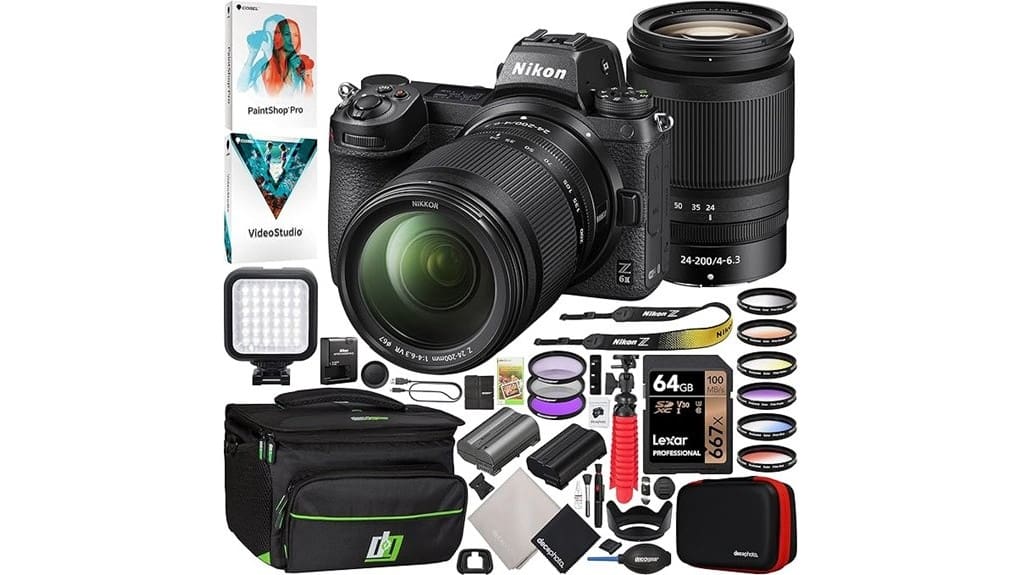
You’ll get a ready-to-shoot Nikon Z 6II kit that pairs a 24.5MP full-frame BSI sensor and dual EXPEED 6 processors with a versatile 24–200mm Z lens, dual CFexpress/XQD + UHS-II SD slots, spare EN-EL15c power, and essential accessories. Expect reliable eye/animal AF, 14 fps bursts, and 4K/60p internal capture with manageable heat for typical projects. The bundle trims setup time and risk; keep going for deeper specs, workflows, and alternatives.
Some Key Takeaways
- Nikon Z 6II offers 24.5MP BSI full-frame sensor with strong dynamic range and neutral, predictable color for consistent post-processing.
- Dual EXPEED 6 processors enable reliable autofocus, eye/animal detection, and 14 fps continuous shooting for decisive moments.
- 4K/60p full-pixel internal recording and Full HD 120p slow-motion suit most video projects without external recorders.
- Bundle includes Z 24–200mm lens, dual-card support, spare EN-EL15c battery, filters, tripod, and LED light for field-ready shooting.
- Recommended for weddings, travel, wildlife, and hybrid creators; consider Z7 II or primes/used glass if more resolution or reach is needed.
What the Nikon Z 6II Bundle Includes and Why It Matters
The Z 6II bundle brings a ready-to-shoot kit that pairs Nikon’s full-frame mirrorless body and 24.5MP sensor with a versatile NIKKOR Z 24–200mm F4–6.3 VR lens, dual-card media support, spare battery and charger, essential filters and cleaning tools, tripod/grip, LED hot-shoe light, and software—so you can shoot stills, action, low-light scenes and video straight out of the box without sourcing critical accessories. You’ll get reliable dual-slot workflow, EN-EL15c plus compatible spare for extended battery longevity, and standardized mounts/filters enhancing accessory compatibility. The bundle reduces setup time and guarantees field-ready power, storage, and support. It’s an ideal package for mirrorless camera enthusiasts who want curated essential gear to get shooting immediately.
Image Quality, Autofocus, and Performance: Lab Specs vs Real-World Results
Having a complete kit on hand makes it easy to evaluate how the Z 6II performs under real shooting conditions versus what the lab numbers promise. You’ll see the 24.5MP BSI sensor deliver measured dynamic range that holds shadow detail at low ISO while maintaining highlight headroom. Color fidelity remains neutral and predictable across presets, aiding consistent post workflows. Dual EXPEED 6 processors translate to responsive subject tracking with adjustable sensitivity and reliable eye/animal detection in mixed lighting. Shutter durability and 14 fps burst capability feel robust in sustained use, matching rated specs with minimal buffer-induced slowdown. For enthusiasts and camera fans, this bundle approach also makes it simple to compare lenses, accessories, and other gear from the same Gear Guide.
Video Features and Workflow: 4K/60p, Slow Motion, Media and Battery Considerations
Because you’ll often prioritize frame rate and bitrate when shooting motion, the Z 6II’s 4K/60p full-pixel readout and 4K/30p/Full HD 120p options directly shape your capture workflow and media needs. You’ll plan 4K workflows around codec, bit depth, and crop-free framing; internal UHD recording at high bitrates reduces reliance on external recorders for most projects. Use the CFexpress/XQD slot for sustained write speed and UHS-II SD for overflow clips. Monitor heat and clip duration in prolonged 4K/60p takes. Practice Battery management: carry spare EN-EL15c/EN-EL15 batteries, use USB-C charging, and rotate batteries to avoid mid-shoot downtime. Consider using color calibration tools to maintain consistent color across devices and editing environments for reliable results, especially when working in mixed media workflows and varying lighting conditions with color calibration.
Who This Bundle Is Best For: Use Cases (Wedding, Wildlife, Travel, Video Creators)
When you need a single, versatile kit to handle fast-paced events, low-light ceremony work, wildlife action, and high-resolution video, this Nikon Z 6II bundle delivers a balanced mix of speed, focusing, and optics tailored to those demands. You’ll appreciate dual EXPEED processors, 14 fps burst, and reliable eye/animal detection for wedding photographers capturing decisive moments and wildlife enthusiasts tracking subjects. The 24–200mm range, in-body performance, and low-light AF to −4.5 EV suit travel and event shoots. Video creators get full-pixel 4K60 options and slow-motion Full HD. Dual card slots and spare battery support extended shoots. Consider pairing this kit with a dedicated camera shoulder bag to keep gear organized and protected on the move.
Value Analysis and Buying Recommendation: Price, Warranty, Alternatives to Consider
Those use cases help define what you should expect to pay and what protections matter for long shoots and travel. You’ll evaluate this bundle by price comparison against body-only and single-lens kits; the included 24–200mm, extras, and accessories tilt value toward professionals needing versatility immediately. Factor warranty implications: Nikon USA authorization gives full coverage and faster service, lowering downtime risk. If budget is tight, consider buying a Z6II body with a prime lens or used glass; if you need robust telephoto or CFexpress speed, compare Z7 II or third-party options. Buy if bundled savings exceed incremental needs. Pelican cases are a popular choice for photographers who need rugged, protective transport for gear; consider hard-shell protection when planning travel and storage.
Some Questions Answered
Does This Bundle Include a Screen Protector Preinstalled?
Yes — the bundle includes screen protectors, but they’re not preinstalled. You’ll need to apply them yourself to gain anti glare coating and fingerprint resistance benefits. Installing the protector won’t void warranty coverage as long as no damage results from application; keep original packaging and follow Nikon’s warranty terms. Use included tools and a clean environment to avoid dust and bubbles, ensuring ideal adhesion and screen performance.
Are Third-Party Lenses Fully Compatible With Z6II Autofocus?
Yes — many third-party F-mount lenses will work on your Z6II via adapter compatibility, and native Z-mount third-party lenses generally offer full AF support. However, AF performance varies: when using adapters (FTZ/third-party) you may see slower tracking, occasional hunting, or limited eye/animal detection. Always check specific lens+adapter combos for firmware updates and focus confirmation behavior to guarantee reliable autofocus and full feature interoperability.
Can the Camera Charge via Power Bank While Shooting?
Yes — you can charge the battery via a power bank while shooting using the camera’s USB port, but it’s not true USB passthrough. The camera supports battery charging over USB (battery charging) with the EN-EL15c via the USB-C power input and EH-7p adapter. You’ll get continuous power during operation, yet some power banks may not supply stable current for high-draw tasks like 4K/60p or long timelapses.
Is the LED Hot-Shoe Light Dimmable or Color-Adjustable?
Yes — the LED hot-shoe lighting system provides brightness control, but it’s not fully color-adjustable. You can adjust output intensity to suit exposure needs and reduce glare, and you’ll control color temperature only within limited presets or fixed white-balance modes rather than continuous tuning. You’ll rely on camera white-balance adjustments or external gels for precise color temperature shifts. This setup favors straightforward exposure control over advanced color customization.
Are Firmware Update Instructions and Links Included in the Bundle?
Yes — the bundle includes documentation pointing to firmware sources and outlines an update workflow you can follow. You’ll find links and basic steps in the supplied manuals and quick-start guides, plus USB/HDMI cables for connections. For full firmware files, detailed procedures, and checksums you’ll still go to Nikon’s official support site. Follow Nikon’s sequence: download, verify, prepare battery/card, run update, confirm firmware version.


