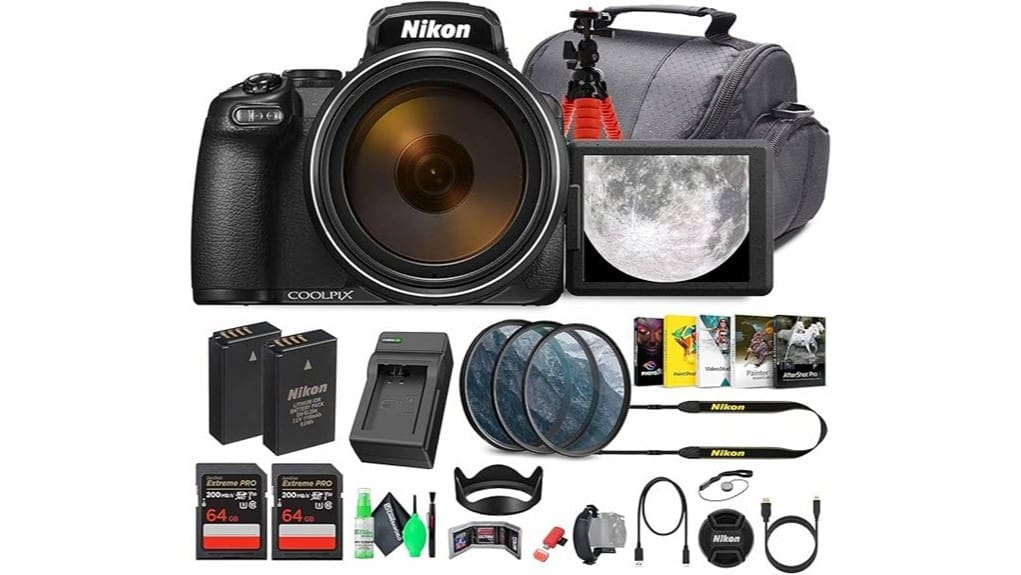
You’ll get a pocketable 24–3000mm equivalent zoom with RAW (.NRW) support, Dual Detect Optical Vibration Reduction, and 4K30 video in a compact, tactile body tuned for long‑reach work. Controls are direct and responsive for fast focal and exposure changes, while stabilization handles most handheld shots up to very high magnifications. Autofocus slows at extreme telephoto and noise rises above ISO 800, so monopod or tripod use is advised for best results—keep going to see full test findings.
Some Key Takeaways
- Exceptional 24–3000mm-equivalent 125x zoom enables isolating distant subjects without lens changes.
- Dual Detect Optical Vibration Reduction plus up to 250x Dynamic Fine digital zoom keeps handheld shots usable.
- 16MP BSI CMOS sensor with RAW (.NRW) support delivers good color and recovery, ISO usable up to ~800.
- 4K UHD video at 30 fps with clean HDMI output and still extraction suits hybrid photo/video workflows.
- Compact, well-laid-out body with tactile controls, moderate battery life, and included accessories for ready-to-shoot use.
What the P1100 Offers at a Glance
While the P1100 targets photographers who need extreme reach without a bulky rig, it packs a technically rich feature set into a compact body: a 125x optical zoom (24–3000mm equivalent) with Dual Detect Optical Vibration Reduction and up to 250x Dynamic Fine digital zoom, a 16MP BSI CMOS sensor with RAW (.NRW) support and ISO 100–6400, a 3.2″ vari-angle LCD plus a 2.36M-dot electronic viewfinder, 4K UHD video at 30 fps with clean HDMI output and the ability to extract high-quality stills from footage, and an all-inclusive accessory bundle that includes two 64GB UHS-I cards, extra battery and charger, filter kit, padded bag, and external connectivity tools.
You’ll find compact features prioritized: a dense feature set in a small chassis, straightforward menu layers, tactile dials and buttons, and a responsive user interface tuned for quick focal-length changes and exposure adjustments. The layout aids fast parameter access while preserving image-quality controls and RAW workflow compatibility.
This kit is especially well suited for mirrorless camera enthusiasts looking to complement their setup with a lightweight super-zoom option.
Real-World Zoom, Stabilization, and Handling Tested
Having outlined the P1100’s specification sheet and control layout, let’s examine how that 125x zoom, Dual Detect Optical Vibration Reduction and compact ergonomics behave in practice. You’ll reach distant subjects fast; the 24–3000mm equivalent range lets you isolate targets for telephoto hunting without swapping lenses. Zoom creep is controlled, but slow-focus hunting can occur at extreme reach. Dual Detect OVR mitigates handheld shake effectively up to high magnifications, though you’ll still need steady stance or support beyond ~2000mm equivalent. Controls remain accessible; weight and grip aid stability, but long-duration telephoto use benefits from monopod support. Perfect Tripods recommends using a stable tripod for the best long-range results.
Image and Video Quality: Stills, RAW, and 4K Performance
Because the P1100 uses a 16MP BSI CMOS sensor and supports RAW (.NRW), you’ll get more latitude for exposure and recovery than with JPEGs alone, particularly in shadows and highlights at base ISOs. You’ll find stills exhibit good color rendering and measurable color depth, with RAW preserving tonal gradation for post-processing. Low light performance is respectable to ISO 800, beyond which noise rises and detail softens. Autofocus speed is adequate for static subjects but slows at long-zoom extremes. 4K video at 30 fps delivers clean framing, though compression artifacts appear under heavy motion or high detail; bitrates and clean HDMI help. Carrying a spare camera battery is recommended for extended shoots to avoid running out of power.
Accessories, Battery Life, and Workflow in Everyday Use
After evaluating image and video performance, you’ll want to contemplate how the P1100’s included accessories and power system affect real-world shoots and post-production workflow. You get a complete kit—external charger, EN-EL20 replacement battery, two 64GB UHS-I cards, card reader, padded bag, tripod, filters—that reduces setup friction. Battery life for mixed 4K and stills is moderate; carry spare batteries for extended sessions and swap via external charger to avoid downtime. Clean HDMI output and bundled software streamline ingest; set consistent file naming and metadata templates to enable workflow automation. Physical accessories and clear power management materially speed turnarounds. Consider consulting resources on camera battery compatibility to choose the right replacements and optimize performance.
Who Should Buy the P1100 : Use Cases, Alternatives, and Final Verdict
Who needs the P1100? You do if you prioritize extreme reach and versatile output: wildlife enthusiasts needing 24–3000mm equivalent optics with Dual Detect Optical Vibration Reduction, and travel vloggers wanting 4K UHD at 30 fps plus clean HDMI. The 16MP BSI CMOS and RAW support give post-ready stills; ISO 100–6400 handles varied light with noise trade-offs. Bundle extras (two 64GB cards, filters, spare battery, tripod) support field workflows. Alternatives include lightweight APS-C mirrorless with interchangeable lenses for image quality, or compact superzooms with smaller sensors for portability. Verdict: specialized tool, excellent for long-reach shooting. Many buyers of telephoto gear also value accessories and guidance from telephoto lens resources to get the most from long-reach setups.
Some Questions Answered
Does the P1100 Have Built-In GPS or Geotagging?
No, the P1100 doesn’t include internal GPS; it lacks built-in location sensors. You can still add location data manually: you’ll use manual geotagging by matching timestamps between the camera’s images (RAW/JPEG) and a GPS track log from a separate device, or by embedding coordinates later in software. You’ll need to guarantee clock accuracy, export/import GPX tracks, and use compatible geotagging software to write precise coordinates into the image metadata.
Can the Camera Shoot Interval/Timelapse Sequences Natively?
Yes — you can perform interval shooting/time lapse natively. You’ll set interval shooting parameters in the camera menu, specifying start delay, interval between frames, and total frame count; the camera then captures sequential stills at chosen intervals. It stores images (including RAW) on the SD card for later assembly, or you can record continuous 4K video separately. Dual Detect VR still operates, but expect potential battery and storage limits during long sequences.
Is There a Microphone Input for External Audio Recording?
No — there’s no dedicated external mic jack on this model, so you can’t plug an external mic directly. You’ll need to rely on the camera’s internal microphone or capture clean HDMI output to an external recorder that accepts external mic input. If you plan external audio, use audio adapters and an external recorder/mixer (with appropriate HDMI-to-recorder workflow) to synchronize or embed higher-quality audio into your footage during recording or post.
What Weather Sealing Does the P1100 Offer?
No weather sealing: the P1100 doesn’t provide full environmental protection. You’ll get only light splashproofing at best around some seams and controls, not a sealed gasketed construction. Treat it as vulnerable to heavy rain, dust storms, and immersion. You should avoid prolonged exposure, use protective covers or a rain sleeve, and keep spare silica packs in the bag. For rugged use, choose a camera with explicit IP or weather-sealed ratings.
Are Firmware Updates User-Installable via SD Card?
Yes — you can perform firmware flashing via sd installation. You’ll download the official firmware file, verify its checksum, and copy the update file to a formatted SD card’s root directory. Insert the card, power the camera, and follow on-screen prompts to start the install. Don’t remove power or the card during flashing. Use Nikon’s release notes and instructions precisely to avoid bricking the camera and make certain compatibility with your current firmware.


