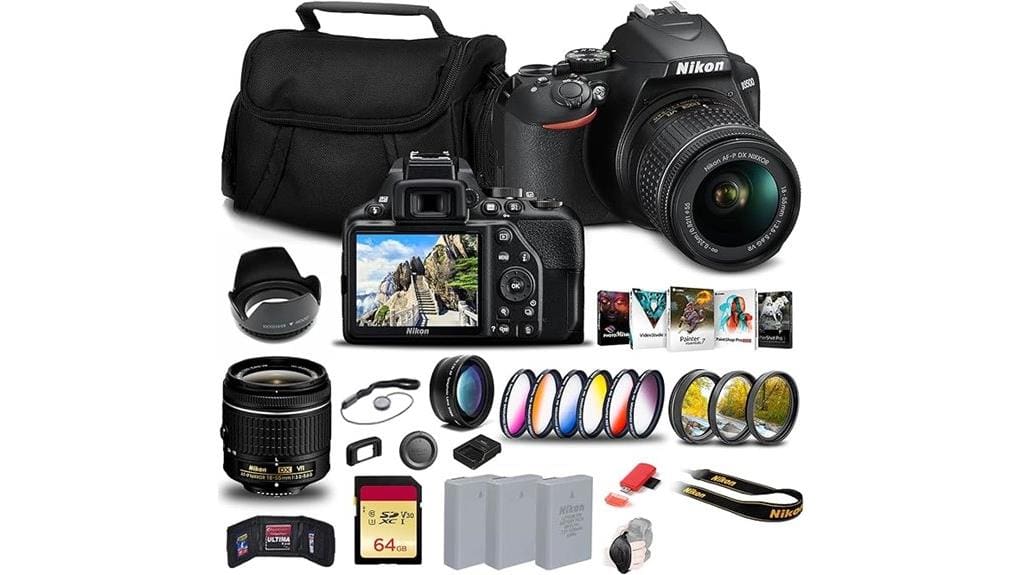

You’ll get a compact, beginner‑focused DSLR with a 24.2MP DX sensor, EXPEED 4 processing and the AF‑P 18–55mm VR lens for quiet, accurate AF and 5 fps bursts. Expect clean files to ISO 800, usable ISO 1600, limited highlight recovery and excellent JPEGs for the class. 1080p60 video is steady though codec‑limited. Two EN‑EL14a batteries, filters and a 64GB card make it travel‑ready, and the next section compares strengths, limits and alternatives.
Some Key Takeaways
- Excellent starter kit: 24.2MP DX sensor and bundled AF‑P 18–55mm VR lens suit beginners and travelers.
- Image quality is sharp to ISO 800; usable to ISO 1600 with rising grain and limited highlight recovery.
- Autofocus: reliable 11‑point Multi‑CAM 1000 AF and quiet AF‑P lens performance for stills and 5 fps bursts.
- Video: 1080p60 with steady AF and low rolling shutter, but limited codec detail compared with higher‑bitrate systems.
- Strong value pack: two EN‑EL14a batteries, 64GB card, filters, case, and SnapBridge make it ready out of the box.
What the Nikon D3500 + 18–55mm Kit Includes and Who It’s For
Packed with everything you need to start shooting, the Nikon D3500 + 18–55mm kit pairs the compact D3500 body—featuring a 24.2MP DX sensor, EXPEED 4 processor, 3.0″ 921k-dot LCD and a Multi-CAM 1000 11-point AF system—with the AF-P DX 18–55mm f/3.5–5.6G VR lens, a 55mm tulip hood, and a 3-piece filter set (UV, CPL, F); the bundle also includes two EN-EL14a batteries, a 64GB Extreme PRO UHS-I SDXC card, a memory card reader, SnapBridge Bluetooth compatibility, a soft padded carrying case and a software/video suite—making it a compact, entry-level DSLR package aimed at beginners and travelers who want DSLR image quality, reliable autofocus and 5 fps continuous shooting without the complexity or bulk of higher-end systems.
You’ll find the kit balanced for beginner workshops and family events, offering straightforward controls, lightweight portability and essential accessories so you can focus on composition rather than gear changes. This package is ideal for photographers transitioning from smartphones to mirrorless camera systems who want familiar handling with improved optics.
How the 24.2MP Sensor, EXPEED 4, and AF‑P 18–55mm Lens Perform in Real Shooting
Moving from kit contents to actual image-making, the D3500’s 24.2MP DX sensor paired with the EXPEED 4 processor and the AF‑P 18–55mm f/3.5–5.6G VR lens delivers a precise, efficient shooting experience. You’ll notice sharp base resolution, thanks to the lack of an optical low-pass filter and effective EXPEED 4 demosaicing; compare to older entry bodies and you get cleaner detail. AF accuracy on the Multi-CAM 1000 11-point system is reliable for stills, with the AF‑P motor offering quiet, quick adjustments. Sensor heat remains modest in typical bursts, minimizing noise spikes during continuous shooting. This setup is ideal for enthusiasts who want essential DSLR gear that performs well across common shooting scenarios.
Image Quality and Video Tests: Low Light, Dynamic Range, and 1080p60 Footage
Because low-light performance, dynamic range, and 1080p60 video are the practical metrics that separate entry-level DSLRs, you’ll see how the D3500’s sensor, EXPEED 4 processing, and kit optics behave under challenging conditions. You’ll notice clean files to ISO 800, usable results to ISO 1600, then increasing grain; noise handling is respectable for class but trails newer processors. In high-contrast scenes highlight recovery is limited—clipped areas stay clipped—while shadow lift recovers midtones without excessive banding. For 1080p60 footage the AF-P 18–55mm maintains steady focus and low rolling shutter; codec limits fine detail compared with higher-bitrate systems. For those performing sensor maintenance after shooting, using a purpose-made sensor cleaning fluid and proper technique helps avoid damage and remove stubborn particles.
Handling, Battery Life, Connectivity, and Bundled Accessories That Matter
After evaluating how the sensor and kit optics behave under low light and during 1080p60 capture, it’s worth examining how the D3500 feels in use, how long it keeps shooting, and what accessories and connectivity actually affect workflow. You’ll notice button placement favors beginners: accessible mode dial and simple menu clusters, though advanced users may find limited direct controls. Grip comfort is excellent for prolonged handheld shooting; the compact body balances well with the 18–55mm. Two EN-EL14a batteries and a 64GB UHS-I card in the bundle deliver lengthy sessions. SnapBridge Bluetooth eases image transfer but isn’t fast for large RAW files. The site also emphasizes choosing the right spare battery to keep shooting during long outings.
Should You Buy the Nikon D3500 Kit? Best Users, Alternatives, and Final Verdict
If you’re weighing the D3500 kit against other entry-level options, focus on what you actually need: lightweight, reliable stills performance with a sharp 24.2MP sensor and long battery life, or faster autofocus and video features found elsewhere. You’ll get excellent JPEG output, 5 fps, and an intuitive interface—ideal if you prioritize travel, portraits, and low-maintenance shooting. Pros: compact DX body, bundled 18–55mm VR, extra batteries, and accessories that boost immediate use. Consider budget alternatives like used mirrorless bodies for better autofocus/video. Resale value remains strong for Nikon DSLRs, so upgrading later is financially pragmatic. Also consider choosing a dedicated camera bag designed for photographers to protect and carry your gear comfortably on adventures.
Some Questions Answered
Is the AF-P 18–55mm Lens Compatible With Older Nikon DSLR Bodies?
Yes — the AF-P 18–55mm lens will work on many older Nikon DSLRs, but you’ll face limitations. You’ll get autofocus compatibility only on bodies with firmware that supports AF-P stepping-motor lenses; older cameras lacking that support won’t autofocus and may require manual focus. You can use legacy adapters for mount differences or to fit F-mount variants, though they won’t restore AF. Compare body firmware and adapter features before relying on AF performance.
Can the D3500 Use External Microphones for Better Audio?
No — the D3500 lacks a dedicated external microphone jack, so you can’t directly attach an external microphone. You can, however, use external microphones with audio adapters or recorders: employ a hot-shoe-mounted recorder, a camera-top shotgun with independent recorder, or wireless lav systems feeding a separate recorder. Compared to cameras with mic jacks, this adds gear and sync work but yields far superior audio quality and flexibility for interviews and run-and-gun shoots.
Are Firmware Updates Available for the D3500 and How to Install?
Yes — Nikon releases firmware updates for the D3500; you’ll check Nikon’s support site for the latest. For installation, download the correct firmware to your computer, copy it to a fully charged camera SD card, insert it, then run Firmware > Update in the camera menu. Observe firmware scheduling and update precautions: don’t power off, remove battery, or interrupt transfer. Compare versions, back up images, and verify checksum before proceeding.
Does the Kit Include a Charger for Both En‑El14a Batteries?
Yes — the kit includes a battery charger for the EN‑EL14a and one spare battery, but not a dual charger. You’ll get a single‑slot charger that charges one battery at a time; the second EN‑EL14a serves as a spare for continuous use. If you need simultaneous charging, you’ll want to buy a third‑party dual charger or an additional OEM charger. Charging times and safety specs match Nikon’s standard single‑slot charger performance.
Can the Camera Be Used for Tethered Shooting With a Computer?
No — the D3500 doesn’t support native remote capture via USB tethering to a computer. You can transfer images over SnapBridge Bluetooth, but true tethered shooting (live view control and capture from desktop apps) isn’t provided by Nikon for this model. For tethered workflows you’ll need a higher-tier Nikon body or third-party hacks (inconsistent), or use wireless transfer plus manual import; expect limited remote-control functionality compared to pro DSLRs.


