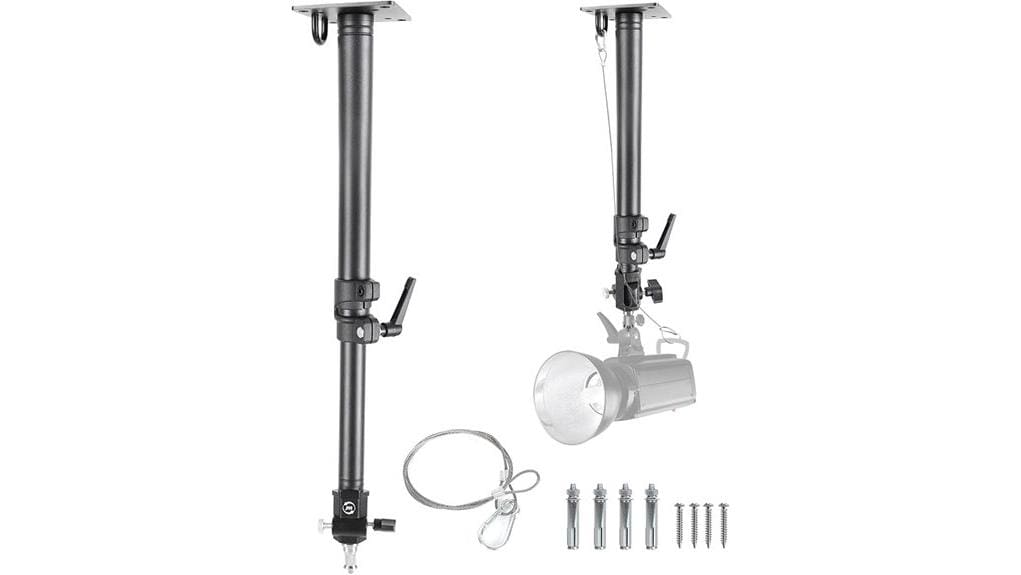

You’ll get a compact, low-profile 360° ceiling mount that locks cameras and lights overhead where floor stands won’t fit. It’s aimed at pros and serious hobbyists who need repeatable overhead angles and tight studio ergonomics. Check extension range (e.g., 17–28.3 in), rated load, and dual 1/4″/3/8″ threads. Install to joists, concrete, or load-bearing walls using supplied anchors and follow torque specs. It’s rigid with marginal damping; keep payloads conservative and learn more below.
Some Key Takeaways
- Verify rated load capacity matches camera plus modifiers; exceedance risks sag and failure.
- Check dual thread adapters (1/4″ and 3/8″) and supplied fasteners for head/accessory compatibility.
- Prefer thickened aluminum tubing and anti-shake design to minimize flex and residual vibration under load.
- Confirm mounting method: joist/beam lag bolts for wood, expansion anchors for concrete, and full eight-hole use on walls.
- Test torque settings, cable management, and rotation friction before shoots to ensure smooth 360° operation and safety.
What This 360° Ceiling Mount Is and Who It’s For
Think of this 360° ceiling mount as a compact boom arm engineered to position cameras and lighting precisely above your set. You’ll recognize it as a purpose-built fixture for overhead storytelling and tight studio ergonomics, letting you place DSLRs, strobes, or modifiers where floor stands can’t. You’ll appreciate the low profile for permanent rigs and the 360° rotation for framing adjustments without repositioning subjects. It’s aimed at pros who need repeatable overhead angles—product photographers, portrait studios, and videographers needing ceiling clearance. Don’t expect a general household arm; this is a tool for controlled, repeatable studio workflows. Consider pairing it with tripod carrying cases designed for outdoor photographers to protect and transport related stands and accessories.
Key Specs and Hardware That Matter (Length, Load, Threads)
Now let’s move from who uses it to what to check on the spec sheet: length, load capacity, and thread fit. You’ll evaluate extension range (17–28.3 inches) against your studio reach needs; shorter extension limits overhead clearance, longer adds torque. Check rated load capacity relative to combined gear weight—camera plus light modifiers—to avoid sag or failure. Thread compatibility matters: dual 1/4″ and 3/8″ adapters are essential for heads and accessories. Inspect supplied fasteners for your substrate: concrete expansion bolts and self-tappers for wood/drywall. Prioritize mounts with thicker tubing and anti-shake design when your gear approaches the load limit. Consider mounts designed specifically for studio use to ensure compatibility with common photography accessories.
How to Install It: Ceiling, Wall, and Desktop Setups
When you install the mount, choose the orientation that matches your workflow—ceiling for true overhead shots, wall for angled side lighting, or desktop for portable/stern setups,—and verify the substrate can bear the load. For ceiling mounts, mark joists, use included expansion screws for concrete, or lag into beams; check tool placement to avoid drilling into services. For wall installations, fasten to a load-bearing wall only, use all eight mounting holes when possible, and tighten progressively to avoid misalignment. Desktop setups require a firm clamp or base plate and lower payloads. Observe safety precautions: torque specs, cable management, and test with spare weight before live use. Clamp mounts provide a stable solution for creative photography setups when properly installed and secured, especially for overhead shots.
Real-World Performance: Stability, Rotation, and Build Quality
After you’ve secured the mount in your chosen orientation, evaluate how it performs under real loads rather than relying on specs alone. You’ll notice aluminum alloy and thickened tube resist flex; base rigidity prevents sag with typical DSLRs and single lights. Vibration damping is present but marginal—small mirror slap or heavy modifiers reveal residual oscillation. Swivel friction offers adjustable resistance; tighten for static overhead shots, loosen for smooth panning. Threads and hardware hold without creep when properly anchored. Corrosion-resistant finish and robust welds instill confidence, though aggressive loads expose limitations—use rated weight margins and verify periodic torque checks. For portable setups, consider how the mount integrates with compact light stands to maintain overall system stability and portability.
Who Should Buy It and Mounting Checklist Before You Purchase
Although it’s compact, this ceiling camera mount targets pros and serious hobbyists who need secure, adjustable overhead support for cameras and single lights; you should buy it only if your gear and space meet its limits. You should buy it if you use DSLRs, single studio lights, or compact strobes and need 360° rotation with vertical or horizontal mounting. Check load-bearing ceiling or wall capacity, thread compatibility (1/4″ and 3/8″), and included anchors for concrete or wood. Factor budget considerations and inspect warranty terms for defects or load failures. Don’t buy if you need heavy multi-light rigs or uncertain mounting points. Consider pairing it with tripod bags to protect and transport compatible equipment.
Some Questions Answered
Can It Support Heavy Cinema Lenses or Only Standard DSLRS?
You can mount heavy cinema lenses only if the total load stays within the mount’s weight capacity; it’s built for DSLRs and typical studio lights, not guaranteed for large cinema rigs. Check your combined camera+lens weight against specifications before installing. Lens compatibility depends on dual-thread adapter and secure attachment, but for safety you’ll want a load-bearing ceiling or wall and possibly a reinforced support if you routinely use heavy cinema glass.
Is the Finish Resistant to Scratches and Fingerprints?
Yes — the stainless-steel coated aluminum finish offers good scratch resistance and reasonable fingerprint resistance, but it’s not impervious. You’ll avoid light abrasion and most handling marks during normal studio use, yet sharp edges or heavy gear can still nick the surface. Clean with a soft microfiber to maintain coating integrity. For maximum longevity, avoid abrasive cleaners and consider protective films in high-contact zones.
Does the Mount Swivel Quietly or Make Grinding Noises?
Yes — you’ll mostly get quiet operation if assembled correctly. Mechanical noise is minimal thanks to decent bearing quality; rotation smoothness is good under normal loads. If you hear grinding, recheck mounting torque and thread engagement: loose bolts or misaligned adapter cause noise. Installation tips: tighten evenly, use included anchors suited to your substrate, and run a test with your gear to confirm load distribution before final use.
Can Multiple Mounts Be Linked for Longer Reach?
Yes — you can chain multiple mounts, but you’ll hit limits. You’re effectively building extension rigs with modular arms, yet payload and rigidity drop as length increases. The aluminum alloy and thickened tubes help, but longer stacks amplify sway and torque; wall or ceiling anchors must be load-bearing and reinforced. For safe, precise overhead work keep total reach conservative, calculate torque, and prefer professional-rated extension rigs for heavy cameras.
Is There a Warranty or Replacement Parts Available?
Yes — you’ll get limited warranty terms and replacement availability, but check specifics. The warranty covers manufacturing defects for a defined period; it won’t cover misuse or improper installation (especially non–load-bearing mounts). Replacement availability exists for core parts and adapters, though lead times vary. You should document purchase and installation, register the product if required, and contact the seller/manufacturer promptly for claims, serial verification, and shipping instructions.


