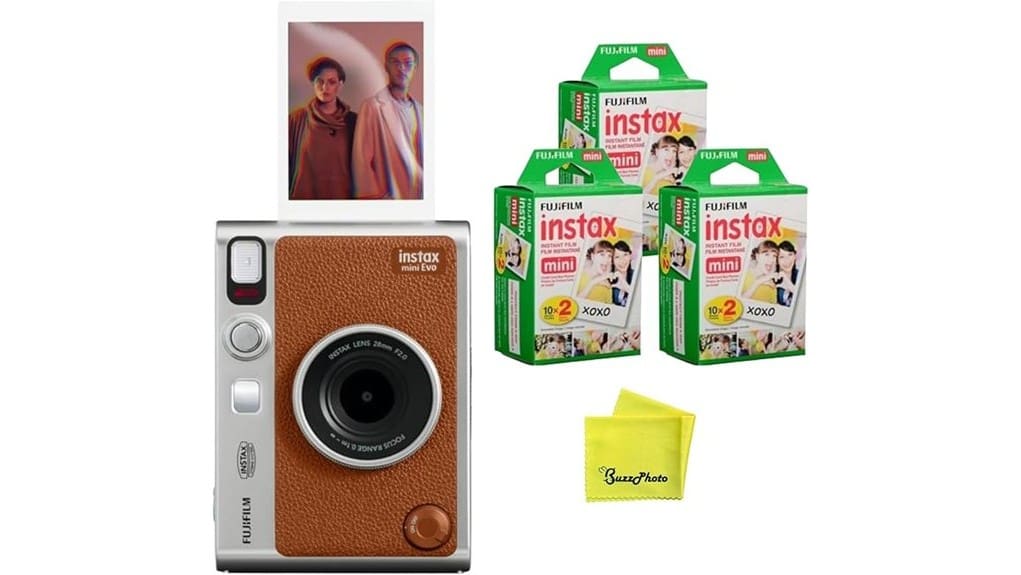
You’ll get a hybrid Instax that blends tactile instant prints with digital previews, Bluetooth control, and selective saving to phone or microSD. It lets you mix 10 lens and 10 film effects for 100 looks, tweak exposure and white balance, and enjoy punchy or muted INSTAX presets. The compact, mostly-plastic body handles well with useful selfie controls and a basic viewfinder. It’s great for social shooters and travelers — keep going to see detailed impressions and alternatives.
Some Key Takeaways
- Hybrid design pairs tactile instant printing with digital previews, Bluetooth control, and microSD storage for selective prints and reduced waste.
- Ten lens and ten film effects create 100 distinct looks, plus exposure and white-balance tweaks for creative control.
- Image quality suits 2″×3″ instax prints: punchy, instant-photo character rather than high-resolution detail.
- Compact, well-placed controls, textured grip, optical viewfinder, and dual shutters make it portable and selfie-friendly.
- App connectivity enables remote shooting, phone printing, and cloud-friendly archiving, complementing mirrorless setups or casual shooters.
How the Instax Mini EVO Works: Hybrid Camera Features and Workflow
While the Instax Mini EVO prints like a classic instant camera, it mixes digital control and connectivity so you can shoot, edit, and print with more precision. You’ll toggle lens and film dials to craft looks, then preview on the camera or phone via Bluetooth. The hybrid design saves frames to microSD or your smartphone, letting you manage shots before committing to a physical print. Your analog digital print workflow gives you exposure adjustment, mode selection, and remote triggering in a compact body. You’ll appreciate the balance: tactile instant prints coupled with smartphone editing and selective printing to reduce waste. It’s a great fit for mirrorless camera enthusiasts who want complementary essential gear that enhances their creative workflow.
Photo Quality and Print Results: 100 Effect Combos, Exposure, and Color Modes
Because the Instax Mini EVO blends 10 lens effects with 10 film effects, you get 100 distinct looks that let you tailor tone, contrast, and vignette before you print. You’ll judge prints by exposure control, color consistency, and tonal range. Auto exposure is reliable, and you can tweak exposure and white balance to correct highlights or deepen shadows. INSTAX-Rich boosts saturation for punchy prints; INSTAX-Natural cools and mutes for classic finishes. Digital preview and selective printing reduce wasted film. Expect sharpness suited to 2″×3″ output—pleasant instant-photo character rather than high-resolution fidelity. For even more creative finishing options, consider applying Lightroom presets to scanned Instax prints to expand tone and color possibilities.
Design, Controls, and Everyday Handling: Size, Viewfinder, Selfie Tools, and Build
When you pick up the Instax Mini EVO you’ll notice Fujifilm balanced compactness with usable controls, so it feels at home in everyday shooting rather than as a bulky gadget. You get compact ergonomics that sit well in one hand, aided by textured grip and light weight for pocket-to-street use. The optical viewfinder is small but effective for quick framing; don’t expect precise composition for close-ups. Selfie tools include a built-in mirror and dual shutter buttons for portrait and landscape, improving convenience. Shutter placement is thoughtful, keeping finger reach natural while avoiding accidental presses. Build feels solid, mostly plastic but durable. It pairs well with camera messenger bags designed for everyday photographers who want quick access and protection.
Connectivity, Storage, and App Features: Bluetooth Printing, MicroSD, and Remote Use
The Mini EVO’s handling carries over into its wireless and storage features, which are designed to make sharing and archiving straightforward. You’ll set up Bluetooth pairing via the INSTAX MINI EVO app to print directly from your phone or use the camera as a remote shutter. The app also stores digital captures so you can pick shots before printing. Locally, you’ll save high-res stills to a microSD card slot for organized archiving (card not included). The app supports simple export and optional Cloud backup through your phone’s services, letting you keep edits and prints synced without cluttering the camera. Consider adding an on-camera LED light to brighten prints and improve exposure when shooting low-light subjects.
Who Should Buy the Instax Mini EVO and Alternatives to Consider
If you’re after a tactile instant-photo experience without giving up modern conveniences, the Instax Mini EVO fits photographers who want fun, creative prints plus digital backup and control. You should buy it if you value hybrid workflow, easy exposure control, tons of lens/film combinations, and compact design for events or travel. It’s ideal for gift-giving, social shooters, and anyone chasing a vintage aesthetic without sacrificing app-based sharing. If you’re a strict budget buyer or need larger prints, consider cheaper basic Instax Mini models or the Fujifilm Instax Square/Polaroid Now for bigger format alternatives. The site also carries a range of instant camera gear and accessories perfect for analog photography lovers.
Some Questions Answered
Does the Camera Include Instax Mini Film in the Box?
No, the box contents don’t include Instax Mini film. You’ll get the camera and three twin packs listed in the product bundle description, but Instax Mini instant film and a microSD card aren’t included by default, so check film availability before you buy. You’ll want to purchase Instax Mini film separately to print immediately; verify pack sizes and seller inventory to avoid delays, and confirm warranty and return details if needed.
Can the Instax Mini EVO Record Video Clips?
No — the Instax Mini EVO doesn’t offer video recording or audio capture. You can take digital stills, preview effects, and save images to a microSD or smartphone via Bluetooth, but it lacks any movie mode, microphone, or video file output. If you need moving images with sound, you’ll want a dedicated digital camera or smartphone that supports video recording and audio capture; the EVO focuses on hybrid stills and instant printing.
Is the Camera Compatible With Third-Party Instax Film Brands?
Yes — you can use many third party compatibility films, but you should be cautious. You’ll want to verify film thickness and cassette dimensions match Instax Mini specs; variations can affect film feeding, exposure and print quality. Stick to reputable third-party brands that state Instax Mini compatibility, test one pack first, and avoid unknown sellers. If you encounter jams or poor prints, revert to genuine Instax Mini film for reliable results.
What Batteries Does the Instax Mini EVO Use?
The Instax Mini EVO uses two CR2 lithium batteries that you’ll insert into the camera for power. They’re disposable lithium batteries, offering reliable performance and long shelf life. You can’t use standard AA cells, but you can explore rechargeable options: some vendors sell rechargeable CR2-style lithium batteries or adapters—check compatibility and capacity carefully. Always follow Fujifilm’s recommendations to avoid voiding warranty or damaging the camera.
Does the Warranty Cover Accidental Damage?
No, the warranty doesn’t cover accidental damage. You’ll get the standard manufacturer warranty, but it includes warranty limitations and accidental exclusions that bar coverage for drops, spills, and misuse. You should register your camera, keep proof of purchase, and consider buying separate accidental-damage coverage or retailer protection plans if you want accidental protection. Check the full warranty terms for specifics and any available optional protection options before purchasing.


