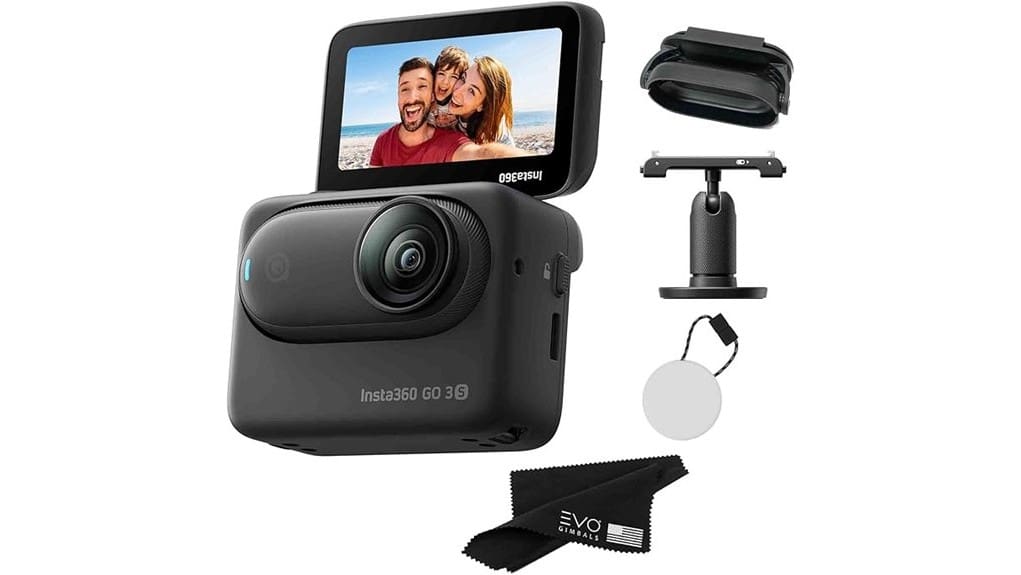
You’ll get a pocketable 4K action cam that’s built for effortless, stabilized POV capture and day-long use thanks to the 128GB Action Pod. It shoots sharp 4K, takes 12MP stills, and nails FlowState stabilization with reliable horizon lock. Audio and autofocus are improved, low-light and manual control are modest, and the unit warms under long 4K runs. It’s ideal for commuters, vloggers, and helmet mounts—keep going to see detailed tests, trade-offs, and alternatives.
Some Key Takeaways
- Pocketable 4K action cam with 128GB internal storage and FlowState stabilization for smooth, ready-to-wear POV and vlogging capture.
- Action Pod provides charging, touchscreen control, and extends usable runtime for longer day trips.
- 12MP photos and sharp 4K video deliver accurate color and responsive autofocus, though low-light detail drops with noise.
- Upgraded AAC audio improves clarity for handheld and wearable use, but wind noise and limited manual controls remain trade-offs.
- Best for commuters, travel vloggers, and helmet/dash mounts; consider GoPro or DJI alternatives for richer controls or longer battery life.
Quick Verdict: Who the GO 3S 128GB Is Best For
Think of the GO 3S 128GB as a pocketable, ready-to-wear action cam for anyone who values unobtrusive capture and reliable stabilization—it’s ideal if you vlog on the move, mount a camera to your helmet or dash, or want hands-free POV footage without hauling bulky gear. You’ll find it excellent if you’re a commuter or among commuters who need discreet dash or helmet footage, and attractive for travel bloggers needing lightweight 4K capture with strong FlowState stabilization. Battery life and internal 128GB storage suit day trips; voice control and quick-capture let you grab decisive moments without fumbling gear. It’s also a great companion for photography enthusiasts who use specialized GoPro mounts to secure compact action cameras in challenging positions.
What You Get in the Box and Key Specs at a Glance
You’ll get a compact kit that’s ready to go out of the box: the GO 3S 128GB camera itself plus a Lens Guard, Action Pod, USB charging cable, Magnet Pendant, Easy Clip, Pivot Stand, QuickStart Guide, and an EVO Gimbals microfiber cleaning cloth. You’ll find 128GB storage built in, a 2.2″ display for framing, and support for 4K video and 12MP photos. The Action Pod doubles as charger and touchscreen controller. FlowState Stabilization and a waterproof design are onboard. The USB Cable, Easy Clip, Pivot Stand, Microfiber Cloth and QuickStart Guide make setup and mounting straightforward. This setup is ideal for enthusiasts who value compact, wearable cameras and hands-free shooting.
Real-World Performance: Video, Photo, Audio, and Stabilization
Although it’s tiny, the GO 3S punches well above its weight in everyday shooting: 4K video is sharp with accurate color and responsive autofocus, 12MP photos capture usable detail for social and quick edits, and the upgraded AAC audio is noticeably clearer than the prior model. You’ll appreciate stable handheld clips thanks to FlowState and 360° horizon lock—motion looks natural without heavy crop. Low light performance is competent for short clips but shows noise and reduced detail past ISO limits. Monitor battery thermals during long sessions; the unit warms under continuous 4K recording, slightly shortening runtime. For on-camera setups, pairing the GO 3S with compact LED lights can significantly improve exposure and color consistency.
Use-Case Tests: Vlogging, Action Sports, Dashcam, and Wearable Shots
When you mount the GO 3S for vlogging, strap it to a helmet for action, clip it on a dash, or wear it for POV shots, the camera stays unobtrusive while delivering usable footage—4K holds up for social and quick edits, FlowState keeps motion smooth, and the front-button quick capture makes spontaneous takes painless. You’ll vlog handheld with decent audio and stable framing; helmet-mounted mountain biking runs show minimal judder and reliable horizon lock; dashcam clips capture incidents clearly enough for reference; wearable POV excels for urban rides and concert recording snippets, though low-light detail and wind noise can limit utility. It’s a strong choice for those who want high-resolution aerial photos alongside versatile video capture.
Should You Buy It? Alternatives, Trade-Offs, and Final Buying Advice
The real question after testing vlogs, action runs, dash clips and wearables is whether the GO 3S fits your shooting needs and budget. If you need ultra-small 4K, reliable FlowState stabilization, and excellent mount compatibility for helmets, dashboards, or clothing, buy it. Expect decent battery longevity for short outings—combine the Action Pod for longer sessions. Trade-offs: limited manual controls, digital zoom artifacts, and modest low-light performance. Alternatives: GoPro for richer controls and accessories, DJI Action for battery life. If portability and quick capture matter most, the GO 3S is a smart, specialized choice. The GO 3S pairs especially well with gimbal stabilizers to maximize smooth shots in wearable and action setups.
Some Questions Answered
Does It Support External Microphones or Audio Input?
No — it doesn’t have a dedicated external mic jack, so you can’t plug an external mic directly into the unit. You can, however, use Bluetooth or record via your phone and sync audio, or route sound through compatible audio adapters that work with the Action Pod or your smartphone. You’ll need to test latency and levels; adapters vary, so choose ones rated for low-latency, clean gain to get the best external mic results.
Can I Livestream Directly From the GO 3S?
Yes — you can livestream from the GO 3S, but it’s tied to mobile pairing. You’ll pair the camera to your phone, open the Insta360 app, choose Live streaming, and select platform/settings. Expect app-dependent bitrate and resolution limits; you won’t get RAW HDMI out. Battery and Action Pod runtime limit prolonged streams, so monitor heat and charge. For reliable streams, test connection, enable horizon lock, and use stable mobile data or Wi‑Fi.
Is There RAW Photo or LOG Video Support?
No — you won’t get RAW photos or Log recording from this unit. The GO 3S outputs JPEGs and MP4s with FlowState stabilization and improved AAC audio; PureShot HDR helps stills, but there’s no native RAW capture or flat/log video profile for extended color grading. You can still extract decent color via the Action Pod and post-processing, but expect limited headroom compared with cameras that offer RAW or true log workflows.
How Durable Is the Lens Guard for Impact Protection?
The lens guard offers solid everyday impact protection; it’s built to resist knocks and falls during casual use. You’ll benefit from a scratch resistant coating that helps keep optics clear, though extreme impacts can still crack it. If the guard gets damaged, replacement availability is good — you can order spares from Insta360 or third-party retailers. You’ll want to inspect and swap it promptly after noticeable hits to protect the lens.
Are Firmware Updates User-Installable via Smartphone?
Yes — you can install firmware updates via your smartphone. You’ll use the Insta360 app to check for firmware installation, download updates, and push them to the GO 3S; smartphone compatibility is required for over‑the‑air installs. Follow prompts, keep battery charged, and maintain Bluetooth/Wi‑Fi during transfer. The app verifies version and completes installation automatically; you’ll get progress feedback and restart instructions for a hands‑on, low‑risk update.


