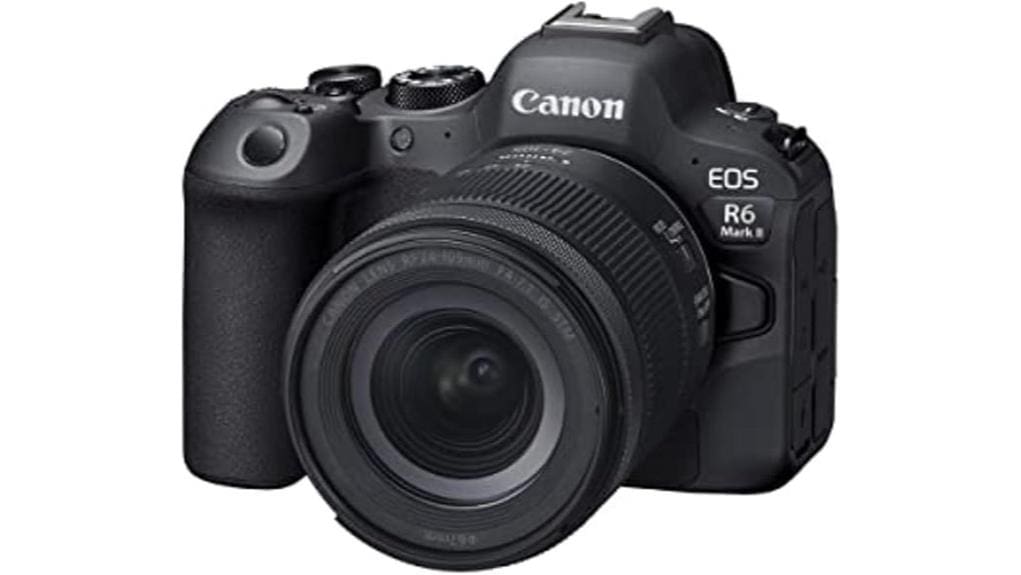
You’ll get a compact, pro-grade hybrid that nails autofocus, low-light performance, and high-speed capture for events or run-and-gun video. Its 24.2MP full-frame sensor, DIGIC X, and Dual Pixel CMOS AF II deliver reliable subject detection and clean files to high ISO. Shoot up to 12 fps mechanical or 40 fps electronic, record internal 4K60 with C-Log/10-bit, and use IBIS for steady handheld work. Keep an eye on buffer, battery, and kit-lens limits to learn more.
Some Key Takeaways
- 24.2MP full-frame sensor with DIGIC X and excellent high-ISO performance for low-light shooting.
- Dual Pixel CMOS AF II with 1,053 AF zones and deep-learning subject detection for reliable tracking.
- High-speed capture: up to 12 fps mechanical and 40 fps electronic, suitable for sports and run-and-gun.
- Internal 4K60 10-bit, C‑Log, ProRes RAW via HDMI, plus IBIS for stabilized handheld video.
- RF24-105mm F4-7.1 kit is versatile and lightweight but limited in aperture, weather sealing, and corner sharpness.
Who This Review Is For and Quick Verdict: Is the Canon EOS R6 Mark II Worth It?
While it balances high-end stills and advanced video features, the R6 Mark II is best for hybrid shooters who need reliable autofocus, strong low-light performance, and high-speed capture in a relatively compact body. You’ll find the target audience includes pros and serious enthusiasts covering events, weddings, documentary, and run-and-gun video where AF, stabilization, and low-noise ISO matter. For a buying decision, weigh sensor resolution versus speed and lens kit practicality; the RF24-105mm F4-7.1 offers versatility but limits max aperture. Overall, it’s a solid, balanced choice if you prioritize AF, low-light, and frame rates. It also pairs well with essential mirrorless accessories like lenses and stabilizers that enhance versatility and handling.
Key Features That Matter: Sensor, AF, and Burst Performance
You’ve seen who this camera suits and why; now let’s look at the three hardware elements that define day-to-day performance: the 24.2MP full‑frame sensor and DIGIC X processor, the Dual Pixel CMOS AF II system with 1,053 AF zones and deep‑learning subject detection, and the high‑speed shooting modes that deliver up to 12 fps with the mechanical shutter and 40 fps electronically. You’ll get clean files across 100–102400 ISO (expandable) with controlled noise — solid high iso performance for most workflows. AF delivers wide coverage, excellent face tracking reliability and subject recognition. Burst modes, RAW options and fast shutter ceilings support action and wildlife shooting. If you shoot handheld for long sessions, consider improving handling with a camera grip to enhance comfort and stability.
Video Capabilities and Recording Workflows for Creators
Because Canon built the R6 Mark II as a hybrid, its video toolkit is robust and workflow‑friendly: you get 4K60 internal recording, C‑Log, ProRes RAW support up to 6K (when paired with compatible recorders), sensor‑shift stabilization for steady handheld shots, and clean 10‑bit capture options that fit professional grading pipelines. You’ll manage 4K workflows via internal 10‑bit HEVC or external ProRes RAW over HDMI; dual UHS‑II slots let you separate proxies and masters. Monitoring LUTs, timecode over HDMI, and reliable autofocus simplify production. Audio integration requires external mics via the hot‑shoe or interface; onboard audio is adequate for reference. Perfect Lighting offers recommended video light panels that complement the R6 Mark II for controlled, consistent illumination during shoots.
Image Stabilization, Viewfinder, and Handling in Real-World Use
When shooting handheld, the R6 Mark II’s sensor‑shift stabilization and responsive EVF work together to keep framing steady and make critical focusing decisions easier. You’ll find in body stabilization yields 5‑axis correction that reduces blur across stills and 4K video, improving usable shutter speeds. The 3.69M‑dot electronic viewfinder supplies high refresh and accurate exposure preview so you can confirm AF and motion behavior before capture. Hand grip ergonomics are secure for long shoots; controls fall naturally under your fingers. In real world testing the system noticeably lowers keeper rate losses, particularly with longer focal lengths and slower shutter speeds. This kit is well suited for DSLR enthusiasts looking for essential gear that complements their camera setup.
RF24-105mm Kit Lens: Performance, Sharpness, and When to Upgrade
Hand‑held stability and the R6 Mark II’s sensor‑shift mean you’ll get more usable frames from a standard zoom, but lens optics still set final image quality. The RF24-105mm F4-7.1 IS STM delivers versatile coverage, competent IS, and acceptable centre sharpness at most focal lengths. Corner resolution softens toward tele and wide extremes; stop down for improved microcontrast. Autofocus is fast and quiet, though focus breathing is noticeable during video zooms. Build quality is plastic and lightweight—convenient for travel but not weathersealed for demanding pro use. Upgrade when you need edge-to-edge sharpness, faster apertures, or robust construction. For photographers who specialize in landscapes or architecture, investing in dedicated wide-angle optics with edge-to-edge sharpness will make a noticeable difference.
Battery Life, Cards, Ports, and Practical Shooting Limits
Although the R6 Mark II’s dual UHS-II SD slots and USB/HDMI ports give you flexible workflow options, battery life and practical capture limits are the key constraints to plan around. You’ll rely on efficient battery management for long shoots; Canon batteries included deliver moderate runtimes, especially when using IBIS, high frame rates, or 4K/60p. Use spare LP‑E6NH cells and USB power delivery for extended sessions. Card compatibility with UHS-II, U3, V90 cards is required for sustained high-bitrate video and RAW bursts. Expect thermal cutoffs and buffer limits during prolonged 40 fps electronic shooting; plan swaps and power routines accordingly. Consider picking up extra camera batteries and reliable memory cards from a specialist retailer to avoid interruptions during shoots.
Value Comparison: R6 Mark II vs Competitors and Upgrade Recommendations
Put simply, the R6 Mark II delivers a compelling balance of stills and video capabilities for its price, but its value depends on what you prioritize: if you need higher resolution for studio work, the Sony A7 IV (33 MP) or Canon R5 (45 MP) offer better detail; if you want top-tier high-speed performance or global-shutter-like heat handling, the Sony A1 or flagship sports models beat it; if you mainly shoot video, cameras like the Panasonic S1H or Canon R5 C provide longer recording times and cinema-oriented codecs. You’ll appreciate the R6 II’s price positioning, broad lens ecosystem, clear firmware roadmap, and solid third party support. For shooters who demand the fastest write and transfer speeds, investing in CFexpress cards like those designed for professional workflows can make a tangible difference for burst shooting and video offload cfexpress performance.
Some Questions Answered
Does the R6 Mark II Support In-Body Interval Shooting for Timelapses?
Yes — you’ll get in body interval shooting for timelapses. The R6 Mark II offers an in body interval timer that sequences exposures at set intervals and durations. You’ll control interval, number of shots, and exposure settings; Timelapse exposure can be set to manual or auto depending on your workflow. It’s suitable for internal timelapse capture or outputting interval sequences for post-processing into 4K/6K video.
Can the Camera Charge and Power Accessories via USB-C While Shooting?
Yes — you can charge the camera via USB-C and provide limited USB charging and Accessory power while shooting. You’ll be able to power the R6 Mark II from a USB-C PD source for extended operation and battery charging, and the port can supply accessory power (small devices like remotes or dongles). High-draw accessories or continuous charging under heavy video loads may still favor external AC adapters or dedicated power solutions for reliability.
Is There Built-In GPS or Geotagging Support Without a Smartphone?
No built in GPS is available; you won’t get standalone geotagging without a smartphone. The camera has no internal GPS receiver, so it can’t log location by itself. You’ll need to pair via Bluetooth or Wi‑Fi with a smartphone app to transfer location data, or use an external GPS logger that records coordinates separately and syncs in post. This is a technical limitation, not a configurable setting.
How Weather-Sealed Is the Body and Kit Lens for Harsh Conditions?
The body offers robust weather sealing for professional use, but it’s not fully waterproof—expect dust and moisture resistance with sealed buttons, dials, and compartments. The kit lens has basic weather sealing and moderate lens durability; it resists light rain and dust but isn’t rated for heavy immersion or prolonged exposure. You should use additional protection (rain cover, dry bag) for harsh conditions to guarantee long-term reliability and warranty compliance.
Are Firmware Updates User-Installable Without Canon Service Centers?
Yes — you can install firmware updates yourself. You’ll download Canon’s firmware file, copy it to a formatted SD card, and run the update via the camera menu, which offers firmware convenience for most users. Follow Canon’s instructions precisely to avoid bricking. Be aware of updater risks: interrupted power, wrong file, or card errors can render the camera unusable, so use fully charged batteries and verified files before proceeding.


